Image library management
Some clubs, especially if they have been around for a while, have a large library of images. It can be difficult keeping track of all of them. Even being aware of which ones are actually used is a challenge.
To help you in keeping your FTH site image collection within bounds, there is the Image library manager.
To access this, click on the Manage Image Library button in the Admin console. It's in the top part of the panel, Website section.
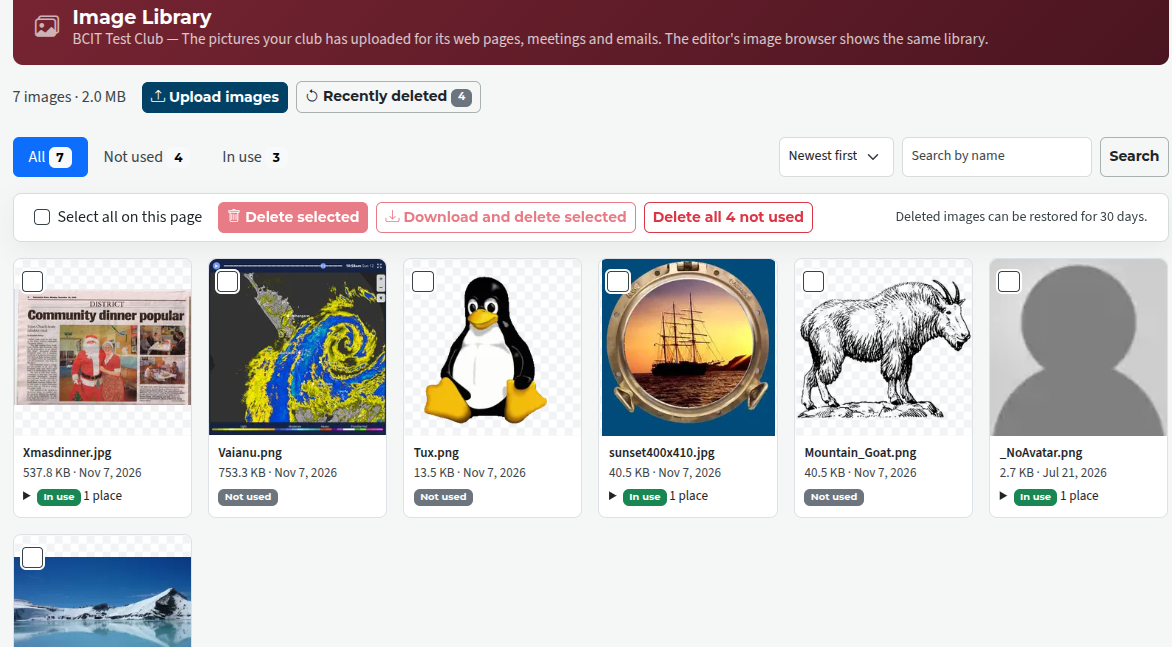
The page shows you the files with the following details:
- name
- size
- date uploaded, and
- whether in use or not
You can select files to be deleted, or just delete everything that's not in use.
You can also select files to be downloaded and deleted. If you do this, the files are gathered up into a .zip archive which is then downloaded as a single file. You can then unzip the files wherever is convenient for you.
Any files that are deleted can be undeleted (restored) until 30 days have elapsed. Click on the Recently Deleted button to access those. In the meantime, if they are part of a page, they will still be visible. Restore promptly any that are still in use, and there should be no problems with missing images.
Last updated 8 November 2026