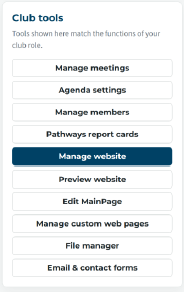
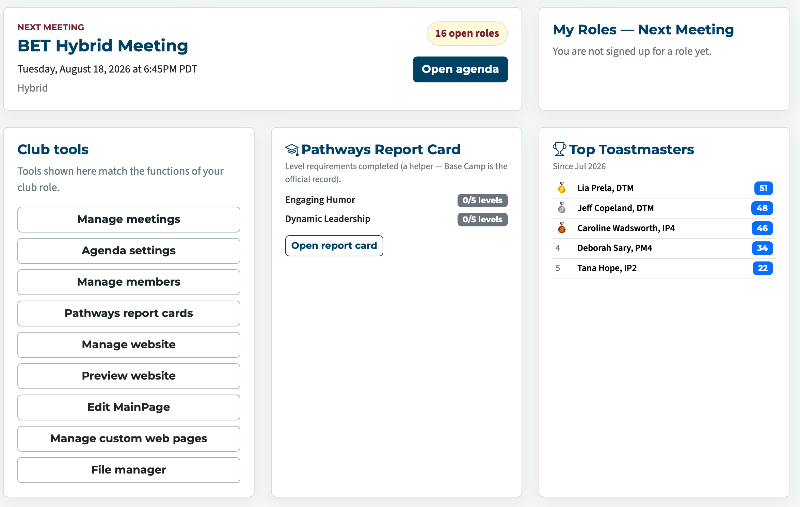
When I go to the Dashboard, it appears that Manage Website is always highlighted. Does that mean the focus is there and that we need to scroll up or down to see the other options?Would it be possible to have the focus start on the first option in the box instead?
Club Tools Focus
Locked 5 replies · 209 views
All the main buttons in each card are coloured.
Thank you,
Brian McDonald DTM
Silver and Wiser Online Toastmasters Club #777940
Technical Support Consultant and Developer for FreeToastHost
Brian McDonald DTM
Silver and Wiser Online Toastmasters Club #777940
Technical Support Consultant and Developer for FreeToastHost
I'm confused. Only the Manage Website white letters on blue background, the rest are blue letters on white background.
@Brian, the member dashboard.
Richard Taylor
TM Club #7045
TM Club #7045
Lia:
You need to be precise when you are reporting an issue.
Please post the URL where you are seeing the issue and a screen shot is always helpful.
Just drag the screen shot into the "You can drop files here or use the add files button." area and click insert.
You are referring to an officer sign in with edit access to the Manage Website in their Club tools box.
Thank you for pointing that out.
The Highlight has been removed.
You need to be precise when you are reporting an issue.
Please post the URL where you are seeing the issue and a screen shot is always helpful.
Just drag the screen shot into the "You can drop files here or use the add files button." area and click insert.
You are referring to an officer sign in with edit access to the Manage Website in their Club tools box.
Thank you for pointing that out.
The Highlight has been removed.
Thank you,
Brian McDonald DTM
Silver and Wiser Online Toastmasters Club #777940
Technical Support Consultant and Developer for FreeToastHost
Brian McDonald DTM
Silver and Wiser Online Toastmasters Club #777940
Technical Support Consultant and Developer for FreeToastHost
I believe I did attach a shot of the issue when I opened this ticket. I can see it attached in this string.
Thank you for the fix!
Thank you for the fix!