Toastmasters International — Club & District Websites
FreeToastHost 4

Support and Development Site

Forum index Recent topics

Role Report Summary view can't fit (horizontally) in the web page

10 replies · 652 views

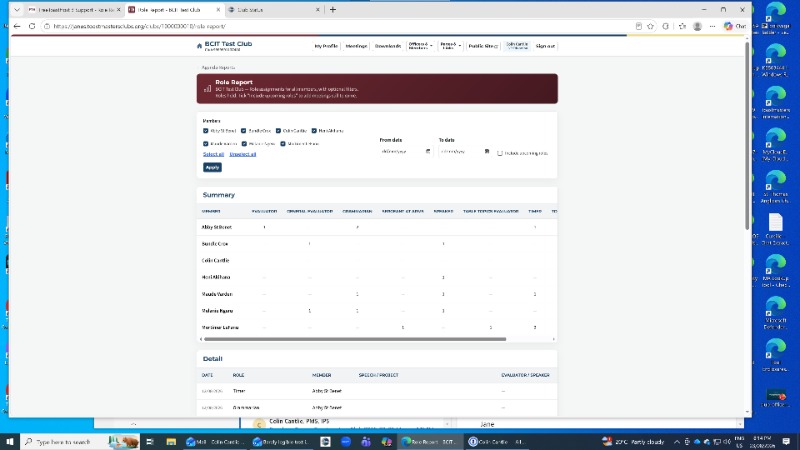
Using Jane Atkinson's test club janes.toastmastersclubs.org Role Report, the summary pane insists on presenting an embedded horizontal scroll bar so that I cannot see the whole summary report no matter how wide I resize the browser window nor how small I zoom-down the web page.

I am using Microsoft Edge browser, Version 151.0.4129.101 (Official build) (64-bit).

See attachment for screenshot.

Same issue if I try to print the web page, no matter how much I ask the browser to shrink the page.  There is no way to print or save the entire summary report.   Have you considered adding a way to save the summary report on its own?

Thanks.
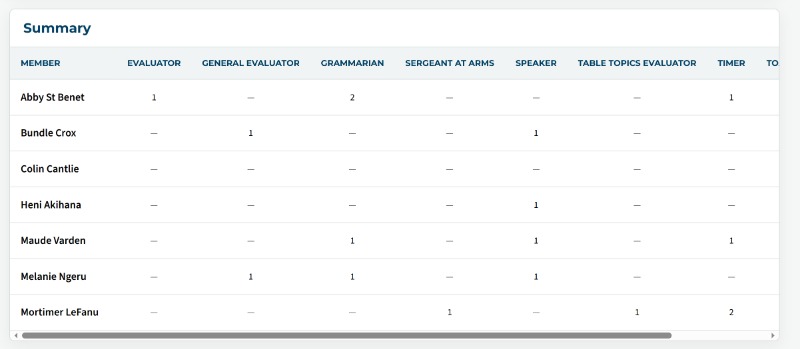
  • Screenshot_23-8-2026_195914_janes.toastmastersclubs.org.jpeg
Web Administrator
Speakers Corner Toastmasters Club (#3619)
speakersottawa.ca

And unrelatedly, Beta Tester for FTH4 documentation
Please post the URL of the summary, 
Did you switch the paper to landscape?
Thank you,

Brian McDonald DTM
Silver and Wiser Online Toastmasters Club #777940

Technical Support Consultant and Developer for FreeToastHost
Here is the URL: https://janes.toastmastersclubs.org/clubs/1000000010/role-report/

Attached is a screen shot in my browser with the browser window maximized and set to 75% zoom.  I also printed to PDF in landscape layout at 50% scaling, with same problem. Attached also.
Web Administrator
Speakers Corner Toastmasters Club (#3619)
speakersottawa.ca

And unrelatedly, Beta Tester for FTH4 documentation
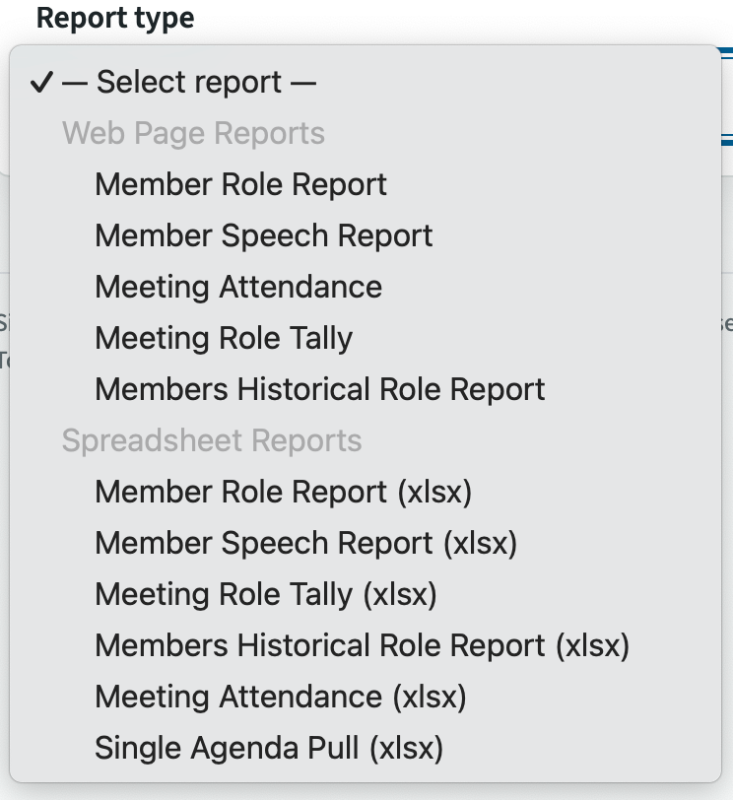
Not all reports are designed to be printed.
Use the pull down to get a printable report.

 Screenshot 2026-08-23 at 8.28.04 PM.png
Thank you,

Brian McDonald DTM
Silver and Wiser Online Toastmasters Club #777940

Technical Support Consultant and Developer for FreeToastHost
Hi Brian.

Noted. But is there a way to view the whole width of the report when I am viewing it through the Role Report web page?
Web Administrator
Speakers Corner Toastmasters Club (#3619)
speakersottawa.ca

And unrelatedly, Beta Tester for FTH4 documentation
reduce the time frame or reduce the people selected, so you don't have as many roles
Thank you,

Brian McDonald DTM
Silver and Wiser Online Toastmasters Club #777940

Technical Support Consultant and Developer for FreeToastHost
Identical problem with the "Meeting Role Tally" report and using the PRINT button shown within the report page.

Attached PDF is landscape and printed with 50% scaling.
Web Administrator
Speakers Corner Toastmasters Club (#3619)
speakersottawa.ca

And unrelatedly, Beta Tester for FTH4 documentation
You have to much data to print on paper.
Some reports are not designed to be printed view in a browser or export into excel.
Thank you,

Brian McDonald DTM
Silver and Wiser Online Toastmasters Club #777940

Technical Support Consultant and Developer for FreeToastHost
Hi Brian,

Has the test club been configured with too many role definitions? Is the report working okay for other clubs using FTH4?

Which role definitions come built-in?

Last edited 23 Aug 2026, 9:06 p.m. by Colin Cantlie: to add a question

Web Administrator
Speakers Corner Toastmasters Club (#3619)
speakersottawa.ca

And unrelatedly, Beta Tester for FTH4 documentation
From memory, only one role definition has been added to that site: Table Topics evaluator.
Clubs #1137486 (D72) & #777940 (D61)
FTH Field Officer, District 72, (NZ)

It captures all the different roles from all the agendas. Using the Agenda Template Roles and role names and Role synonyms you can reduce the number of actual roles in the reports.
Thank you,

Brian McDonald DTM
Silver and Wiser Online Toastmasters Club #777940

Technical Support Consultant and Developer for FreeToastHost

Log in to reply.