Toastmasters International — Club & District Websites
FreeToastHost 4

Support and Development Site

Forum index Recent topics

FTH4 BETA CLUBS: 7765790 ACA Toastmasters

18 replies · 926 views

With the FTH 4.0 version of our website launching today, I have just begun trying to understand it. My first 2 concerns / questions are:

1. How do we re-establish a left side menu rather than the menu on top?

2. Why did our customized club meeting agenda templates disappear and can they be restored?

Last edited 3 Aug 2026, 3:15 p.m. by Lee Holliday, DTM, PID: Typo correction

Lee Holliday
topeagle@mindspring.com

Spartanburg Toastmasters, Club 1453
https://spartanburg.toastmastersclubs.org

ACA Toastmasters, Club 7765790
https://7765790.toastmastersclubs.org/
There is no left menu with the new template.
Your club agenda templates should all be there do you remember what their names where?

I see only 1 agenda template Executive Committee Meeting Agenda
Thank you,

Brian McDonald DTM
Silver and Wiser Online Toastmasters Club #777940

Technical Support Consultant and Developer for FreeToastHost
Thanks for the prompt response. There should have been at least 2 agenda templates. What is showing is an Executive Committee meeting agenda template. There should have also been at least a  customized Club Meeting agenda template.
Lee Holliday
topeagle@mindspring.com

Spartanburg Toastmasters, Club 1453
https://spartanburg.toastmastersclubs.org

ACA Toastmasters, Club 7765790
https://7765790.toastmastersclubs.org/

Lee your missing template has been restored.
Executive Committee Meeting Agenda 8   
Hybrid (In-Person & Zoom) Meeting Template 26

Last edited 3 Aug 2026, 3:50 p.m. by Brian

👍 Thanked by Lee Holliday, DTM, PID

Thank you,

Brian McDonald DTM
Silver and Wiser Online Toastmasters Club #777940

Technical Support Consultant and Developer for FreeToastHost
Thanks for “rescuing” our club meeting agenda template. im trying to figure out how to assign a specific club member to a recurring role in the meeting agenda template. This is for meeting roles that should not have the option for members to select.
Lee Holliday
topeagle@mindspring.com

Spartanburg Toastmasters, Club 1453
https://spartanburg.toastmastersclubs.org

ACA Toastmasters, Club 7765790
https://7765790.toastmastersclubs.org/
ClubAdmin > Agenda Templates > Manage Agenda templates >Agenda Template >Edit > Scroll down to the role > Edit > Select the member from the Default member list.
Thank you,

Brian McDonald DTM
Silver and Wiser Online Toastmasters Club #777940

Technical Support Consultant and Developer for FreeToastHost
It appears that the first two agenda itemsrows on this meeting agenda template do not offer the drop down to select the member .
Lee Holliday
topeagle@mindspring.com

Spartanburg Toastmasters, Club 1453
https://spartanburg.toastmastersclubs.org

ACA Toastmasters, Club 7765790
https://7765790.toastmastersclubs.org/
1) Which meeting agenda?
2) Does the role have the tick at the bottom to be selected by members?
Thank you,

Brian McDonald DTM
Silver and Wiser Online Toastmasters Club #777940

Technical Support Consultant and Developer for FreeToastHost
Hybrid (In-Person & Zoom) Meeting Template

not sure what you mean by a “tic” at the bottom

the roles I’m having difficulty with are:

• Meeting Preparation
• President
Lee Holliday
topeagle@mindspring.com

Spartanburg Toastmasters, Club 1453
https://spartanburg.toastmastersclubs.org

ACA Toastmasters, Club 7765790
https://7765790.toastmastersclubs.org/
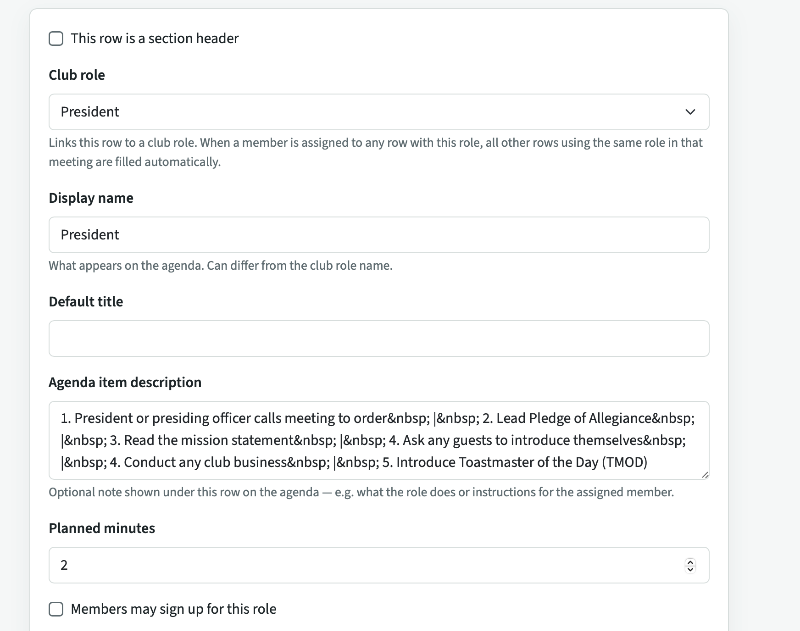
If you want to assign a member you need to tick 
"Members may sign uo for this role"
Due to you are preassigning the role no one will be abler to sign up for it.

 Screenshot 2026-08-03 at 5.34.50 PM.png

👍 Thanked by Lee Holliday, DTM, PID

Thank you,

Brian McDonald DTM
Silver and Wiser Online Toastmasters Club #777940

Technical Support Consultant and Developer for FreeToastHost
Brian and FTH4 Team:

After working with the new FTH4 version for a few days, I have a few more questions. Please see the attached PDF  FTH4.0 Questions 20260807.pdfdocument.

Thanks,
Lee FTH4.0 Questions 20260807.pdf
Lee Holliday
topeagle@mindspring.com

Spartanburg Toastmasters, Club 1453
https://spartanburg.toastmastersclubs.org

ACA Toastmasters, Club 7765790
https://7765790.toastmastersclubs.org/
You can change the photo and the text, you cannot remove them.

https://7765790.toastmastersclubs.org/clubs/1000000478/site/
Thank you,

Brian McDonald DTM
Silver and Wiser Online Toastmasters Club #777940

Technical Support Consultant and Developer for FreeToastHost
Brian, thanks for answering question #1 in the pdf that I sent you. I"m looking forward to getting answers to question 2, 3, and 4 when you have the opportunity.

Thanks,
Lee
Lee Holliday
topeagle@mindspring.com

Spartanburg Toastmasters, Club 1453
https://spartanburg.toastmastersclubs.org

ACA Toastmasters, Club 7765790
https://7765790.toastmastersclubs.org/
Please don't load pdf's like that they are to hard to process just upload the images and paste the questions

2) no
3) no, it shows on print agenda
4)  Screenshot 2026-08-08 at 9.59.45 AM.png
Thank you,

Brian McDonald DTM
Silver and Wiser Online Toastmasters Club #777940

Technical Support Consultant and Developer for FreeToastHost
Good afternoon, Brian,

I have now done a deeper dive into FTH4. While it will take some getting used to by members and officers, I recognize that my other club (Spartanburg Toastmasters Club #1453) – which uses the club website much more robustly than Club #7765790) – will probably have all we need in FTH4. I think the biggest challenge for members and officers is the learning curve when Spartanburg Toastmasters Club #1453 is eventually migrated to FTH4.
  1. What we call a “signup sheet” is called a “forward planner” in FTH4. (probably a better name for it, but will require getting used to it)
    1. A concern is that it is only available to be exported as an Excel file instead of the Web Page Grid we really like and use in FTH3.
    2. We recognize that it Can be converted to a pdf, if desired – but we are concerned that it does not contain the alternate shaded rows (like we have in FTH3) to make it easier to follow across the page – but we recognize the shading could be added to the Excel document before converting to pdf (just another extra step on the user end)
    3. Row heights are tight – would need adjusting to make it easier to read; column widths MAY also need adjusting; can this be fixed in the FTH4 design?
    4. Seems to not give the option to not list certain agenda items on the Forward Planner like we currently have in FTH3
    5. Meeting Roles / Items in column 1 NOT shown as bold font – likely easier to read if so adjusted
    6. Multiple instances of roles (speaker, speech evaluator) NOT shown as #1, #2, etc – makes it clearer to match up speakers and evaluators
    7. Seems to not provide the option to show a “NOT ATTENDING” row on the Forward Planner – this has proven to be quite useful for us in FTH3
  2. Don’t know if all the agenda history from our FTH3 site will be carried over into FTH4, but if seems as if it will
  3. Various agenda reports (member role report, member speech report, etc.) are all available in FTH4, but seem to NOT be available in the html report format we frequently use in FTH3
  4. It appears that the reports (e.g., Forward Planner, Member Speech Report, Member Role Report, etc.) in FTH4 do NOT have the nice report name headers that we have in FTH3
  5. Home Page set up – seems to have less flexibility to edit than allowed in FTH3
  6. Membership Management – most, if not all, of the FTH3 functions seem to be available in FTH4 – just requires some “hunting” to find it all
    1. Interesting (but not necessarily useful for Spartanburg Toastmasters 1453) is the ability to print name tags directly from the club website
  7. Dues Management – unable to “test drive” this in the ACA Toastmasters website since the company pays club dues and the club doesn’t use the website to track – not sure if all the FTH3 dues management functionality is also available in FTH4
With kind regards,Lee
Lee Holliday, CEBS, SPHR, DTM, PID

Last edited 24 Aug 2026, 2:16 p.m. by Lee Holliday, DTM, PID

Lee Holliday
topeagle@mindspring.com

Spartanburg Toastmasters, Club 1453
https://spartanburg.toastmastersclubs.org

ACA Toastmasters, Club 7765790
https://7765790.toastmastersclubs.org/
1) The Forward Planner is not the main signup sheet as you know it from FTH3, look at the online signup sheet or the Signup sheet
2) All agendas from FTH3 are migrated to FTH4
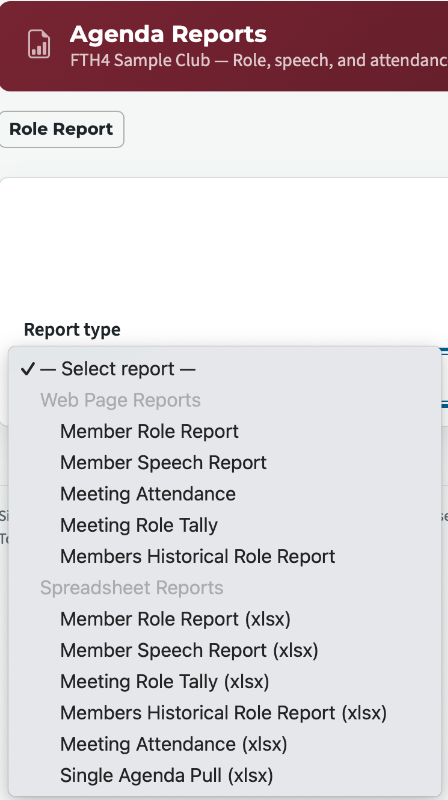
3) All reports are available in both HTML (top of pull down) and xlsx (bottom of pull down) formats
4) We thought that in this day and age people would be printing less and using the online reports more. If you think that better heading are a requirement when we open the Suggestion forum please do submit it as an request.
5) You have the ability to put any content you want in the Mainpage area, You can change the image and text in the Hero (top) section
6) All membership functions from FTH3 are in FTH4 including the name tags from FTH3
7) The FTH4 Dues module has been improved over the FTH3 one

Last edited 24 Aug 2026, 2:51 p.m. by Brian

Thank you,

Brian McDonald DTM
Silver and Wiser Online Toastmasters Club #777940

Technical Support Consultant and Developer for FreeToastHost
Thanks so much for your responses yesterday, Brian. 
  1. I can see the Online Signup Sheet, but do not see how to print it.=11.0pt
  2. You indicate that all l reports are available “in HTML (top of pull down)” but I do not understand what you mean by “top of pull down”, or see how to access that and print them.=11.0pt
  3. Perhaps I overlooked it, but I didn’t see a response to our concern that we need an option to not list certain agenda items on the Forward Planner or Online Signup Sheet like we currently have in FTH3=11.0pt
  4. Also, perhaps I overlooked it, but I didn’t see a response to our concern that multiple instances of roles (speaker, speech evaluator) are NOT shown as #1, #2, etc – showing this would make it clearer to match up speakers and evaluators=11.0pt
  5. Again, maybe I overlooked it, but didn’t see a response to our concern that the Online Signup Sheet does not provide the option to show a “NOT ATTENDING” row on it – this has proven to be quite useful for us in FTH3=11.0pt
  6. We don's see where the VPE or other designated officers can preload expected absences, which has proven quite helpful to us in FTH3.  It appears to be member driven to do that from the FTH4 site. Are we overlooking something?=11.0pt
  7. Yes, we would like to ask for reports that are preformatted with headers and are printable – which your prior answer seems to indicate are available, although I haven’t yet figured out how to do that. This would be an improvement that many clubs would likely like to have.
  8. Our Immediate Past President and a past VPE created an Excel database that serves an Agenda Master. At some point, he would like to discuss implementing some of the features of this Agenda Master. It seems that you already have a lot of the database function there to set multiple agendas up at once, so it might be an easy add-on to what you already have.
With kind regards,
Lee  
Lee Holliday, CEBS, SPHR, DTM, PID

Last edited 25 Aug 2026, 11:23 a.m. by Lee Holliday, DTM, PID

Lee Holliday
topeagle@mindspring.com

Spartanburg Toastmasters, Club 1453
https://spartanburg.toastmastersclubs.org

ACA Toastmasters, Club 7765790
https://7765790.toastmastersclubs.org/
1) Download the Forward Planner xlsx and print it.
2) Agenda Report (see image)
 Screenshot 2026-08-25 at 7.37.46 PM.png

3) For a role to show up on the planers it needs to have role with a person allowed to sign up
4) The System handles that by the role settings internally you don't need the # for Speakers and Evaluators
5) The online planner handles that the non attending aren't in the list
6) when editing an agenda the Attendance button
7) When the FTH4 Suggestion forum opens you can add it.
8) Have him open a thread in the forum and tell us what he has done.
Thank you,

Brian McDonald DTM
Silver and Wiser Online Toastmasters Club #777940

Technical Support Consultant and Developer for FreeToastHost
Brian, thank you for your patience with all my questions. I am not a “tech” guy, so please view my follow-up questions and comments below from that perspective.
  1. Yes, I see how to download and print the Forward Planner. I had the following comments / questions about this in an earlier message to you on 8/24.
    1. a. A concern is that it is only available to be exported as an Excel file instead of the Web Page Grid we really like and use in FTH3.
    2. b. We recognize that it can be converted to a pdf, if desired – but we are concerned that it does not contain the alternate shaded rows (like we have in FTH3) to make it easier to follow across the page – but we recognize the shading could be added to the Excel document before converting to pdf (just another extra step on the user end)
    3. c. Row heights are tight – would need adjusting to make it easier to read; column widths MAY also need adjusting; can this be fixed in the FTH4 design?
    4. d. Seems to not give the option to not list certain agenda items on the Forward Planner like we currently have in FTH3
    5. e. Meeting Roles / Items in column 1 NOT shown as bold font – easier to read if so adjusted
    6. f. Multiple instances of roles (speaker, speech evaluator) NOT shown as #1, #2, etc – makes it clearer to match up speakers and evaluators on the Forward Planner
    7. g. Seems to not provide the option to show a “NOT ATTENDING” row (like we have in FTH3) on the Forward Planner – this has proven to be quite useful for us in FTH3
  2. Thanks. I see the web vs. Excel report options for the “Agenda Reports.” As noted in item 1.a above, we were hoping to see the same kind of option for the Forward Planner.
  3. Apparently I didn’t express this clearly, so let me put it a different way. In FTH3, for each meeting role, we have several options we can select, one of which is “This role should appear on the printed agenda.” Is that option available in FTH4?
  4. I see that the FTH4 agenda automatically lists the Speaker that the Speech Evaluator is evaluating. However, the concern is that the Forward Planner does not show that, as mentioned in 1.f above.
  5. (See 1.g above.)
  6. Perfect. I see the Attendance button for each agenda and how that works. Would really be helpful if ABSENT would reflect on the Forward Planner (items 1.g and 5 above).
  7. Okay.
  8. Will pass that along to Burnnie Holliday.

Last edited 26 Aug 2026, 4:13 p.m. by Lee Holliday, DTM, PID

Lee Holliday
topeagle@mindspring.com

Spartanburg Toastmasters, Club 1453
https://spartanburg.toastmastersclubs.org

ACA Toastmasters, Club 7765790
https://7765790.toastmastersclubs.org/

Log in to reply.