Barbara
Were you able to resolve issue? I am having a similar issue dealing with "priniting. . I see no print function. Can anyone help out on this? Thanks
Alvin
alvin.benjamin@gmail.com
(912) 432-6423
How do I print an agenda
6 replies · 320 views
To keep the agenda to one page, you can also print to the back of the page using 2-sided printing if your printer provides that feature.
Yes thanks! I understand that part but I do not see "WHERE" the print function is located or hy to print. The previous version of FTH was there staring at you. ?? Got time for a quick chat? (912) 432-6423
I do not see a "print" function. This should be fairly intuitive and second nature but notta.
Alvin
Alvin
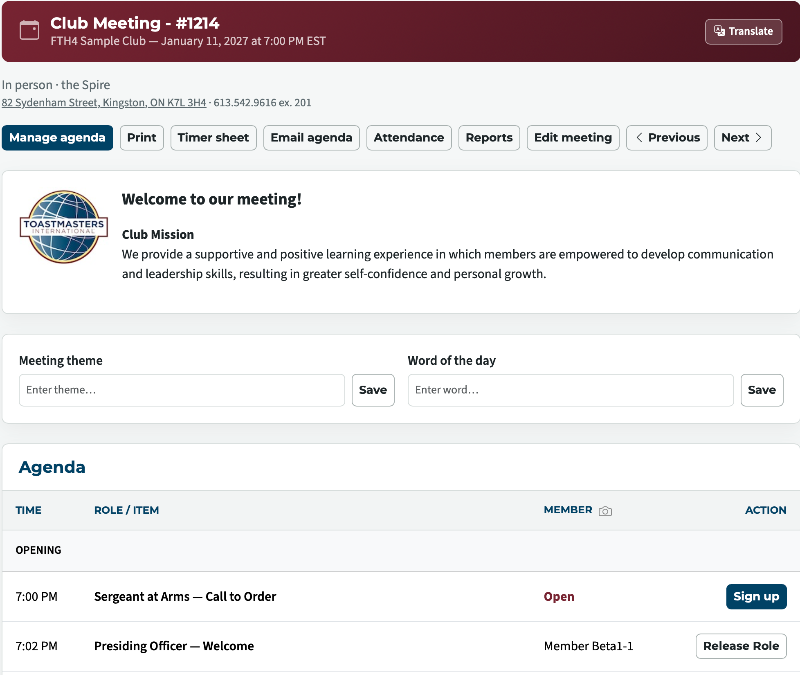
1) Meetings > Select the meeting > click on Agenda > Look at the Print Button it is the second button near the top.
Last edited 10 Sep 2026, 5:53 p.m. by Brian
Thank you,
Brian McDonald DTM
Silver and Wiser Online Toastmasters Club #777940
Technical Support Consultant and Developer for FreeToastHost
Brian McDonald DTM
Silver and Wiser Online Toastmasters Club #777940
Technical Support Consultant and Developer for FreeToastHost
Well, that is plain as day but I do not see that on my side. OK maybe I am logged under a nonprivileged account. I'll reset password and use club number to log in. Thanks
Alvin
Alvin
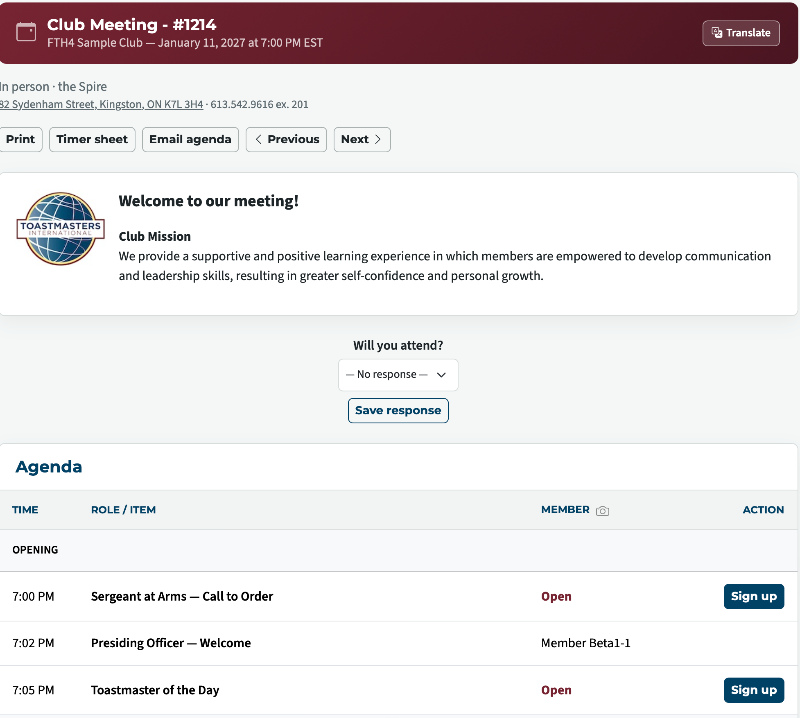
As a regular member you should see this, Click in meetings > view the agenda > and Print is the first Button.
Thank you,
Brian McDonald DTM
Silver and Wiser Online Toastmasters Club #777940
Technical Support Consultant and Developer for FreeToastHost
Brian McDonald DTM
Silver and Wiser Online Toastmasters Club #777940
Technical Support Consultant and Developer for FreeToastHost
Log in to reply.