It appears that if our club (1294652) use the Dues Mgmt Module to send Dues Payment Notices, each member sees a drop-down option for payment method with the following options: Cash, Check, PayPal, Direct Deposit, TI Self-Pay, No Email / Other. A screen shot is attached. Prior to TI providing Self-Pay, we set up PayPal as an option to accept payments, even though they charged a fee, which our club required to pay from club dues. When TI Self Pay came out, we dropped PayPal and added free Zelle as a 2nd option to TI
Self-Pay. We have modified the text in the Dues Module to direct members to Self Pay or Zelle. Is there a way to list only our two best Choices?
We also used the option "Use your club's default wording", so the Invoice Preview does not mention the methods we don't want, except for the direct deposit option at the bottom. Is there a way to leave off the Direct Deposit option?
Request ability to choose which Payment Methods are listed in Dues Mgmt Module
Locked 2 replies · 175 views
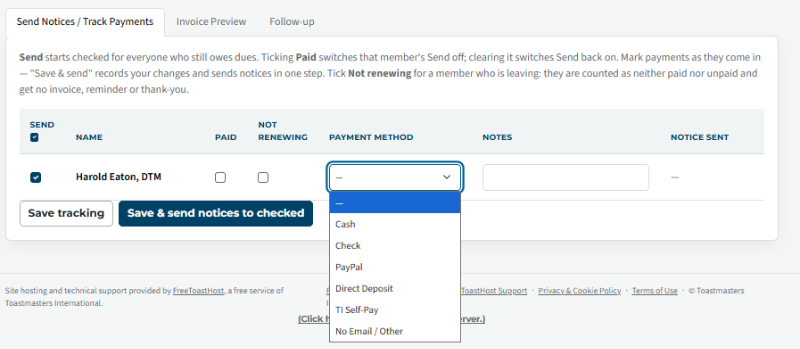
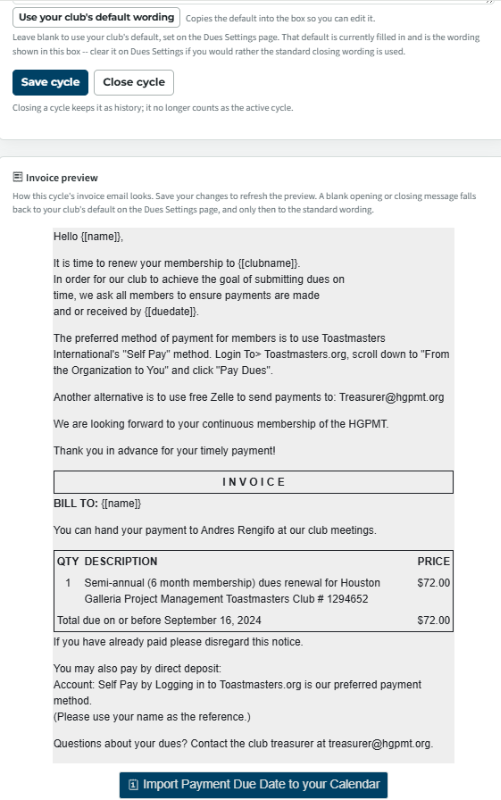
1) Your members don't see the Pull down with the payment options.
2) You have the other option for your zell etc.
3) Changed the wording from Direct Deposit to pay directly.
2) You have the other option for your zell etc.
3) Changed the wording from Direct Deposit to pay directly.
👍 Thanked by Harold Eaton
Thank you,
Brian McDonald DTM
Silver and Wiser Online Toastmasters Club #777940
Technical Support Consultant and Developer for FreeToastHost
Brian McDonald DTM
Silver and Wiser Online Toastmasters Club #777940
Technical Support Consultant and Developer for FreeToastHost
Thanks for your assistance. Now I understand that it is the sender's responsibility to select the payment method before sending the invoices. As our default is "Self Pay", I will choose that for all members.