I have tried to update Member Information for our club (1294652), such as Joined Club Date, while logged in as Club admin by using: Edit Member, update "Joined Club on" date, then Save Member. The date is there, as expected. I use the "<Membership Management" button to go back to Membership Management and there is no "joined" date for that member. I use "Edit" in that member's row to verify, and there is no longer a date in the "Joined Club on" field. I have included a screen shot.
Please share a procedure that works.
How to update Member Information in Membership Management
12 replies · 584 views
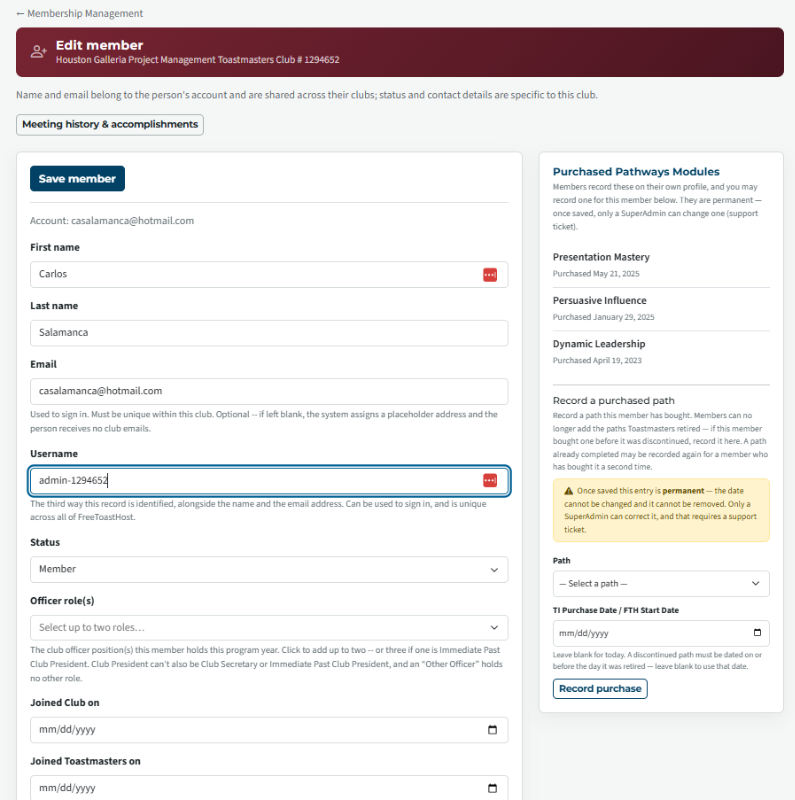
Worked for me
I used the same record as you.
set the club start date to 2026-01-01
What browser are you using what OS?
Did you do a hard reload after the update? (You can use the link at the bottom of your site.)
I used the same record as you.
set the club start date to 2026-01-01
What browser are you using what OS?
Did you do a hard reload after the update? (You can use the link at the bottom of your site.)
Thank you,
Brian McDonald DTM
Silver and Wiser Online Toastmasters Club #777940
Technical Support Consultant and Developer for FreeToastHost
Brian McDonald DTM
Silver and Wiser Online Toastmasters Club #777940
Technical Support Consultant and Developer for FreeToastHost
Brian, thanks for the quick feedback. I am using Chrome Browser (version 153.0.8010.37) 64-bit on Windows 11 (version 25H2 OS build 26200.9445. I see that you did successfully update the club join date for Carlos to 2026-01-01. I tried again and got the same results as before. I repeated the process again and clicked on "Click here to reload website from server" wafter updating the date to 3/1/23 and selecting "Save Member" from the top of the screen. The date remains updated after both "Save Member" and "Click here to reload website from server".
I think it must be my next step that is wrong because it reverts to 2026-01-01 after I select "<Membership Management" at the top of the screen, just above the red "Edit Member" in order to return to the Membership Management screen.. Please let me know the correct step (the next step you took) after editing the date and "save Member" to return to the Membership Management screen.
Thanks for your time.
I think it must be my next step that is wrong because it reverts to 2026-01-01 after I select "<Membership Management" at the top of the screen, just above the red "Edit Member" in order to return to the Membership Management screen.. Please let me know the correct step (the next step you took) after editing the date and "save Member" to return to the Membership Management screen.
Thanks for your time.
I just changed it again.
Membership Management > Carlos Edit > 2023-03-01 <<<<< make sure you are entering a valid date
Check at the top for errors or the "Carlos was updated."
Membership Management > Carlos Edit > 2023-03-01 <<<<< make sure you are entering a valid date
Check at the top for errors or the "Carlos was updated."
Thank you,
Brian McDonald DTM
Silver and Wiser Online Toastmasters Club #777940
Technical Support Consultant and Developer for FreeToastHost
Brian McDonald DTM
Silver and Wiser Online Toastmasters Club #777940
Technical Support Consultant and Developer for FreeToastHost
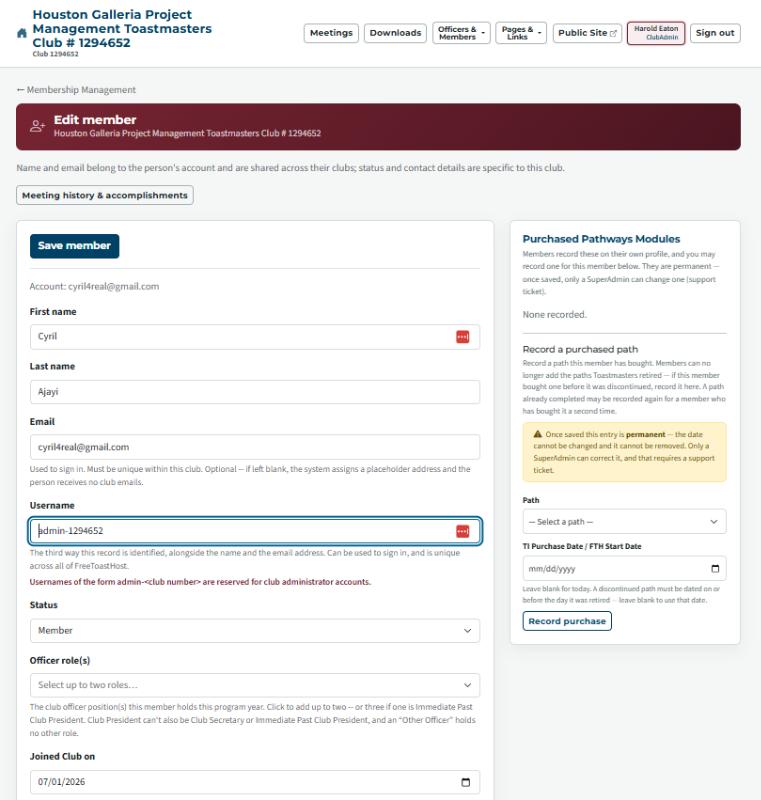
I have now updated the "joined club on" date for Cyril. I am attaching a screen shot where you can see that the date format is correct. When updating it highlighted Month / Date / Year, and appears correct. The moment I hit "save member" it highlights my user name "admin - 1294652". Perhaps the admin can't update club join dates?
I did not see any errors at the top or any message that "Cyril was updated".
Should I login as my user account instead of admin?
Would you please clarify:
Is there is anything else you are doing other "Save Member"
Is there anything wrong with exiting the screen by hitting the "<Membership Management" above "Edit Member" after "Save Member"
Please see attachment.
I did not see any errors at the top or any message that "Cyril was updated".
Should I login as my user account instead of admin?
Would you please clarify:
Is there is anything else you are doing other "Save Member"
Is there anything wrong with exiting the screen by hitting the "<Membership Management" above "Edit Member" after "Save Member"
Please see attachment.
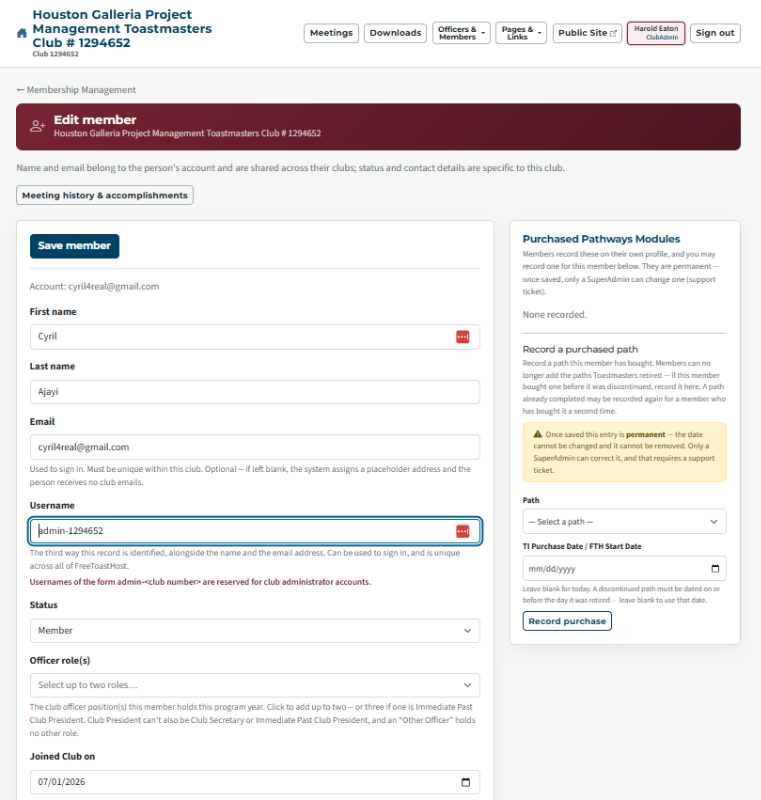
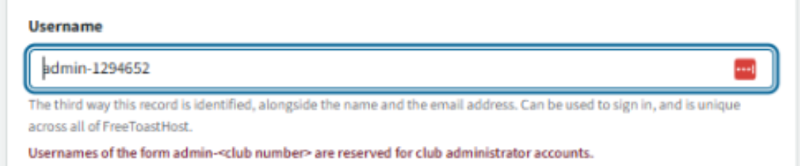
READ the ERROR in RED
Thank you,
Brian McDonald DTM
Silver and Wiser Online Toastmasters Club #777940
Technical Support Consultant and Developer for FreeToastHost
Brian McDonald DTM
Silver and Wiser Online Toastmasters Club #777940
Technical Support Consultant and Developer for FreeToastHost
Brian, I am the club Admin. It is my understanding that, as club admin, I have the right edit many things on our FTH4 site. So, I think I can update the member records that are missing a club member date. As soon as I open a club member's record, this field jumps from the member's username to the club admin user name. There is nothing that I am aware of doing, other than clicking on "Edit" to open this record.
- Am I wrong that the club admin can update a member record?
- I understand that you want me to notice the msg that usernames of this type are reserved for admins. I agree. I assume that if I logged in as my personal account, I would not have the rights to update the record?
Tell me exactly what you are doing to edit the members record.
Which member and what date
Which member and what date
Thank you,
Brian McDonald DTM
Silver and Wiser Online Toastmasters Club #777940
Technical Support Consultant and Developer for FreeToastHost
Brian McDonald DTM
Silver and Wiser Online Toastmasters Club #777940
Technical Support Consultant and Developer for FreeToastHost
As a starter, just in case you meant that I should be using my member account instead of my club admin account, I have logged in with my Harold Eaton, Club president account to see if I could edit user information, such as club join date, from a different account. I get the same results. As soon as open Edit Member, it replaces the username of the subject with the username of the account I am using. I think this is the problem. Does it do the same for you? if so, what do you do. Because you asked for a detailed explanation, I will break it down with images.
---- Process of trying to replace a blank "joined club on" field with the correct date from club central membership list while logged in as club admin ----
Note: I started this effort because I read in the documentation that it was helpful for members to have correct club join dates.
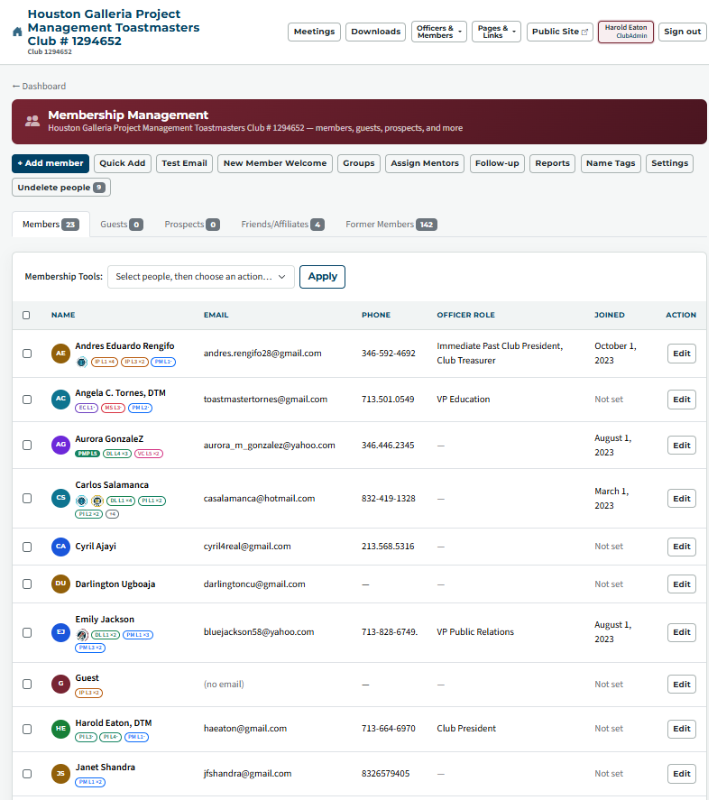
The 2 png files are screenshots of what I see on the Membership Mgmt and Edit screen for member Ajaji
---- Process of trying to replace a blank "joined club on" field with the correct date from club central membership list while logged in as club admin ----
Note: I started this effort because I read in the documentation that it was helpful for members to have correct club join dates.
The 2 png files are screenshots of what I see on the Membership Mgmt and Edit screen for member Ajaji
- png file> 1-Membership Management page for club 1294652 - Note some mem show -Not Set- in joined col.png
- I clicked on "Edit" for Cyril Ajaji (the first one below Carlos that was already updated)
- Note: as soon as Cyril's record opens, his username is automatically replaced by mine>admin-1294652
- png file> 2-Cyril Join club date updated to 7-1-26.png
- Note only manual changes was to replace the "joined club on date" "mm/dd/yyyy" with "07/01/2026"
- 2nd step was to click "save member"; the result was that the following text appeared in red beneath the username: "Usernames of the form admin-<club number> are reserved fo club administrative accounts."
- I have also tried not clicking save member. The result is the same, the update to the "joined club on date" is not saved
- Since the "joined club on date" update worked for you, there must be something else you are doing? Please let me know what you do in the edit screen besides the date entry. Perhaps you replace your username with the club member's username?
In chrome do you have ant plugins or extensions?
Can you try another browser Firefox?
There is something on your computer that is doing the autofill of the userid, It is not FTH4.
Can you try another browser Firefox?
There is something on your computer that is doing the autofill of the userid, It is not FTH4.
👍 Thanked by Harold Eaton
Thank you,
Brian McDonald DTM
Silver and Wiser Online Toastmasters Club #777940
Technical Support Consultant and Developer for FreeToastHost
Brian McDonald DTM
Silver and Wiser Online Toastmasters Club #777940
Technical Support Consultant and Developer for FreeToastHost
I have 6 extensions in my Chrome Browser: 1) Full screen for Google Tasks; 2)LastPass Password Manager; 3) OneNote Web Clipper; 4)Google Keep Chrome Extension; McAfee WebAdvisor; Zoom Chrome Extension.
Thanks for your time and persistence, I know you are swamped and doing good work.
- I tried Chrome Incognito mode; it did not replace the member username, and so works
- I tried Firefox on user Darlington, it also did not replace the member username, and so worked
Thanks for your time and persistence, I know you are swamped and doing good work.
One more related question: Am I recalling correctly that it is useful to update the member club join date for our club members? If so, are there other fields in Member information that are useful to update?
Make sure their emails are valid. We are finding a lot of members with work or personal domain emails have gone bad. Either they don't work there any more or they let the domains expire.
Thank you,
Brian McDonald DTM
Silver and Wiser Online Toastmasters Club #777940
Technical Support Consultant and Developer for FreeToastHost
Brian McDonald DTM
Silver and Wiser Online Toastmasters Club #777940
Technical Support Consultant and Developer for FreeToastHost
Log in to reply.