Toastmasters International — Club & District Websites
FreeToastHost 4

Support and Development Site

Forum index Recent topics

The Pathways Drop Down Menu on The Agenda is Defective

3 replies · 160 views

I am Darryle Brown with Aurorators Club #2136. We have a problem with your FTH Pathways drop down menu on the agenda and are receiving complaints. When member are attempting to put their speech information on the agenda, even when they select the speech project and the speech times as required, they receive the following error messages:

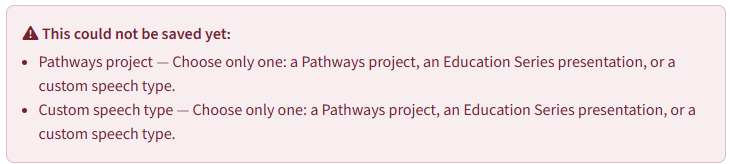
** This could not be saved yet:
  • Pathways Project - Choose only one: a Pathways project, an Education Series Presentation, or a custom speech type
  • Custom speech type - Choose only one: a Pathways project, an Education Series Presentation, or a custom speech type.
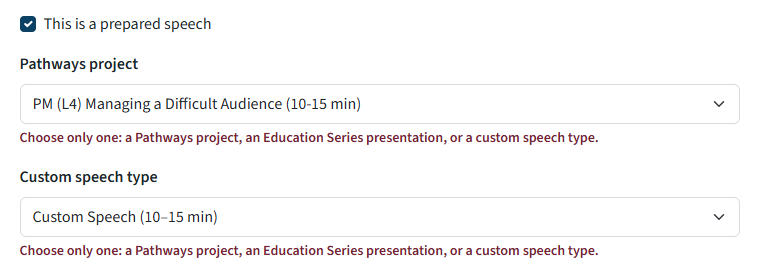
The thing is, the drop down only offers singular options, not multiple options so the error makes no sense, especially after an option is made on the drop down menu. It's implying that multiple options are being made to trigger such an error message. Otherwise, why is there an error at all? The screenshots below show the selection made and then the error message both underneath the selection and the error message up top on why the selections cannot be saved.

Could you please address and fix that discrepancy?
  • Screenshot 2026-09-16 100308.png
  • Screenshot 2026-09-16 101551.png

Last edited 16 Sep 2026, 12:20 p.m. by Darryle Brown, DTM, PDD, PRA
1) we always require your club number
2) if this is an agenda issue, what Date, what member? and What Path and Project are they trying to use.
Thank you,

Brian McDonald DTM
Silver and Wiser Online Toastmasters Club #777940

Technical Support Consultant and Developer for FreeToastHost
I think your members are confused

1) sign in
2) click meetings
3) click view on the meeting you want
4) click sign up beside the speaker role you want
5) say if in person or online
6) click Speech details
7) Select the Pathways project
8) ie ice breaker
9) Type in your Speaker Intro
10) Save speech details

That is it. NO Custom Speech, that is if you are only doing a non pathways project. (Which should be almost never.)
Thank you,

Brian McDonald DTM
Silver and Wiser Online Toastmasters Club #777940

Technical Support Consultant and Developer for FreeToastHost
debrown.consulting@gmail.com post=103675 userid=60434 wrote:
The screenshots below
The screenshot is from the manage agenda > edit role screen, not the members view of entering speech details.

I am unable to get 'Pathways project' and 'Custom speech type' to appear simultaneously. Selecting one blanks the other whether on the edit page like the screenshot ore the members view of speech details.
Richard Taylor
TM Club #7045

Log in to reply.