Toastmasters International — Club & District Websites
FreeToastHost 4

Support and Development Site

Forum index Recent topics

Agenda Roles not auto populating

7 replies · 383 views

I belong to two clubs: 637 & 3342.

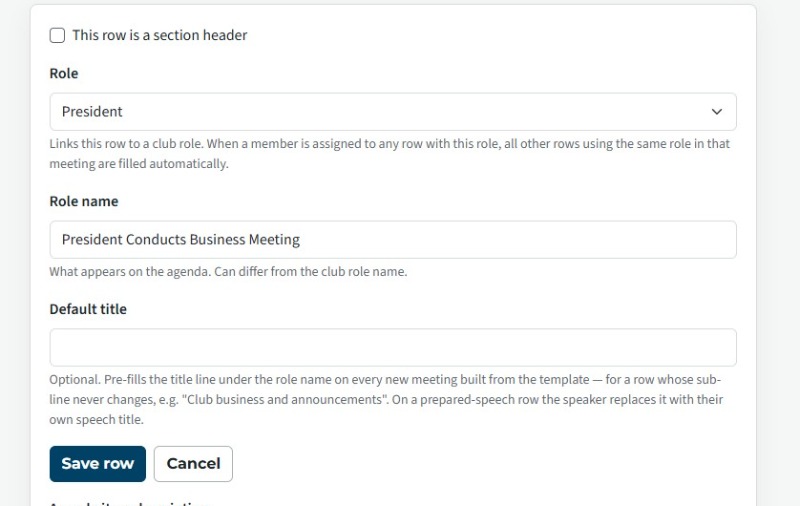
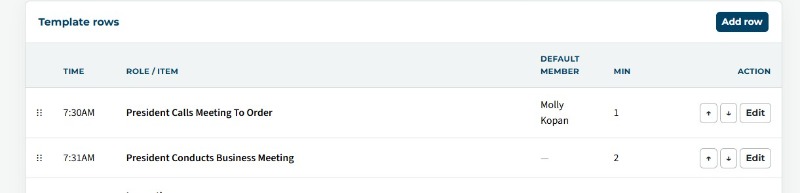
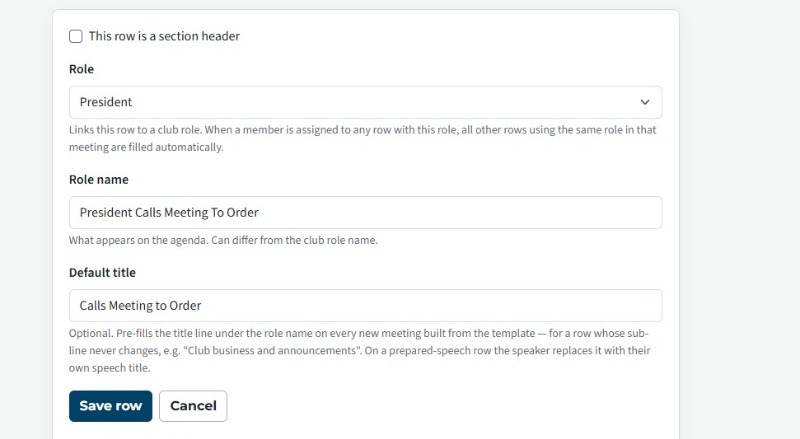
So there are a few roles (President, Toastmaster, & General evaluator) that we have more than once in a meeting.  The person in that role doesn't change.  In FTH3, we would use the "*" around the role name and we would only set up the first occurrance to be a sign-up role.  And whenever that role appeared again in the agenda, the person assigned to that role automatically had their name appear again.  It's my understanding that by defining the roles ahead of time, whenever we add a new item to the agenda and assign a role to that item, if that role has been assigned earlier for that agenda, then the name would automatically appear in the rest of the agenda whenever that role was assigned.  That does not seem to be the case.  I've been working on this thing for about 3 hours today trying different combinations of settings to get it to work.  I've even created a new template from scratch and I still can't get it to work.  For example, our president opens the meeting.  So for that line item I assign the President to that role.  The only options I have turned on are:
- Members may sign up for this role
- Show this row on the printed agenda

Then in the Default Member drop down, I select our current president.

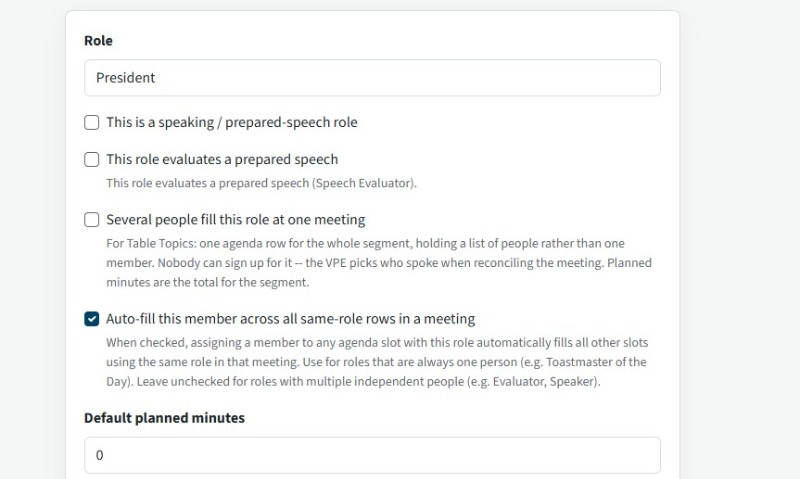
Later in the agenda I have a line item titled "President conducts business meeting" and I assign the role of President.  I would then expect the name of the president to show up on that line like it does for the first line item since it's the same role, but it does not.  I have played with the "Members may sign up for this role" option to see if that makes a difference, but it does not.  What am I missing?  I've attached screenshots of how it appears in the agenda as well as editing those line items to show the roles assigned to them. I also added a screenshot to show the settings for the President role; specifically that the "auto-fill this member across all same-role rows in a meeting" is selected.
  • FTH4Error2.jpg
  • FTH4Error3.jpg
  • FTH4Error1.jpg
  • FTH4Error4.jpg

Last edited 17 Sep 2026, 1:00 p.m. by Sylvan Jonas: Added a screenshot to show Role settings.

1) You can set the permanent assign people in the Agenda template, then when you create a meeting from the template they will already be assigned.

2) Use the Role feature in the Agenda Templates, especially for roles that appear multiple times in an Agenda.

3) which agenda template are you talking about, and what dated agenda did you create from it.
Thank you,

Brian McDonald DTM
Silver and Wiser Online Toastmasters Club #777940

Technical Support Consultant and Developer for FreeToastHost
1.)  That's how I have been assigning roles that are for officers.  In the template, I assign a person to that role in the template, but as you can see from the screen shots I attached in my original post, that person was not showing up, even though the role was the same.

2.) I am using the Role feature.  I'm using the President Role feature in the examples that I posted.

3.) For my examples, I'm using club 3342's FTH.  I created a brand new template from scratch called "New FT4 Weekly Agenda."  But I'm having the same problem in the original template, "Weekly Agenda Template."  I don't know you if you can look at them to see what I am doing wrong.
Using the FT4 template
There are 2 positions pre-filled President and educational minute.
I created a meeting using FT4 for 2026-12-31
the president and educational minute are still filled
Thank you,

Brian McDonald DTM
Silver and Wiser Online Toastmasters Club #777940

Technical Support Consultant and Developer for FreeToastHost
There is only one role filled by the VPE.  That one I don't have a problem with.  It's the two roles filled by the president.  When you created a new agenda with the template, were both president roles auto populated or just the first role?  The two roles that should populate with the President's name are:
- President Calls Meeting To Order
- President Conducts Business Meeting

One is at the top of the agenda and the other is at the bottom of the agenda.
Now I see what you mean.
 Screenshot 2026-09-18 at 7.56.19 AM.png


Template fixed, required a save
 Screenshot 2026-09-18 at 7.53.40 AM.png

Agenda fixed, required to reapply the temple
 Screenshot 2026-09-18 at 7.55.02 AM.png
Thank you,

Brian McDonald DTM
Silver and Wiser Online Toastmasters Club #777940

Technical Support Consultant and Developer for FreeToastHost
Thank you.  Was it something I did wrong?  Was there a setting I didn't choose or was it something on the back end?
Template wasn't obeying the Role rules.
Thank you,

Brian McDonald DTM
Silver and Wiser Online Toastmasters Club #777940

Technical Support Consultant and Developer for FreeToastHost

Log in to reply.