Toastmasters International — Club & District Websites
FreeToastHost 4

Support and Development Site

Forum index Recent topics

Navigation on the Manage Meetings page

Locked 6 replies · 461 views

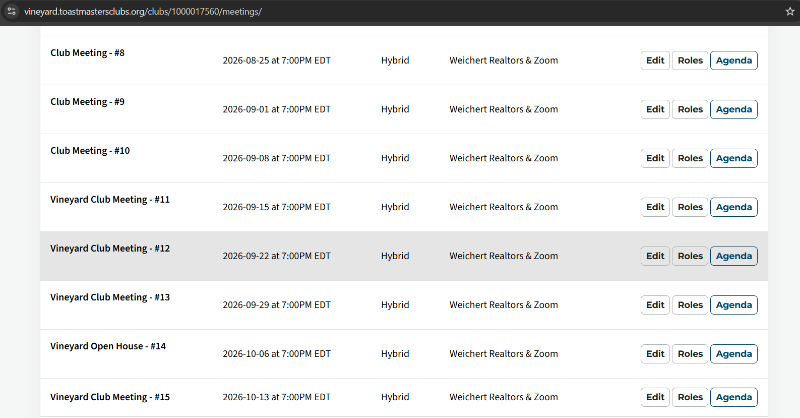
When 'Manage Meetings' (on a VPE dashboard) is clicked, the page currently opens with the view automatically positioned near the upcoming meeting, which is located toward the bottom of the page.

This means that if the user wants to create a new meeting using the 'Create Meeting' button at the top of the page, they first have to scroll all the way back to the top, or use Ctrl+Home.

Is there a way to avoid this? Perhaps the display order could be changed so that the most recent or upcoming meetings appear at the top rather than at the bottom?
Best,
Anmol Wakankar
Vineyard Toastmasters
(Club: 1109991)
it now shows 10 with an option button at the bottom to show all.
Thank you,

Brian McDonald DTM
Silver and Wiser Online Toastmasters Club #777940

Technical Support Consultant and Developer for FreeToastHost
Thanks, but the number of meetings displayed is not the issue. The issue is the initial scroll position.

When I click 'Manage Meetings', the page opens already scrolled down to the upcoming meeting, as shown in Attachment 1. I then have to scroll back to the top to access the meeting management buttons at the top of the page.

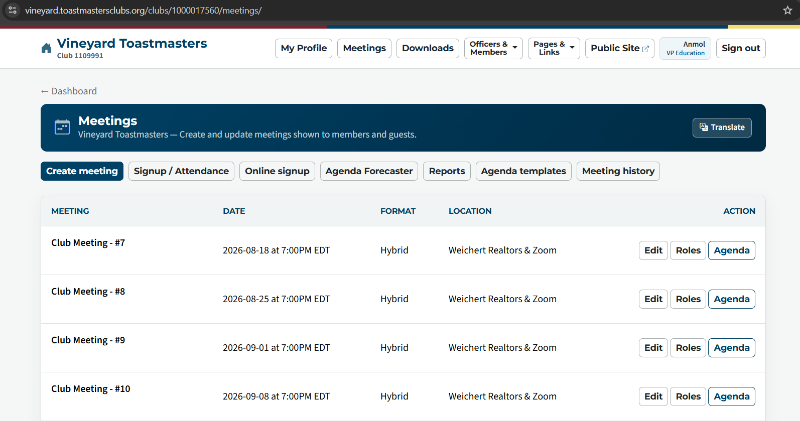
Could the page instead open at the top, as shown in Attachment 2 (i.e., window.scrollTo(0, 0))?

ManageMeetings_CurrentNav.png

ManageMeetings_RequestedNav.png

Last edited 17 Sep 2026, 4:43 p.m. by Anmol Wakankar

Best,
Anmol Wakankar
Vineyard Toastmasters
(Club: 1109991)
What size screen are you viewing your website on?
The majority of screens I have used the top menu still shows.
Thank you,

Brian McDonald DTM
Silver and Wiser Online Toastmasters Club #777940

Technical Support Consultant and Developer for FreeToastHost
I tested on the following devices and viewport sizes:

HP laptop
Display 1920 × 1080
Browser viewport 1536 × 730

LG Flatron E2242 monitor
Display 1920 × 1080
Browser viewport 1920 × 945

Google Pixel 9a
Display 1080 × 2424
Browser viewport 411 × 785

OnePlus Nord CE 5G
Display 2400 × 1080
Browser viewport 360 × 689

The same behavior occurs across all four devices. The Manage Meetings page opens positioned at the upcoming meeting rather than at the top of the page.
Best,
Anmol Wakankar
Vineyard Toastmasters
(Club: 1109991)
Just to add, I checked the page behavior further. It consistently opens at scrollY = 277, even with direct navigation. There is no URL anchor involved, and disabling scroll restoration makes no difference.
Running window.scrollTo(0, 0) moves it to the top and it stays there. So something during page loading appears to be positioning it at 277px.
Best,
Anmol Wakankar
Vineyard Toastmasters
(Club: 1109991)
Yes for 90% of the people who go to that page it takes them to the next meeting.
Thank you,

Brian McDonald DTM
Silver and Wiser Online Toastmasters Club #777940

Technical Support Consultant and Developer for FreeToastHost