Dear FTH4 Team,
is there an option to adjust the flag times for the rows in the agenda?
Best regards
Markus Ogrizek
Poland's First Toastmasters (1548)
Timing adjustments for green/yellow/red flags
Locked 18 replies · 588 views
Look at the timing sheet, link beside the Role called timer or link at top of the agenda.
Thank you,
Brian McDonald DTM
Silver and Wiser Online Toastmasters Club #777940
Technical Support Consultant and Developer for FreeToastHost
Brian McDonald DTM
Silver and Wiser Online Toastmasters Club #777940
Technical Support Consultant and Developer for FreeToastHost
But when I click on that it only shows me the timing, it doesn't allow me to adjust it. Or do I need to click something more?
What do you mean by adjust the timing?
Thank you,
Brian McDonald DTM
Silver and Wiser Online Toastmasters Club #777940
Technical Support Consultant and Developer for FreeToastHost
Brian McDonald DTM
Silver and Wiser Online Toastmasters Club #777940
Technical Support Consultant and Developer for FreeToastHost
I want to adjust the timing for the green, yellow and red flags.
For example I was giving our Evaluators in the agenda a 4 minutes timeframe and now the green, yellow and red flag are at 3 min, 3,5 min and 4 min, but I want them as usual at 2 min, 2,5 min and 3 min.
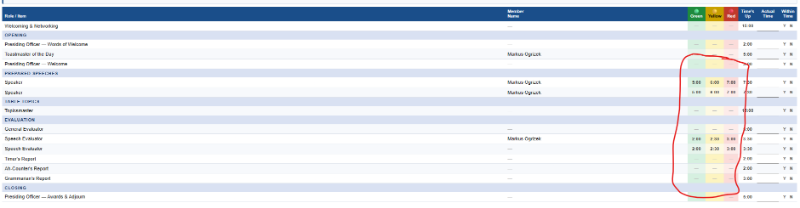
I attached a photo and marked the part I am talking about (the photo is from a different agenda, the system standard)
For example I was giving our Evaluators in the agenda a 4 minutes timeframe and now the green, yellow and red flag are at 3 min, 3,5 min and 4 min, but I want them as usual at 2 min, 2,5 min and 3 min.
I attached a photo and marked the part I am talking about (the photo is from a different agenda, the system standard)
Last edited 19 Sep 2026, 7:12 a.m. by Markus
You change it in the role definition Agenda > Templates > Roles
Resaving the agenda template should pickup the new role timing
You can reapply the template against a dated agenda or change the timing on the role and save
The time sheet should show the new timings.
Resaving the agenda template should pickup the new role timing
You can reapply the template against a dated agenda or change the timing on the role and save
The time sheet should show the new timings.
Thank you,
Brian McDonald DTM
Silver and Wiser Online Toastmasters Club #777940
Technical Support Consultant and Developer for FreeToastHost
Brian McDonald DTM
Silver and Wiser Online Toastmasters Club #777940
Technical Support Consultant and Developer for FreeToastHost
Yeah this I understand, but the new role timing in an agenda row seems like automatically adjusting the green, yellow and red flag timings.
And for example when I give the Evaluators 4 minutes in the agenda row, then the flags are 3 min, 3,5 min and 4 min. But when I provide the Evaluator with 3 minutes in the agenda row, the flags are 2 min, 2,5 min and 3 min.
But I dont want the automatically given timings, I would like to adjust them, that the 4 minute evaluator is connected with the 2 min, 2,5 min and 3 min flags.
--> I understand that this can be done most likely in the "Timing adjustments" section. But how can I add green, yellow and red flag timings for example for the various evaluation reports of Ah-Counter, Grammarian etc.?
And for example when I give the Evaluators 4 minutes in the agenda row, then the flags are 3 min, 3,5 min and 4 min. But when I provide the Evaluator with 3 minutes in the agenda row, the flags are 2 min, 2,5 min and 3 min.
But I dont want the automatically given timings, I would like to adjust them, that the 4 minute evaluator is connected with the 2 min, 2,5 min and 3 min flags.
--> I understand that this can be done most likely in the "Timing adjustments" section. But how can I add green, yellow and red flag timings for example for the various evaluation reports of Ah-Counter, Grammarian etc.?
If you adjust the time the lights change to match. You can't just change the lights
Thank you,
Brian McDonald DTM
Silver and Wiser Online Toastmasters Club #777940
Technical Support Consultant and Developer for FreeToastHost
Brian McDonald DTM
Silver and Wiser Online Toastmasters Club #777940
Technical Support Consultant and Developer for FreeToastHost
Ah okay, so there is now way yet that I can manually put the time for the green, yellow and red lights?
Just by changing the time.
👍 Thanked by Markus
Thank you,
Brian McDonald DTM
Silver and Wiser Online Toastmasters Club #777940
Technical Support Consultant and Developer for FreeToastHost
Brian McDonald DTM
Silver and Wiser Online Toastmasters Club #777940
Technical Support Consultant and Developer for FreeToastHost
So there is no option that I can put green, yellow and red lights for example for the general evaluator or Grammarian? Because we do that in our club and the Timer sheet is kinda useless for us when its not adjustable, even though it looks quite nice 🙁
That is not what you asked for. You asked to change the light on speaking roles and evaluators. that will not change. If you want light on the non speaking roles you can ask for that, but they will be based on the role timings not adjustable.
Last edited 19 Sep 2026, 8:14 a.m. by Brian
Thank you,
Brian McDonald DTM
Silver and Wiser Online Toastmasters Club #777940
Technical Support Consultant and Developer for FreeToastHost
Brian McDonald DTM
Silver and Wiser Online Toastmasters Club #777940
Technical Support Consultant and Developer for FreeToastHost
Ah so you can change or add for us in any case some default settings?
put in suggestions to have timing lights on all positions.
Thank you,
Brian McDonald DTM
Silver and Wiser Online Toastmasters Club #777940
Technical Support Consultant and Developer for FreeToastHost
Brian McDonald DTM
Silver and Wiser Online Toastmasters Club #777940
Technical Support Consultant and Developer for FreeToastHost
Hi Brian,
we would like to have timing of the lights similar to the Speech Evaluator please. Meaning that the planned minutes is the red light, 30s before the amber light and 1 minute before the green light.
So for the TImer for example it would be with a planned time of 2 min:
- green at 1 min
- amber at 1:30 min
- red at 2 min
This default timing we would like to try here for the following roles:
- Timer
- Grammarian
- Ah-Counter
For the General Evaluator we would like to have the timing a bit wider, with red light at the planned minutes, amber light 1 minute before and green light 2 minutes before, i.e.:
- Planned Time of GE: 5minutes
- Green light: at 3 minutes
- Amber light: at 4 minutes
- Redlight: at 5 minutes
Thank you in advance.
Best regards
Markus Ogrizek
Poland's First Toastmasters (1548)
we would like to have timing of the lights similar to the Speech Evaluator please. Meaning that the planned minutes is the red light, 30s before the amber light and 1 minute before the green light.
So for the TImer for example it would be with a planned time of 2 min:
- green at 1 min
- amber at 1:30 min
- red at 2 min
This default timing we would like to try here for the following roles:
- Timer
- Grammarian
- Ah-Counter
For the General Evaluator we would like to have the timing a bit wider, with red light at the planned minutes, amber light 1 minute before and green light 2 minutes before, i.e.:
- Planned Time of GE: 5minutes
- Green light: at 3 minutes
- Amber light: at 4 minutes
- Redlight: at 5 minutes
Thank you in advance.
Best regards
Markus Ogrizek
Poland's First Toastmasters (1548)
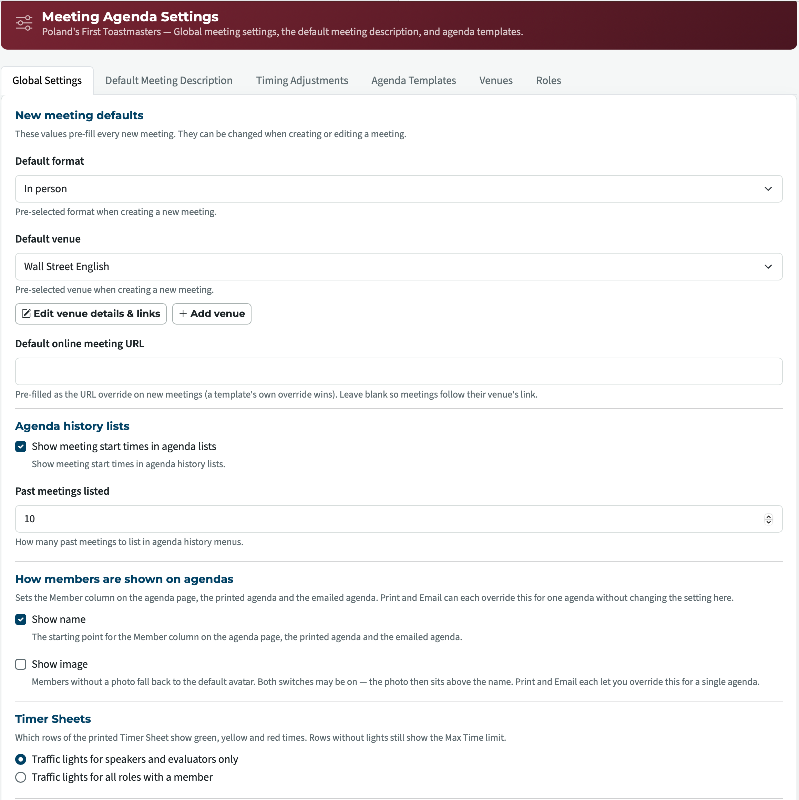
Already available.
👍 Thanked by Markus
Thank you,
Brian McDonald DTM
Silver and Wiser Online Toastmasters Club #777940
Technical Support Consultant and Developer for FreeToastHost
Brian McDonald DTM
Silver and Wiser Online Toastmasters Club #777940
Technical Support Consultant and Developer for FreeToastHost
Looks amazing and it would be even nicer for us if it would show the timings for roles even without a member.
The background: Sometimes people take the role very late and then we wouldn't have the timing on the printed agenda when we basically ask them right before the meeting starts.
The background: Sometimes people take the role very late and then we wouldn't have the timing on the printed agenda when we basically ask them right before the meeting starts.
The timesheet is always up to date as the agenda. If the Timer uses the online sheet and opens after the final update it will be current.
Printed one would only be as upto date as when it was printed.
Printed one would only be as upto date as when it was printed.
👍 Thanked by Markus
Thank you,
Brian McDonald DTM
Silver and Wiser Online Toastmasters Club #777940
Technical Support Consultant and Developer for FreeToastHost
Brian McDonald DTM
Silver and Wiser Online Toastmasters Club #777940
Technical Support Consultant and Developer for FreeToastHost
True yeah introducing the online sheet for the timer would be some nice step into the future here 😆