Good Day and Thank you gain for all the work you've done to create this new and definitely better version of FTH. We change our front page picture each week depending on weekly themes etc. We had a number of images which we re-used over the years and all seem to be gone. Is this correct? the only images we can find are the stock TM images.
Is there a way to recover any of these, or should we just resign ourselves to starting fresh?
Thanks for any help you can provide.
Catriona
Club 643557 and 5265 - Adding images to main page - our saved images gone
Locked 7 replies · 319 views
Please focus on one club per post.
The hero image is not part of a normal page.
To get to the images you uploaded in FTH3
Create a Custom page
give it a title Pictures, web address -pictures.html,
click on the image icon
click on uploaded images
select image from list
I created on for you it is in the officer pages, selected one picture
once you can see the pictures you can right click andsave the image locally.
The hero image is not part of a normal page.
To get to the images you uploaded in FTH3
Create a Custom page
give it a title Pictures, web address -pictures.html,
click on the image icon
click on uploaded images
select image from list
I created on for you it is in the officer pages, selected one picture
once you can see the pictures you can right click andsave the image locally.
Thank you,
Brian McDonald DTM
Silver and Wiser Online Toastmasters Club #777940
Technical Support Consultant and Developer for FreeToastHost
Brian McDonald DTM
Silver and Wiser Online Toastmasters Club #777940
Technical Support Consultant and Developer for FreeToastHost
Hi Brian
I included ninth clubs because neither seemed to be able to access our historical photos. However I am helping our new VPS of PR to keep on top of changing the photos etc. I am admin for St Ignatius club 643557.
I don't understand some of the words you used her - what is the HERO page?
You said you created a Custom Page but I am not sure where to look for it. Officers and members seems to lead me to the members page when're the officers are listed as part of the group. I tried manage custom web pages, but that seems to be more about the colours and there does not seem to be a custom one already here.
I tried creating a CUSTOM page, labeled it pictures, then web address pictures.html - clicked on image and the option is to upload images, but ai cannot see any of our previous images to upload...
Sorry, I feel like a luddite with this question.
I included ninth clubs because neither seemed to be able to access our historical photos. However I am helping our new VPS of PR to keep on top of changing the photos etc. I am admin for St Ignatius club 643557.
I don't understand some of the words you used her - what is the HERO page?
You said you created a Custom Page but I am not sure where to look for it. Officers and members seems to lead me to the members page when're the officers are listed as part of the group. I tried manage custom web pages, but that seems to be more about the colours and there does not seem to be a custom one already here.
I tried creating a CUSTOM page, labeled it pictures, then web address pictures.html - clicked on image and the option is to upload images, but ai cannot see any of our previous images to upload...
Sorry, I feel like a luddite with this question.
Maybe it is the web address I am missing
Club 643557 203 images are now in the image upload library.
https://643557.toastmastersclubs.org/page/pictures/
Thanks for the catch
here is the picture page
https://643557.toastmastersclubs.org/page/pictures/
https://643557.toastmastersclubs.org/page/pictures/
Thanks for the catch
here is the picture page
https://643557.toastmastersclubs.org/page/pictures/
Thank you,
Brian McDonald DTM
Silver and Wiser Online Toastmasters Club #777940
Technical Support Consultant and Developer for FreeToastHost
Brian McDonald DTM
Silver and Wiser Online Toastmasters Club #777940
Technical Support Consultant and Developer for FreeToastHost
I am so sorry Brian! I can get to the page pictures. There are only three pictures there. I do not seem to understand how to grab the pictures from there and to upload them to the main page where I want them.
Thanks again for your generosity and understanding.
Catriona
Thanks again for your generosity and understanding.
Catriona
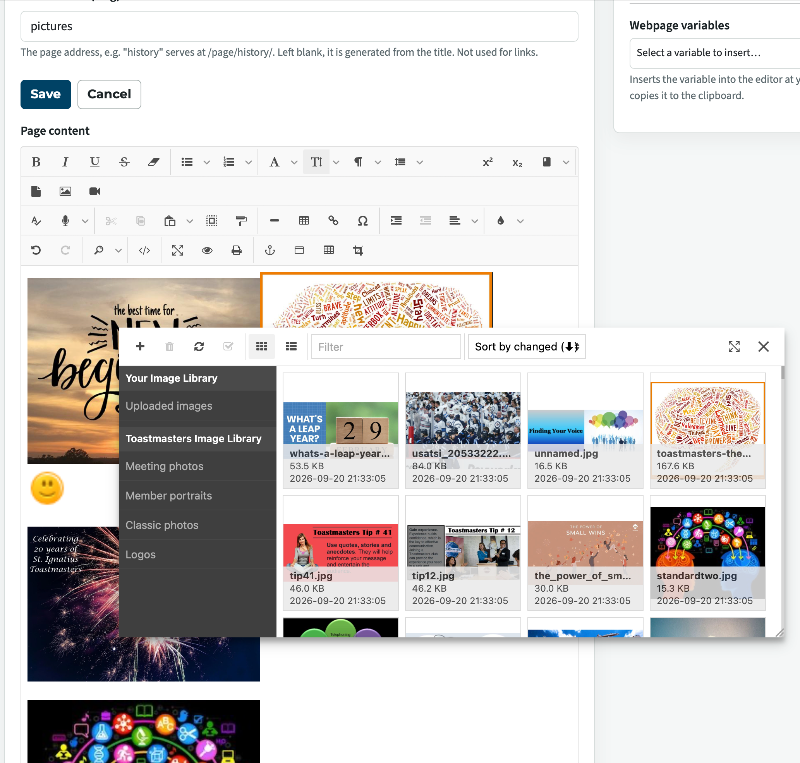
To download the pictures from the editor you first have to put them on a page.
in your Club Admin >Custom Webpages > edit the Pictures page
Place your cursor somewhere in the edit box where you want the picture to appear
click the picture Icon, click browse
click on uploaded images,
double click on the picture you want.
see it on the page
Save the page
view the page and right clight and save image as to save on your PC
in your Club Admin >Custom Webpages > edit the Pictures page
Place your cursor somewhere in the edit box where you want the picture to appear
click the picture Icon, click browse
click on uploaded images,
double click on the picture you want.
see it on the page
Save the page
view the page and right clight and save image as to save on your PC
Thank you,
Brian McDonald DTM
Silver and Wiser Online Toastmasters Club #777940
Technical Support Consultant and Developer for FreeToastHost
Brian McDonald DTM
Silver and Wiser Online Toastmasters Club #777940
Technical Support Consultant and Developer for FreeToastHost
Thank you for the step by step directions! You are amazing!
I am saving these step by step directions for next time I try to do this!
Catriona
I am saving these step by step directions for next time I try to do this!
Catriona