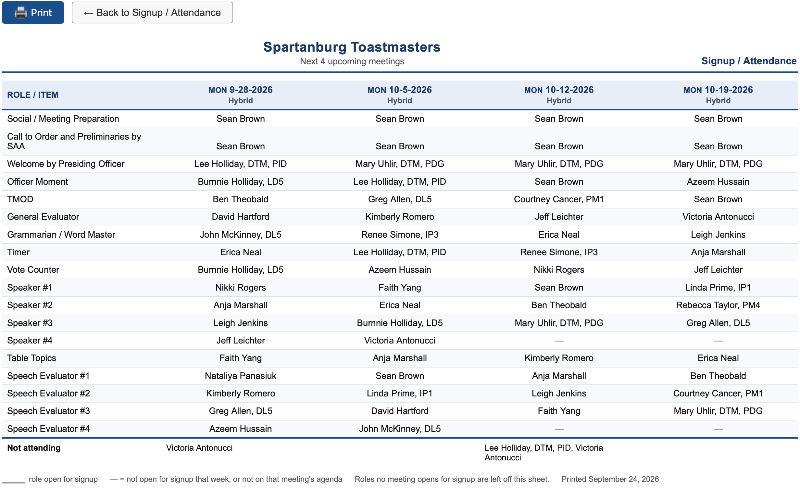
- from the club website
- >> Meetings (in top menu)
- >> Online Signup
- >> View signup sheet
- >> Export Forecast Planner (.xlsx)
- Saved this to my computer
- Deleted non-sign-up rows (for us, this was Social / Meeting Preparation, Call to Order and Preliminaries by SAA, Welcome by Presiding Officer, Officer Moment, and 2nd Monday (couldn’t find a way to make these not come across in the export)
- Added row at the bottom for NOT ATTENDING
- Then for each meeting agenda >> Attendance - On the NOT ATTENDING row, manually entered names of members showing as Absent in the appropriate column
- Made aesthetic formatting edits (made first column bold font, wider rows and columns, a little bigger font, shaded alternate rows and created the document header - “SPARTANBURG TOASTMASTERS” and “Meeting Sign-Up Sheet”)
- Saved as Excel file and PDF.
Can you automate a printable “Look Ahead” or Sign-Up Sheet like was available in FTH3. I created an Excel document and saved it as a PDF (can send these to you, if you’d like). Following are the steps that I took to create this:
Last edited 24 Sep 2026, 11:16 a.m. by Lee Holliday, DTM, PID
Lee Holliday
topeagle@mindspring.com
Spartanburg Toastmasters, Club 1453
https://spartanburg.toastmastersclubs.org
ACA Toastmasters, Club 7765790
https://7765790.toastmastersclubs.org/
topeagle@mindspring.com
Spartanburg Toastmasters, Club 1453
https://spartanburg.toastmastersclubs.org
ACA Toastmasters, Club 7765790
https://7765790.toastmastersclubs.org/