Hi all,
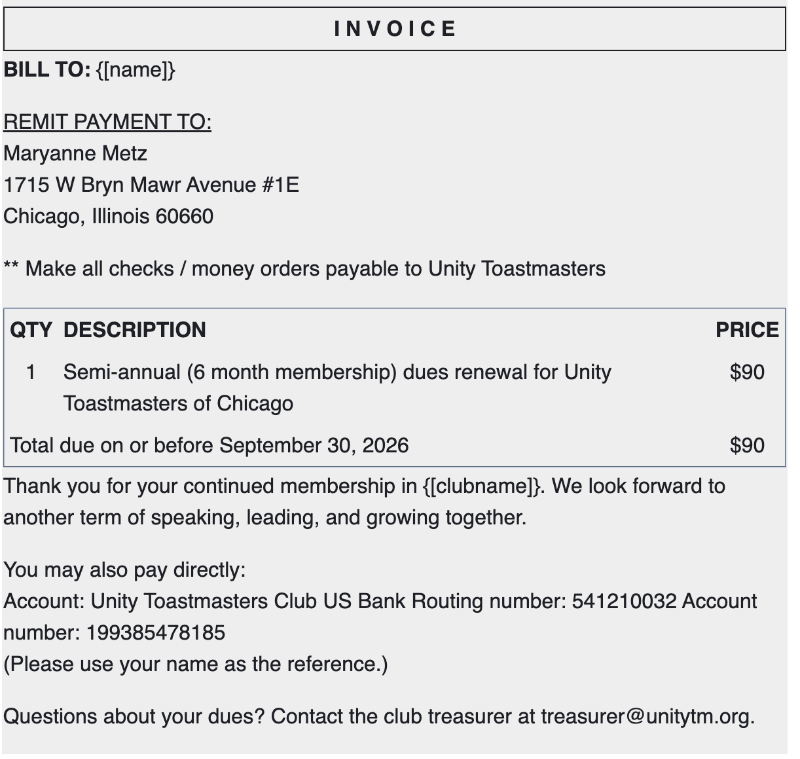
I'm wondering whether there is a way to edit the wording of the invoice that appears in the email Treasurers send to members from the Dues Management console. A screenshot is below. This invoice section of the email is misleading when the club has self-pay enabled on the TI website.
I would like to edit this section or simply remove it altogether, in favor of the custom message above it, which spells out: 1) how to self-pay international dues and, 2) how to pay club dues separately.
Please let me know whether editing or removing this invoice section is possible and if so, provide instructions on how to do it.
Thank you! The new website is wonderful.
Ron Aichholzer
Editing the wording of the invoice that Treasurer sends to members
1 reply · 150 views
What part of the invoice did you want to change?
It you don't have any club dues to collect. You dojn't have to use the Dues function just send your members and email instructing the how to paid at TI.
It you don't have any club dues to collect. You dojn't have to use the Dues function just send your members and email instructing the how to paid at TI.
Thank you,
Brian McDonald DTM
Silver and Wiser Online Toastmasters Club #777940
Technical Support Consultant and Developer for FreeToastHost
Brian McDonald DTM
Silver and Wiser Online Toastmasters Club #777940
Technical Support Consultant and Developer for FreeToastHost
Log in to reply.