Hello,
I've created three animated tiles and inserted the HTML code, but the tiles are static. Is there a way to keep them animated?
Animated Tiles Not Working #8761
12 replies · 515 views
Where are these "animated tiles" located?
Page?
Some sort of identifier?
Page?
Some sort of identifier?
Thank you,
Brian McDonald DTM
Silver and Wiser Online Toastmasters Club #777940
Technical Support Consultant and Developer for FreeToastHost
Brian McDonald DTM
Silver and Wiser Online Toastmasters Club #777940
Technical Support Consultant and Developer for FreeToastHost
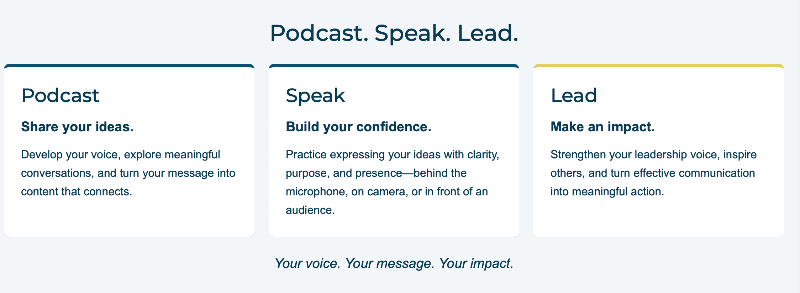
They're at the very top of the home page above the digital banner. The ones that show Podcast, Speak, and Lead. The code I inserted was for them to be animated and stay, that I even checked beforehand.
All I see is static html
Thank you,
Brian McDonald DTM
Silver and Wiser Online Toastmasters Club #777940
Technical Support Consultant and Developer for FreeToastHost
Brian McDonald DTM
Silver and Wiser Online Toastmasters Club #777940
Technical Support Consultant and Developer for FreeToastHost
It's weird because I literally saw it animated before I inserted it. Any suggestions?
Since I don't know what you are doing or what you mean by animated, I have no answers for you.
Thank you,
Brian McDonald DTM
Silver and Wiser Online Toastmasters Club #777940
Technical Support Consultant and Developer for FreeToastHost
Brian McDonald DTM
Silver and Wiser Online Toastmasters Club #777940
Technical Support Consultant and Developer for FreeToastHost
Thank you Brian! After further research, you are correct that the current page contains only static HTML.
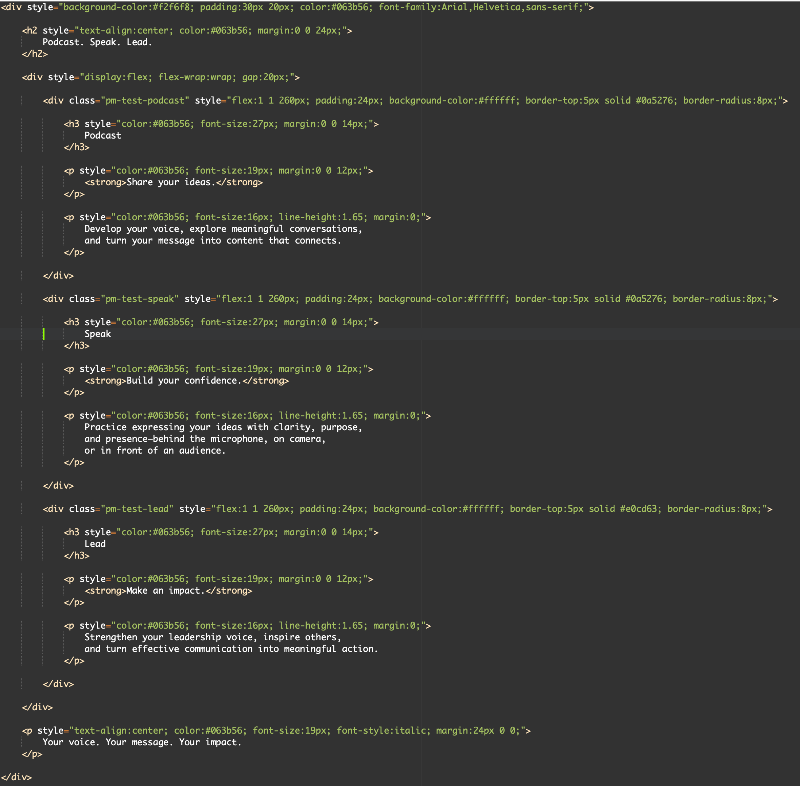
I removed the animation block after finding that it was incomplete in the saved Source. The screenshot shows the remaining static version, not the animation attempt.
The attempted animation used a <style> block containing CSS @keyframes named pmSafeAppear, applied to the classes pm-test-podcast, pm-test-speak, and pm-test-lead.
The intended effect is for Podcast to appear first, Speak 2.5 seconds later, and Lead another 2.5 seconds later, then all three remain visible.
Does FTH4 support a <style> block with CSS @keyframes in home-page Source? If yes, where should we place it, and how should we save it so the editor retains it?
My research did not determine whether the earlier incomplete code resulted from an interrupted paste or an editor change.
I removed the animation block after finding that it was incomplete in the saved Source. The screenshot shows the remaining static version, not the animation attempt.
The attempted animation used a <style> block containing CSS @keyframes named pmSafeAppear, applied to the classes pm-test-podcast, pm-test-speak, and pm-test-lead.
The intended effect is for Podcast to appear first, Speak 2.5 seconds later, and Lead another 2.5 seconds later, then all three remain visible.
Does FTH4 support a <style> block with CSS @keyframes in home-page Source? If yes, where should we place it, and how should we save it so the editor retains it?
My research did not determine whether the earlier incomplete code resulted from an interrupted paste or an editor change.
post your exact code here and let me put it through the wringers to see what pops out.
Thank you,
Brian McDonald DTM
Silver and Wiser Online Toastmasters Club #777940
Technical Support Consultant and Developer for FreeToastHost
Brian McDonald DTM
Silver and Wiser Online Toastmasters Club #777940
Technical Support Consultant and Developer for FreeToastHost
Here you go!
<div style="background-color:#f2f6f8; padding:30px 20px; color:#063b56; font-family:Arial,Helvetica,sans-serif;">
<h2 style="text-align:center; color:#063b56; margin:0 0 24px;">
Podcast. Speak. Lead.
</h2>
<div style="display:flex; flex-wrap:wrap; gap:20px;">
<div class="pm-test-podcast" style="flex:1 1 260px; padding:24px; background-color:#ffffff; border-top:5px solid #0a5276; border-radius:8px;">
<h3 style="color:#063b56; font-size:27px; margin:0 0 14px;">
Podcast
</h3>
<p style="color:#063b56; font-size:19px; margin:0 0 12px;">
<strong>Share your ideas.</strong>
</p>
<p style="color:#063b56; font-size:16px; line-height:1.65; margin:0;">
Develop your voice, explore meaningful conversations,
and turn your message into content that connects.
</p>
</div>
<div class="pm-test-speak" style="flex:1 1 260px; padding:24px; background-color:#ffffff; border-top:5px solid #0a5276; border-radius:8px;">
<h3 style="color:#063b56; font-size:27px; margin:0 0 14px;">
Speak
</h3>
<p style="color:#063b56; font-size:19px; margin:0 0 12px;">
<strong>Build your confidence.</strong>
</p>
<p style="color:#063b56; font-size:16px; line-height:1.65; margin:0;">
Practice expressing your ideas with clarity, purpose,
and presence—behind the microphone, on camera,
or in front of an audience.
</p>
</div>
<div class="pm-test-lead" style="flex:1 1 260px; padding:24px; background-color:#ffffff; border-top:5px solid #e0cd63; border-radius:8px;">
<h3 style="color:#063b56; font-size:27px; margin:0 0 14px;">
Lead
</h3>
<p style="color:#063b56; font-size:19px; margin:0 0 12px;">
<strong>Make an impact.</strong>
</p>
<p style="color:#063b56; font-size:16px; line-height:1.65; margin:0;">
Strengthen your leadership voice, inspire others,
and turn effective communication into meaningful action.
</p>
</div>
</div>
<p style="text-align:center; color:#063b56; font-size:19px; font-style:italic; margin:24px 0 0;">
Your voice. Your message. Your impact.
</p>
</div>
<style>
.pm-test-podcast {
animation: pmSafeAppear 0.01s steps(1, end) 0.3s 1 backwards;
}
.pm-test-speak {
animation: pmSafeAppear 0.01s steps(1, end) 2.8s 1 backwards;
}
.pm-test-lead {
animation: pmSafeAppear 0.01s steps(1, end) 5.3s 1 backwards;
}
@keyframes pmSafeAppear {
from {
opacity: 0;
}
to {
opacity: 1;
}
}
@media (prefers-reduced-motion: reduce) {
.pm-test-podcast,
.pm-test-speak,
.pm-test-lead {
animation: none;
}
}
</style>
<div style="background-color:#f2f6f8; padding:30px 20px; color:#063b56; font-family:Arial,Helvetica,sans-serif;">
<h2 style="text-align:center; color:#063b56; margin:0 0 24px;">
Podcast. Speak. Lead.
</h2>
<div style="display:flex; flex-wrap:wrap; gap:20px;">
<div class="pm-test-podcast" style="flex:1 1 260px; padding:24px; background-color:#ffffff; border-top:5px solid #0a5276; border-radius:8px;">
<h3 style="color:#063b56; font-size:27px; margin:0 0 14px;">
Podcast
</h3>
<p style="color:#063b56; font-size:19px; margin:0 0 12px;">
<strong>Share your ideas.</strong>
</p>
<p style="color:#063b56; font-size:16px; line-height:1.65; margin:0;">
Develop your voice, explore meaningful conversations,
and turn your message into content that connects.
</p>
</div>
<div class="pm-test-speak" style="flex:1 1 260px; padding:24px; background-color:#ffffff; border-top:5px solid #0a5276; border-radius:8px;">
<h3 style="color:#063b56; font-size:27px; margin:0 0 14px;">
Speak
</h3>
<p style="color:#063b56; font-size:19px; margin:0 0 12px;">
<strong>Build your confidence.</strong>
</p>
<p style="color:#063b56; font-size:16px; line-height:1.65; margin:0;">
Practice expressing your ideas with clarity, purpose,
and presence—behind the microphone, on camera,
or in front of an audience.
</p>
</div>
<div class="pm-test-lead" style="flex:1 1 260px; padding:24px; background-color:#ffffff; border-top:5px solid #e0cd63; border-radius:8px;">
<h3 style="color:#063b56; font-size:27px; margin:0 0 14px;">
Lead
</h3>
<p style="color:#063b56; font-size:19px; margin:0 0 12px;">
<strong>Make an impact.</strong>
</p>
<p style="color:#063b56; font-size:16px; line-height:1.65; margin:0;">
Strengthen your leadership voice, inspire others,
and turn effective communication into meaningful action.
</p>
</div>
</div>
<p style="text-align:center; color:#063b56; font-size:19px; font-style:italic; margin:24px 0 0;">
Your voice. Your message. Your impact.
</p>
</div>
<style>
.pm-test-podcast {
animation: pmSafeAppear 0.01s steps(1, end) 0.3s 1 backwards;
}
.pm-test-speak {
animation: pmSafeAppear 0.01s steps(1, end) 2.8s 1 backwards;
}
.pm-test-lead {
animation: pmSafeAppear 0.01s steps(1, end) 5.3s 1 backwards;
}
@keyframes pmSafeAppear {
from {
opacity: 0;
}
to {
opacity: 1;
}
}
@media (prefers-reduced-motion: reduce) {
.pm-test-podcast,
.pm-test-speak,
.pm-test-lead {
animation: none;
}
}
</style>
I set it up as a test page and it does the animation once and that is all.
If you refresh the page it does it again once.
I copied and pasted into your MainPage and it does the same thing just animates once.
If you refresh the page it does it again once.
I copied and pasted into your MainPage and it does the same thing just animates once.
Thank you,
Brian McDonald DTM
Silver and Wiser Online Toastmasters Club #777940
Technical Support Consultant and Developer for FreeToastHost
Brian McDonald DTM
Silver and Wiser Online Toastmasters Club #777940
Technical Support Consultant and Developer for FreeToastHost
That's what I wanted! Thank You!
One remaining issue: visitors see the hero banner first, so the tile sequence may finish before they scroll down to it.
Can FTH4 trigger the Podcast/Speak/Lead animation when the tile section enters the visible screen, rather than immediately on page load? Ideally, it would play once as they scroll to the section, then leave all three tiles visible.
Is an IntersectionObserver implementation supported, or does FTH4 have another supported way to do this?
I would prefer that over continuously hiding and redisplaying the tiles.
Can FTH4 trigger the Podcast/Speak/Lead animation when the tile section enters the visible screen, rather than immediately on page load? Ideally, it would play once as they scroll to the section, then leave all three tiles visible.
Is an IntersectionObserver implementation supported, or does FTH4 have another supported way to do this?
I would prefer that over continuously hiding and redisplaying the tiles.
No we have no control over your content, that is up to you to figure out.
Thank you,
Brian McDonald DTM
Silver and Wiser Online Toastmasters Club #777940
Technical Support Consultant and Developer for FreeToastHost
Brian McDonald DTM
Silver and Wiser Online Toastmasters Club #777940
Technical Support Consultant and Developer for FreeToastHost
Log in to reply.