I’m in the process of reducing two club’s image library but I want to download them to a thumb drive; the only option in the instructions is to delete files. Is there an alternative?, i.e., can I cut and paste them to my laptop. I want to preserve some of the images that were taken long before I joined the club.
Thanks
Zenia Shipp, DTM
Southeast Houston Toastmasters-5324194
Pearland Toastmasters Club 7610
Reducing Club’s Image Library
Locked 2 replies · 226 views
If you go to the file listing in File Manager (admin console), you can download files individually by clicking on the Download button (not the arrow) at the end of each row.
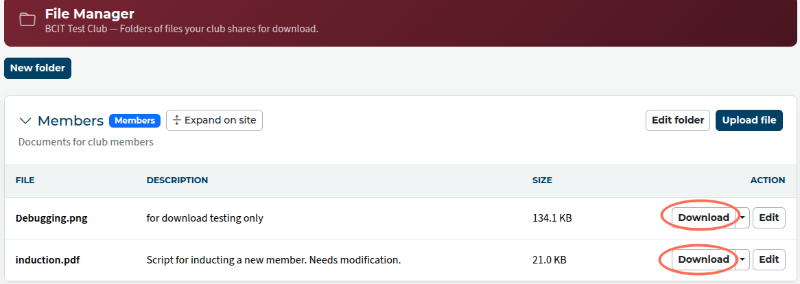
I don't think you can select a number of files and download them all at once.
I don't think you can select a number of files and download them all at once.
Clubs #1137486 (D72) & #777940 (D61)
FTH Field Officer, District 72, (NZ)
FTH Field Officer, District 72, (NZ)
Thanks for your reply Heni.