Hi We recently encountered an issue that was resolved earlier with messages being sent to the members-654507@toastmastmastersclubs.org distribution list not showing in the To line when sent, but rather to an individual recipiences as of the past week. One example occurred on Friday, October 23rd.
The issue is identical to what was describe a the link, but messages sent to officers-654507@toastmastersclubs.org show the distribution list in the to line.
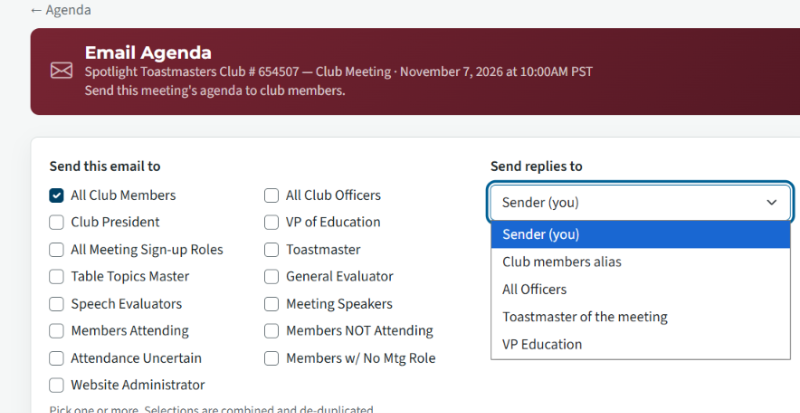
When a member clicks on Email Agenda and makes selection under Email Agenda to send email to all members, is there a recommended selection in the Send Replies To dropdown menu (ie: Sender (you), Club Member alias, etc ) when sending replies to in order for the resulting sent to members to show the member distribution (rather than the individual member's name) in the To line?
https://support.toastmastersclubs.org/kunena-2025-02-09/fth4-support/39765-recipient-display-issue-distribution-list-name-not-shown-after-fth-4-update?start=6#103865
Thanks
Anthony
Spotlight Toastmasters
Club 654507
Recipient Display Issue: Members Distribution List Name Not Shown
3 replies · 236 views
I'm not sure I follow what your intention is - it seems you want agenda emails to go to all members, and then have any replies go to all members too. I'm unsure why anyone would want to do that.
If you want a recommendation I would send the agenda to all members (or the desired members), with the replies set to go only to the sender.
Normally the VPE or Toastmaster would send the initial email. In some cases they might want the replies to go to the other one of those.
The email address of the person being replied to will show on the email if anyone hits the reply button
If you want a recommendation I would send the agenda to all members (or the desired members), with the replies set to go only to the sender.
Normally the VPE or Toastmaster would send the initial email. In some cases they might want the replies to go to the other one of those.
The email address of the person being replied to will show on the email if anyone hits the reply button
FreeToastHost Ambassador
VPE & Webmaster HOT Toastmasters 2026-2027 https://hot.toastmastersclubs.org/
VPE & Webmaster Redlands Toastmasters 2026-2027 http://redlands.toastmastersclubs.org/
VPE & Webmaster HOT Toastmasters 2026-2027 https://hot.toastmastersclubs.org/
VPE & Webmaster Redlands Toastmasters 2026-2027 http://redlands.toastmastersclubs.org/
Thanks for your reply. I'm not asking about where replies go. Sending replies only to the sender is exactly what we want.
The issue is what members see in the To line of the original message:
Before FTH4: When an agenda was sent to all members, each recipient would always see the members distribution list (members-654507@toastmastersclubs.org) in the To line.
Since FTH4: Each member sees only their own name in the To line.
Because of this, members think the sender emailed them personally. They can't tell the agenda went to the whole club, even though they only need to reply to the sender. This has sometimes caused some confusion.
Messages sent to the officers list (officers-654507@toastmastersclubs.org) still show the distribution list in the To line, so the change seems to affect only the members list. One example was an agenda sent last Friday, October 23 as our club's Toastmaster for the next meeting using Email Agenda > All Members.
The issue is what members see in the To line of the original message:
Before FTH4: When an agenda was sent to all members, each recipient would always see the members distribution list (members-654507@toastmastersclubs.org) in the To line.
Since FTH4: Each member sees only their own name in the To line.
Because of this, members think the sender emailed them personally. They can't tell the agenda went to the whole club, even though they only need to reply to the sender. This has sometimes caused some confusion.
Messages sent to the officers list (officers-654507@toastmastersclubs.org) still show the distribution list in the To line, so the change seems to affect only the members list. One example was an agenda sent last Friday, October 23 as our club's Toastmaster for the next meeting using Email Agenda > All Members.

Standard emails will show the response recipients
As far as I'm aware, agendas always show the sender's email (or requested response recipients) in the "To" box when member hits "reply"
(Confession - I see your settings are for "all recipient and sender to receive replies" to member emails (as for officer emails). That "might" have affected the responses in the past - I would never have used that setting - members tend to ignore too many emails)
To overcome your problem, use your agenda email salutation to make it obvious who it has been sent to: e.g. "Hello Spotlight Toastmasters", or "Hello Toastmaster and Speakers for our next meeting" You can set that up in your email templates
As far as I'm aware, agendas always show the sender's email (or requested response recipients) in the "To" box when member hits "reply"
(Confession - I see your settings are for "all recipient and sender to receive replies" to member emails (as for officer emails). That "might" have affected the responses in the past - I would never have used that setting - members tend to ignore too many emails)
To overcome your problem, use your agenda email salutation to make it obvious who it has been sent to: e.g. "Hello Spotlight Toastmasters", or "Hello Toastmaster and Speakers for our next meeting" You can set that up in your email templates
FreeToastHost Ambassador
VPE & Webmaster HOT Toastmasters 2026-2027 https://hot.toastmastersclubs.org/
VPE & Webmaster Redlands Toastmasters 2026-2027 http://redlands.toastmastersclubs.org/
VPE & Webmaster HOT Toastmasters 2026-2027 https://hot.toastmastersclubs.org/
VPE & Webmaster Redlands Toastmasters 2026-2027 http://redlands.toastmastersclubs.org/
Log in to reply.