Toastmasters International — Club & District Websites
FreeToastHost 4

Support and Development Site

Forum index Recent topics

How to get an access to our club's customized web content

5 replies · 52 views

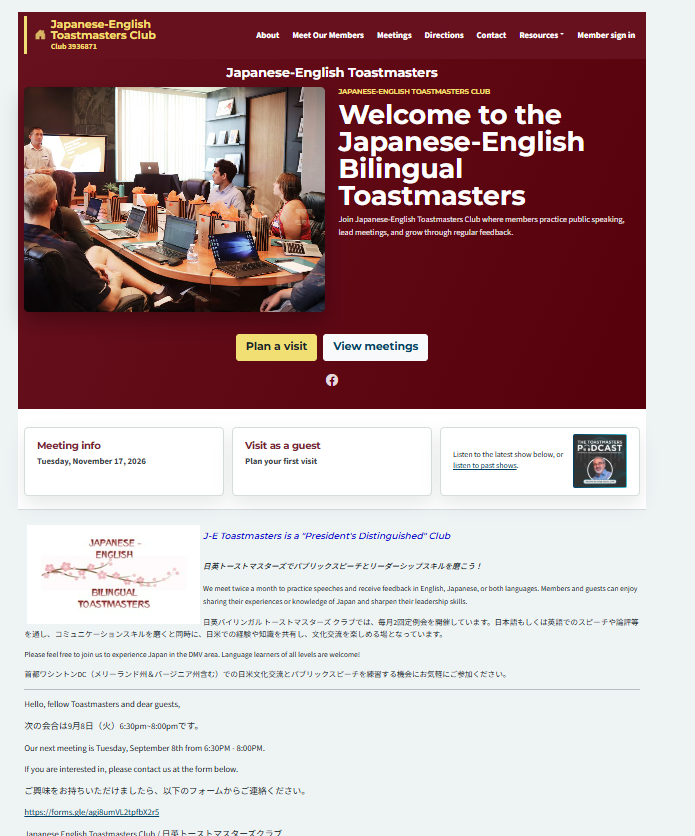
Our club, Japanese English Toastmasters (club number 3936871), maintained our club-specific web content on the previous Free Toast Host web format. However, since last September, we have no longer had access to the content. As you can see on the FTH4 website, our custom-made content appears below. 

Our question is how we can get access back to our content. I am wondering whether that section is a screenshot from when our website was migrated to FTH4 and is no longer editable.

If the lower portion of our additional content is no longer editable, I would like to delete it and start modifying the FTH4 web page instead.

Thank you in advance for your assistance.

Shigeyoshi Ota, President, Japanese English TMC, Web Administrator (for now)
Shigeyoshi Ota, President
Japanese English TMC, Club number 3936871

The club admin should have received an email in September, when the site upgraded to FTH4.

According to our records, the club admin is Japanese English Toastmasters  with a gmail address. If this needs updating, see https://support.toastmastersclubs.org/doc/fth4/changing-club-admin/

If the email can't be found, or the admin has been updated, we can resend the email.

Clubs #1137486 (D72) & #777940 (D61)


FTH Field Officer, District 72, (NZ)


Heni, thank you for your reply. I have received the email in September, but I didn't act on it until last month. For now, I am the "admin-3936871" and registered to FTH4 under my full name. So, I do have the access to modify the agenda format and other available functions. What I can't figure out is how to edit the lower part of our FTH4 club page where our legacy web page is shown. I wonder whether the club web opening page is one entity, and whether I might have to erase the whole content, including what FTH4 created and our legacy opening page.

Shigeyoshi Ota, President
Japanese English TMC, Club number 3936871

The overall format of the Hero section (blue or maroon box at the top) is common to all FTH4 clubs. Various elements within it can be edited in Public Website > Manage Website.

The next chunk below the Hero section is the FTH3 home page contect that was imported from FTH3. You can edit that in Main Page >  Edit MainPage.

Richard Taylor

GOOD MORNING! Toastmasters

Club #7045, District 219

Hello, RichardT.
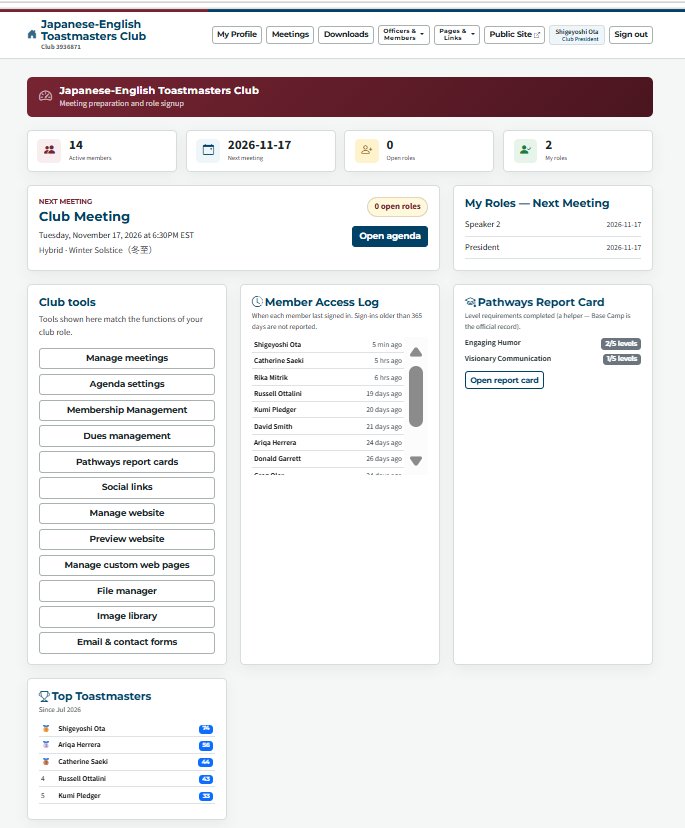
Hmm... I can't seem to find "Main Page > Edit MainPage" that you are referring to. What I see is the picture below. Are you refering to "Club tools" listed on the left bottom of the screen. Is there a hidden heading or something that is the "Main Page"? I tried to see if I could get access to the "Hero Section" by using the "Manage website" and "Manage custom web pages" options, but I could not make any changes. Please let me know how to access the  "Main Page." Thanks.

Shigeyoshi Ota, President
Japanese English TMC, Club number 3936871

Shigeyoshi Ota, President, Japanese English TMC, Web Administrator (for now)
Can you access the Club Admin account? If no one has access, follow this procedure to regain access to the admin account;

https://support.toastmastersclubs.org/doc/fth4/changing-club-admin/

In your member account,  Club Tools: "Manage Website" is your access to the "Hero section" at the top.

Your member account doesn't have access to "Edit Mainpage". 

Once you have access to the Club Admin account, you can give youself access to Edit MainPage when you are in your member account.

https://support.toastmastersclubs.org/doc/fth4/delegating-website-access/

Or, you can edit the MainPage in the Club Admin account.

Richard Taylor

GOOD MORNING! Toastmasters

Club #7045, District 219

Log in to reply.