Toastmasters International — Club & District Websites
FreeToastHost 4

Support and Development Site

Forum index Recent topics

Adding guest to Agenda

2 replies · 56 views

Hello FreeToastHost

On the attendence page if I put in a guests name it only shows up on the Table Topics drop down box but does not show up on the agendas roles.

My Club is hosting a multi Toastmasters Club event where members of the other clubs will will be taking on a role within the meeting. 

How can I add their name to the agenda?

Sincerely;

Stephen Clark 

Clubs often have a dummy user called Guest so that occasional visiting Toastmasters can give speeches or take other roles. The visitor's real name is then added to the role description in the agenda.

I'm not sure how well that would work if you have multiple guests. You could try with a test agenda and see what happens.

Otherwise, I suspect that the FTH agenda isn't going to be the best tool for the job. But we can see what others have to say.

Clubs #1137486 (D72) & #777940 (D61)

FTH Field Officer, District 72, (NZ)


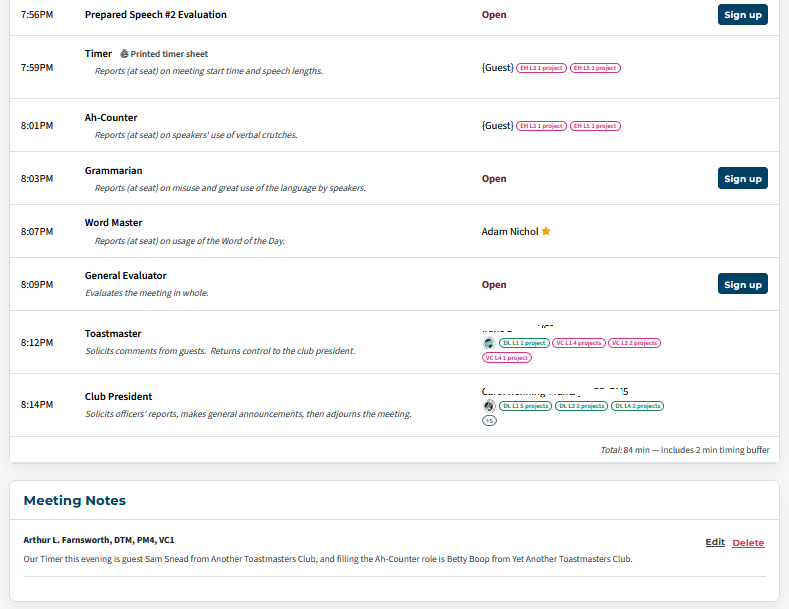
My clubs have for years now used dummy placeholders: {Area Director}, {Division Director}, {Guest}, {No evaluator}, and {Round robin evaluation} to assign to meeting role slots as needed.  For the first three, drop the name in the meeting notes box.  I just tested with two guests using this scheme and it looks fine.  See the screen shot.

Arthur


Arthur Farnsworth, DTM, PM4, VC1
We The Speakers, 9376
In-Person Toastmasters, 3474192

Log in to reply.