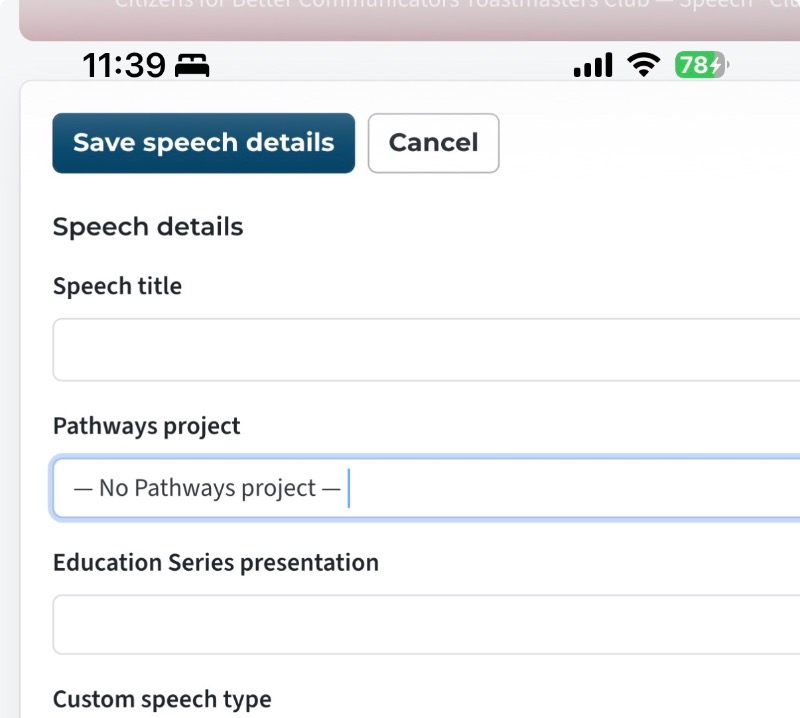
After reviewing my report card I see that the Successful Clubs Series speech was applied to my presentation mastery pathway level 4. But I intended my Engaging Humor pathways Level 4 to get credit!
as far as I can tell, there’s no way for me to choose how to pair it!
this issue also effects meeting roles. If your level 4 says you need to be TMOD you’d probably sign up in the next agenda but there is no way to apply it to a specific pathway and no way to apply it to a specific level.
Im thinking of how this could be resolved. I think a special page needs to be made that shows a list of roles a member has done and a button to the agenda it happened. Then next to the role, a dropdown to select the Pathway and the Level you want to pair the role with. This would resolve ambiguity.
How to pair Successful club series with pathways?
4 replies · 172 views
1) When you sign up you select the path and project this will allocate the project correctly.
2) Meeting Roles are assigned to the next available slot that is how we have decided to do it for now.
2) Meeting Roles are assigned to the next available slot that is how we have decided to do it for now.
Thank you,
Brian McDonald DTM
Silver and Wiser Online Toastmasters Club #777940
Technical Support Consultant and Developer for FreeToastHost
Brian McDonald DTM
Silver and Wiser Online Toastmasters Club #777940
Technical Support Consultant and Developer for FreeToastHost
In drop down I selected the path and project. Then I selected Successful clubs series closing the sale. Doing so unselects the pathways selection. And selecting the pathways option unselects the education speech.
Can you clarify again how to make it work?
Again I suggest that Path Name be a standalone drop down. That way you can choose either the project or the education series speech. That will resolve the ambiguity of which path it goes with
Can you clarify again how to make it work?
Again I suggest that Path Name be a standalone drop down. That way you can choose either the project or the education series speech. That will resolve the ambiguity of which path it goes with
I can confirm this. You can have a Pathways project with Path specified, or you can have an Education Series speech with no Path specified. You can't currently have both.
Clubs #1137486 (D72) & #777940 (D61)
FTH Field Officer, District 72, (NZ)
FTH Field Officer, District 72, (NZ)
I think I have come up with a solution that works
The education series Main Headers are now part of the Path selection.
Once you pick a series then the Education series pull down becomes visible and you select the Project.

The education series Main Headers are now part of the Path selection.
Once you pick a series then the Education series pull down becomes visible and you select the Project.
👍 Thanked by Jane Atkinson
Thank you,
Brian McDonald DTM
Silver and Wiser Online Toastmasters Club #777940
Technical Support Consultant and Developer for FreeToastHost
Brian McDonald DTM
Silver and Wiser Online Toastmasters Club #777940
Technical Support Consultant and Developer for FreeToastHost
Log in to reply.