Our club has been setup with a new site and I have been given access to edit in the admin console, but no access shows in club tools or anywhere in my dashboard
Circle T Toastmasters Club 3093
Unable to access website management as VP public relations
9 replies · 682 views
You need to ask your club admin to set you up with access to the areas you want to edit.
Clubs #1137486 (D72) & #777940 (D61)
FTH Field Officer, District 72, (NZ)
FTH Field Officer, District 72, (NZ)
Could you please elaborate on how to set up the access?
As the VPE, I appear to have admin capabilities: I can adjust agendas, add members, change the page contents, etc.
I cannot find where I change admin capabilities for members though.
Thanks for your assistance.
As the VPE, I appear to have admin capabilities: I can adjust agendas, add members, change the page contents, etc.
I cannot find where I change admin capabilities for members though.
Thanks for your assistance.
Again We cannot assist you if you do not provide a club number.
Thank you,
Brian McDonald DTM
Silver and Wiser Online Toastmasters Club #777940
Technical Support Consultant and Developer for FreeToastHost
Brian McDonald DTM
Silver and Wiser Online Toastmasters Club #777940
Technical Support Consultant and Developer for FreeToastHost
It is in the original help request:
"Our club has been setup with a new site and I have been given access to edit in the admin console, but no access shows in club tools or anywhere in my dashboard
Circle T Toastmasters Club 3093"
Please le me know if more information is needed.
"Our club has been setup with a new site and I have been given access to edit in the admin console, but no access shows in club tools or anywhere in my dashboard
Circle T Toastmasters Club 3093"
Please le me know if more information is needed.
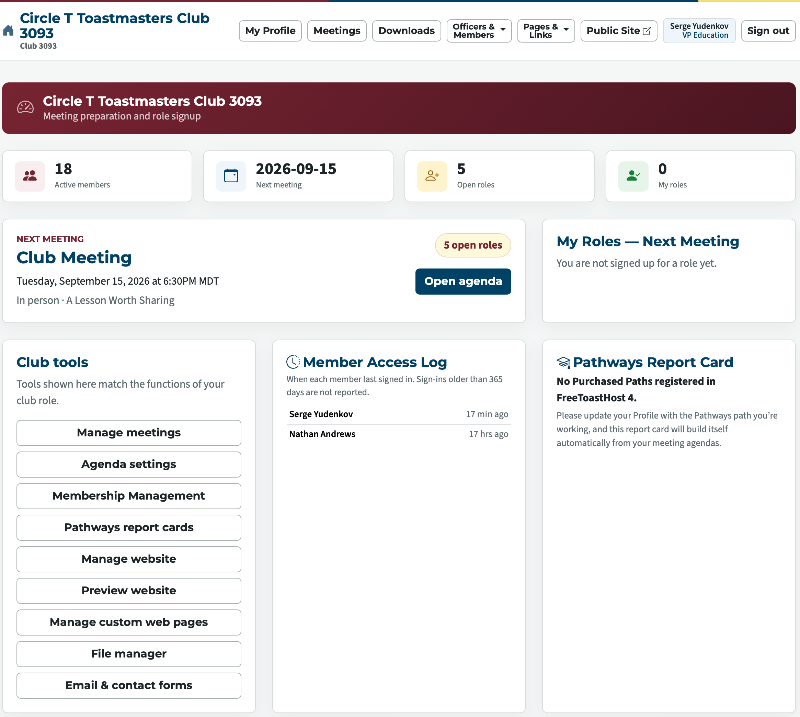
Serge has a lot of club tools, if you are not seeing them logout and log back in.
Thank you,
Brian McDonald DTM
Silver and Wiser Online Toastmasters Club #777940
Technical Support Consultant and Developer for FreeToastHost
Brian McDonald DTM
Silver and Wiser Online Toastmasters Club #777940
Technical Support Consultant and Developer for FreeToastHost
I do have a lot of tools but my fellow officers don't.
In order to get them the same capabilities, I tried "Membership Management", "Emails and Contact Forms" among the other options. I cannot find anywhere where I can give the permissions to other officers.
Where do I need to click?
Thanks
In order to get them the same capabilities, I tried "Membership Management", "Emails and Contact Forms" among the other options. I cannot find anywhere where I can give the permissions to other officers.
Where do I need to click?
Thanks
You can't the ClubAdmin is the only who can delegate.
Your ClubAdmin is Chuck LeBlanc
Your ClubAdmin is Chuck LeBlanc
Thank you,
Brian McDonald DTM
Silver and Wiser Online Toastmasters Club #777940
Technical Support Consultant and Developer for FreeToastHost
Brian McDonald DTM
Silver and Wiser Online Toastmasters Club #777940
Technical Support Consultant and Developer for FreeToastHost
Chuck is not a member of our club (#3039). I reached out to him and he says that he doesn't have the login information.
Could you please provide the contact for IT department, so they can grant admin privileges to any of our Club Officers?
Thank you.
Could you please provide the contact for IT department, so they can grant admin privileges to any of our Club Officers?
Thank you.
Sorry we don't do that, there is one ClubAdmin who delegates functions to roles.
To change your ClubAdmin please follow the directions on this page.
https://www.toastmastersclubs.org/welcome/change-admin/
To change your ClubAdmin please follow the directions on this page.
https://www.toastmastersclubs.org/welcome/change-admin/
Thank you,
Brian McDonald DTM
Silver and Wiser Online Toastmasters Club #777940
Technical Support Consultant and Developer for FreeToastHost
Brian McDonald DTM
Silver and Wiser Online Toastmasters Club #777940
Technical Support Consultant and Developer for FreeToastHost
Log in to reply.