Our new member is preparing to speak next week. He was able to find his assignment as speaker, but he says that the system doesn't show his path, and he hasn't been able to select path and project for this speech. Our club is new at using the agenda part of the site. So far only one member shows multiple Paths status, as he entered a speech in this, our inaugural meeting.
What shall I instruct him to do?
#1284- New Member, New Path not recognized in meeting role selection
1 reply · 141 views
For a Pathway to appear in the 'Speech Details' a member must add a Purchased Pathway to site Profile.
Select 'My Profile' in the top menu, scroll to the bottom of the My Profile page, select a Path and a TI purchase date and click 'Add Path'
An exact purchase date is not important.
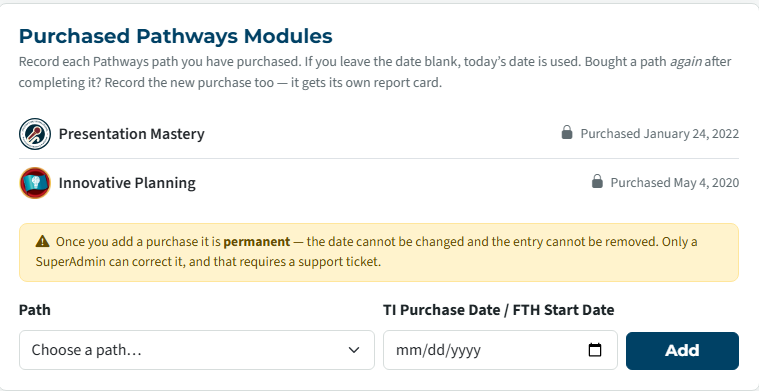
Select 'My Profile' in the top menu, scroll to the bottom of the My Profile page, select a Path and a TI purchase date and click 'Add Path'
An exact purchase date is not important.
👍 Thanked by Ronald Sutliff
Richard Taylor
TM Club #7045
TM Club #7045
Log in to reply.