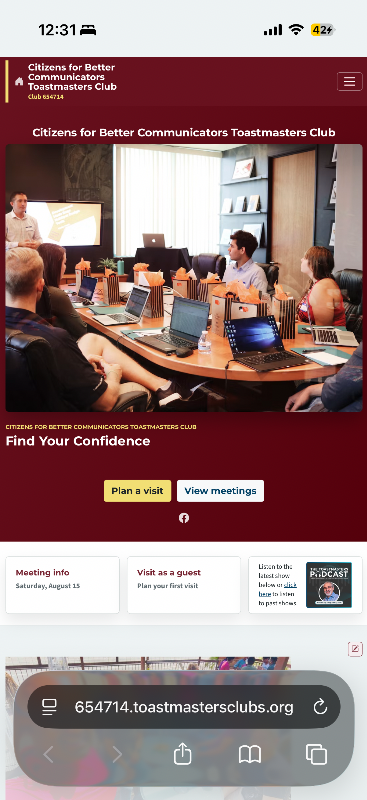
By default there is a large red box with a 1200 x 900 image on the home page. I would like the option to turn it off because I want guests to see the content I’ve written for the home page which includes meeting time and location.
the red box and image takes up the whole screen and I fear people will not see what I’ve written. See the attachment, the red box dominates the screen and is the first thing people see. I don’t want that. I don’t want the red box there since it gets in the way of how I want first time visitors to perceive the club.
Also, any way to hide the toastmasters podcast link? I don’t want first time visitors to go there and with the way it’s layout it get seen earlier than the content I actually want them to see.
Option to disable MainPage photo
Locked 6 replies · 437 views
Sorry the answer to both questions is no.
Thank you,
Brian McDonald DTM
Silver and Wiser Online Toastmasters Club #777940
Technical Support Consultant and Developer for FreeToastHost
Brian McDonald DTM
Silver and Wiser Online Toastmasters Club #777940
Technical Support Consultant and Developer for FreeToastHost
You can replace the photo with the one you have at the top of your club content.
FreeToastHost Ambassador
VPE & Webmaster HOT Toastmasters 2026-2027 https://hot.toastmastersclubs.org/
VPE & Webmaster Redlands Toastmasters 2026-2027 http://redlands.toastmastersclubs.org/
VPE & Webmaster HOT Toastmasters 2026-2027 https://hot.toastmastersclubs.org/
VPE & Webmaster Redlands Toastmasters 2026-2027 http://redlands.toastmastersclubs.org/
It would be helpful to know why the home page is required to look the way it does,
with the large photo,
the large main heading,
the small-type intro,
the "Plan a visit" and "View meetings" boxes,
the maroon/blue background,
the "Meeting info," "Visit as a Guest" and podcast footer,
the "Guests are welcome" subfooter,
as well as the Resources and "Meet our Members" menus.
FTH3 enabled users to customize the home page to suit their needs and hide features they did not want, but FTH4 does not.
Was this some sort of mandatory bargain from a tool that was used to develop the site?
I'm on board with the many system upgrades and appreciate the effort, but I consider the home page to be a significant step backward regarding guest engagement as well as intuitive designability for the many less-than-websavvy Toastmaster webmasters.
with the large photo,
the large main heading,
the small-type intro,
the "Plan a visit" and "View meetings" boxes,
the maroon/blue background,
the "Meeting info," "Visit as a Guest" and podcast footer,
the "Guests are welcome" subfooter,
as well as the Resources and "Meet our Members" menus.
FTH3 enabled users to customize the home page to suit their needs and hide features they did not want, but FTH4 does not.
Was this some sort of mandatory bargain from a tool that was used to develop the site?
I'm on board with the many system upgrades and appreciate the effort, but I consider the home page to be a significant step backward regarding guest engagement as well as intuitive designability for the many less-than-websavvy Toastmaster webmasters.
Peter B
Asheville Speechcrafters
Club 8215
Peter the hero box at the top of the page with the changeable photo and editable headings and text are here to stay.
Last edited 9 Aug 2026, 9:10 a.m. by Brian
Thank you,
Brian McDonald DTM
Silver and Wiser Online Toastmasters Club #777940
Technical Support Consultant and Developer for FreeToastHost
Brian McDonald DTM
Silver and Wiser Online Toastmasters Club #777940
Technical Support Consultant and Developer for FreeToastHost
I tried to do that and it still takes up 1200 x 900 of space and ends up cropping my clubs group photo.
Again my goal here is to show first time users my written content and not a giant photo.
Again my goal here is to show first time users my written content and not a giant photo.
The the instructions on the size of the photo is posted where you do the upload.
Again the answer is still no, you cannot affect the size of the hero block.
Again the answer is still no, you cannot affect the size of the hero block.
Thank you,
Brian McDonald DTM
Silver and Wiser Online Toastmasters Club #777940
Technical Support Consultant and Developer for FreeToastHost
Brian McDonald DTM
Silver and Wiser Online Toastmasters Club #777940
Technical Support Consultant and Developer for FreeToastHost