Toastmasters International — Club & District Websites
FreeToastHost 4

Support and Development Site

Forum index Recent topics

Discrepancies with Base Camp sync and removing an unassigned path from Member

10 replies · 610 views

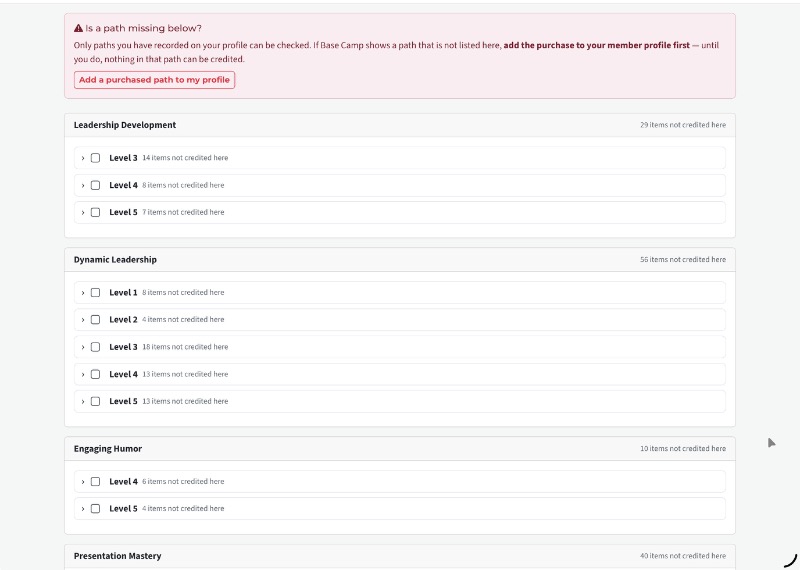
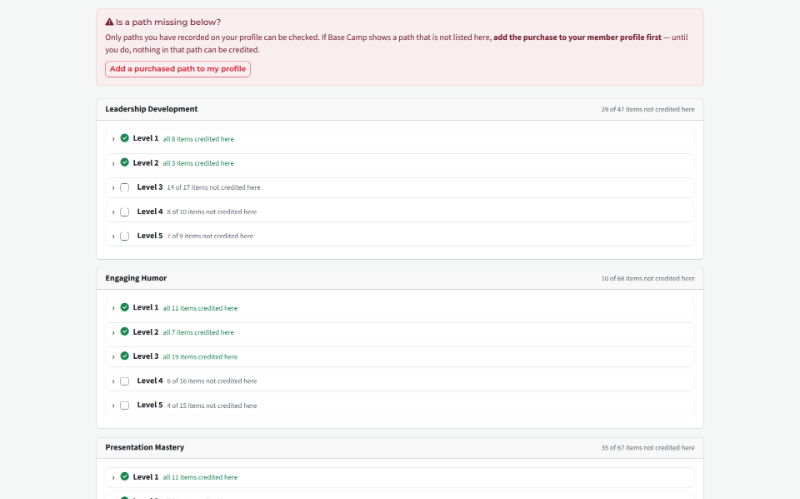
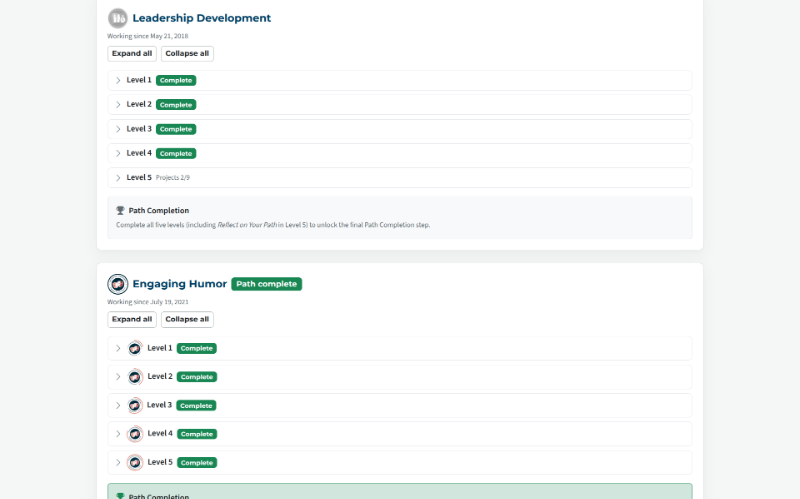
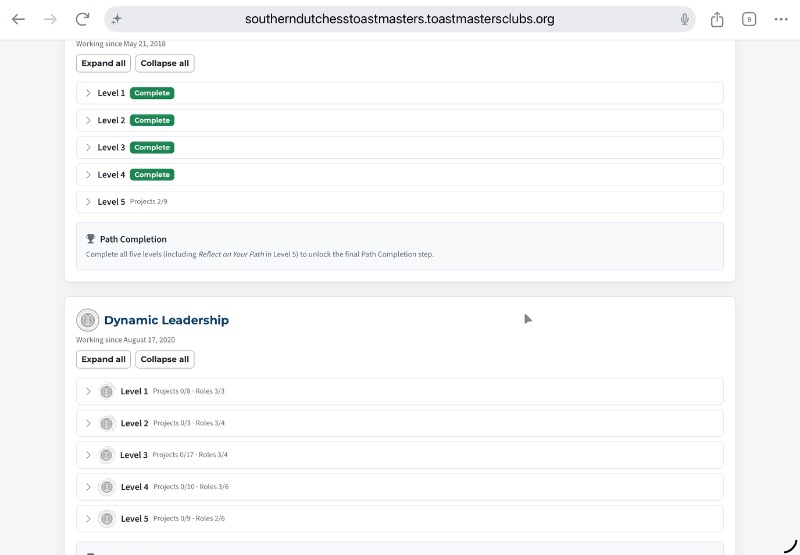
I recently logged in as an administrator to update my member report card so it accurately matches my completed levels in Base Camp. However, I’ve noticed a discrepancy with the new "Check Against Base Camp" feature. When I view my report card as a member for Leadership Development, Levels 1 through 4 correctly show as complete. Yet, when I click the "Check Against Base Camp" button, Levels 3 and 4 appear as selectable options rather than reflecting that they are already finished. Since these levels are marked complete on my report card, shouldn't this page match? I am seeing similar sync issues across other paths as well.

Additionally, my report card still lists the Dynamic Leadership path, which I do not own. It was tied to my profile by mistake when that path was selected on a past meeting agenda. Although I went back, corrected the old agenda, and re-reconciled it several weeks ago, the path continues to show up. Is there a way to clear or delete this unassigned path from my report card?

IMG_0225.jpegIMG_0227.jpeg

Last edited 3 Sep 2026, 1:46 p.m. by Kevin Shannon

Club # - 1436813
Dynamic Leadership has been removed from your purchases.
Thank you,

Brian McDonald DTM
Silver and Wiser Online Toastmasters Club #777940

Technical Support Consultant and Developer for FreeToastHost
FTH has no access to Toastmasters.org Pathways.
What we show is what has been captured by the historic agendas.

The check against basecamp allows you to take a screenshot of your path record attach it to your request where you have ticked the missing levels or projects and send it to your VPE to approve. (If it is the VPE asking it goes to the President for approval). To bring your FTH record in sync with your basecamp.
Thank you,

Brian McDonald DTM
Silver and Wiser Online Toastmasters Club #777940

Technical Support Consultant and Developer for FreeToastHost
Hi Brian,

Thank you for the explanation. I want to make sure I’m understanding the purpose of this feature correctly.

Our VPE already reviews and approves members’ Pathways progress through Base Camp, which serves as the official Toastmasters record. If FTH cannot access or synchronize with Base Camp, what additional benefit does manually entering the same information and uploading screenshots into FTH provide?

Does maintaining the Pathways information in FTH support another function, such as agenda building, member progress reports, educational planning, or club recognition? Also, is using this feature completely optional, or would choosing not to maintain the duplicate information affect other areas of the FTH website?

I’m not trying to be critical. I’m genuinely trying to understand the intended workflow and whether the additional data entry would provide enough value for our club to use this feature.

Thank you for any clarification you can provide!

Laura
Top O'The Rock
Club #2155
FreeToastHost does NOT have any access to the information on Toastmasters.org 
The FTH Pathways report cards are based on historical agendas from your club.
The only way for FTH to even get close to what is in basecamp is is to use the method we came up with and that is the BaseCamp reconciliation is with a screen shot and you complete the Path so it equals the screen shot and then sent to your VPE to approve.

it definitely helps with all of the because the agenda building is on FTH and it is much easier for the VPE when filling the agenda if all the information  on who needs what is right there. As with everything in FTH it is optional.

👍 Thanked by Michael

Thank you,

Brian McDonald DTM
Silver and Wiser Online Toastmasters Club #777940

Technical Support Consultant and Developer for FreeToastHost
I understand that you have no connection to TMI (although them providing you an API seems like a great way to resolve all these issues)

My issue has nothing to do with TMI.  See the original screen caps.  If I open my report card it shows I have completed level 1-4.  If I click the button to report discrepancies to the VPED it shows Level 3 and 4 as NOT completed and would allow me to submit them to the VPED.  It just seemed to me anything already marked complete in the report card should not appear when I wish to send a report.  Level 1 and 2 are not showing, not sure why level 3 and 4 are.
Club # - 1436813
I got out my pick and shovel and started digging.
The code was making assumptions it shouldn't have.
All the levels show now and explanations of why some are already ticked.


Thank you,

Brian McDonald DTM
Silver and Wiser Online Toastmasters Club #777940

Technical Support Consultant and Developer for FreeToastHost
I'm not sure if the change took affect already, but for my report card the differences are still there (See attached screen shots)

I think the issue may be that there are levels that show as complete  on the report card screen, yet not all of the projects underneath them are selected.  Only the levels that show as complete and have every item selected are showing up as complete on the report to VPED screen.

  • Screenshot 2026-09-03 9.53.59 PM.png
  • Screenshot 2026-09-03 9.53.43 PM.png
Club # - 1436813
Your VPE had not reconciled the agendas where 3 and 4 were in.
Thank you,

Brian McDonald DTM
Silver and Wiser Online Toastmasters Club #777940

Technical Support Consultant and Developer for FreeToastHost
I just want to make sure I understand.  The VPED or Admin can select any members report card and mark things complete when there is no corresponding agenda entry?

When a member logs on and views their report card, they are seeing the reconciled view the same as the VPED had updated it.  

When a member wants to report an issue and they click the button to send the info to the VPED, the info on that screen DOES NOT come from the same data source as the report card?  Instead it needs to have the agenda's updated in order to reflect a level completion?  That doesn't seem right.

I did a quick test and on my report card I had a level 4 showing up as COMPLETED, but still appearing when I went to the REPORT TO VPED screen.  I logged back in as ADMIN and went into that level.  Although it showed as completed all of the projects under it were not marked complete - only the actual elective that I did.  I went in and marked everything complete.

When I logged back in as a user and opened the REPORT TO VPED screen in my report card the level now showed as completed.

So to me the issue is the report card itself can show a level complete with just the projects you need to qualify, but the screen that you choose to send the report to the VPED is only showing the level complete if every single project is selected.  I would expect that once the level shows as completed on the report card screen it should no longer be selectable to send a report about.
Club # - 1436813
Once a level is marked complete in BaseCamp, FTH doesn't care about the details of what was in the completion. TI keeps changing the requirements.
Thank you,

Brian McDonald DTM
Silver and Wiser Online Toastmasters Club #777940

Technical Support Consultant and Developer for FreeToastHost

Log in to reply.