Club# 2040
Rock Hill TM club
After the latest update, I don't see an option to update our previous homepage. The content was copied over to the new updated website, but I am not able to edit the old content. For example: A pic of previous winner and edit and fix the misalignment of the lines.
https://rockhill.toastmastersclubs.org/
Page down on that page and you will see the pic I want to remove and edit the content.
A user is not able to login to our website, even though he is a member and he is in our members list.
Thanks.
Edit Website
Locked 4 replies · 271 views
You'll find the documentation here: https://support.toastmastersclubs.org/doc/fth4-documentation-index
This document specifically addresses managing page content: https://support.toastmastersclubs.org/doc/fth4/default-pages
Which user is hving a problem and specifically what problem are they experiencing?
This document specifically addresses managing page content: https://support.toastmastersclubs.org/doc/fth4/default-pages
Which user is hving a problem and specifically what problem are they experiencing?
👍 Thanked by Akhtar Malik
I don't see anywhere to edit my club's previous webpage content. I did the following:
Club Tools --> Manage Website --> I only saw your web content that can edited but not mine
Club Tools --> Custom Webpages--> I don't see my old content that can edited
Where else I need to go ?
By the way, how do I add new meeting agenda ? I need to start adding agendas for our January meetings.
This upgrade was a half baked idea. Toastmasters members and users are NOT Google employees. Majority of them are still confused about Pathways, which was introduced years ago. You guys should have provided better menu options.
I can provide you user name in private. Please advice how ?
Club Tools --> Manage Website --> I only saw your web content that can edited but not mine
Club Tools --> Custom Webpages--> I don't see my old content that can edited
Where else I need to go ?
By the way, how do I add new meeting agenda ? I need to start adding agendas for our January meetings.
This upgrade was a half baked idea. Toastmasters members and users are NOT Google employees. Majority of them are still confused about Pathways, which was introduced years ago. You guys should have provided better menu options.
I can provide you user name in private. Please advice how ?
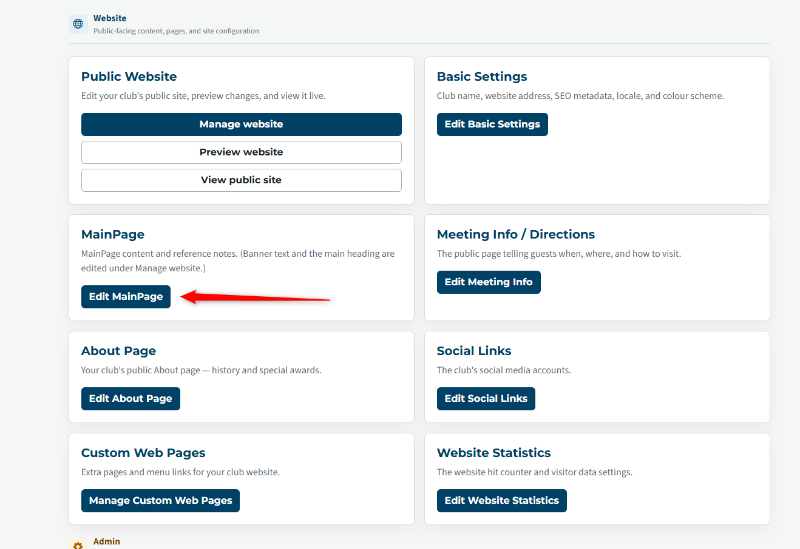
Look at the MainPage card.
You add agendas by using agenda templates and agenda roles, then create meetings.
Not sure what you mean by google employees, but if that is the way you give evaluations to your members I would suggest you reevaluate your technique,
You add agendas by using agenda templates and agenda roles, then create meetings.
Not sure what you mean by google employees, but if that is the way you give evaluations to your members I would suggest you reevaluate your technique,
👍 Thanked by Akhtar Malik
Thank you,
Brian McDonald DTM
Silver and Wiser Online Toastmasters Club #777940
Technical Support Consultant and Developer for FreeToastHost
Brian McDonald DTM
Silver and Wiser Online Toastmasters Club #777940
Technical Support Consultant and Developer for FreeToastHost
Solution: You need to login to your club website as ADMIN to add new meetings agenda and edit your old homepage. Please see screenshots below. Thanks.
.
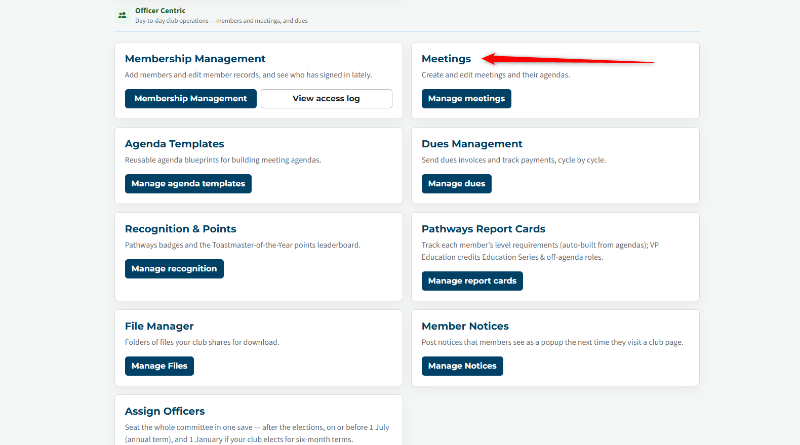
.
Last edited 9 Oct 2026, 5:31 p.m. by Akhtar Malik