Hello, I saw in the documentation that the FTH Standard agenda layout includes a banner and logo at the top. When I select the layout for my club agenda, it doesn't have that banner. Is there a way to customize the agenda layout to change the images and add a table into the agenda layout?
Custom Agenda Layout
9 replies · 371 views
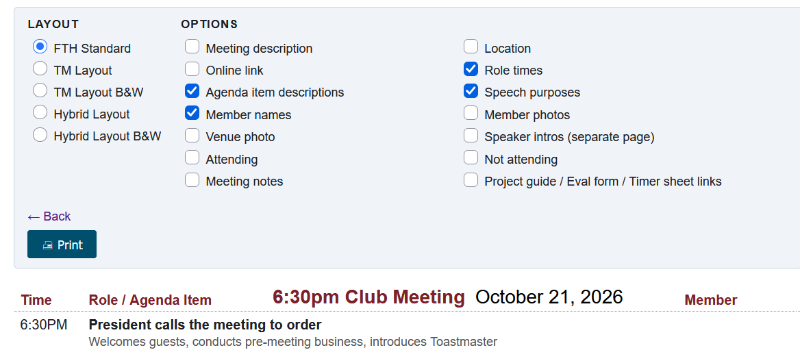
Yes you need to change the meeting description.
Please read the documentation
https://support.toastmastersclubs.org/doc/fth4/default-meeting-description
Please read the documentation
https://support.toastmastersclubs.org/doc/fth4/default-meeting-description
Thank you,
Brian McDonald DTM
Silver and Wiser Online Toastmasters Club #777940
Technical Support Consultant and Developer for FreeToastHost
Brian McDonald DTM
Silver and Wiser Online Toastmasters Club #777940
Technical Support Consultant and Developer for FreeToastHost
Why don't the Print options allow for an agenda on ONE page? We used to have the Hybrid Layout B&W agenda ON ONE PAGE.
We always require your club number.
Printing on a single page depends on what options you pick and how many roles you have in your meeting.
With your club number I would be able to see what your agenda looks like.
Printing on a single page depends on what options you pick and how many roles you have in your meeting.
With your club number I would be able to see what your agenda looks like.
Thank you,
Brian McDonald DTM
Silver and Wiser Online Toastmasters Club #777940
Technical Support Consultant and Developer for FreeToastHost
Brian McDonald DTM
Silver and Wiser Online Toastmasters Club #777940
Technical Support Consultant and Developer for FreeToastHost
Signal Peak #9751
Using the B&W Hybrid you have 2 choices to print on 1 page.
Print at a reducing scale of 89%
or
Don't print the Meeting Description.
Print at a reducing scale of 89%
or
Don't print the Meeting Description.
Thank you,
Brian McDonald DTM
Silver and Wiser Online Toastmasters Club #777940
Technical Support Consultant and Developer for FreeToastHost
Brian McDonald DTM
Silver and Wiser Online Toastmasters Club #777940
Technical Support Consultant and Developer for FreeToastHost
Thanks Brian! I decided to go with the TM layout because it looks better, but now it splits my agenda into 2 pages. Though if I add the meeting description, the agenda line items move up to page 1. Also, is it possible to remove the URL and date/time headers and footers from the printed page?
Is there a way to completely customize the agenda with HTML?
Is there a way to completely customize the agenda with HTML?
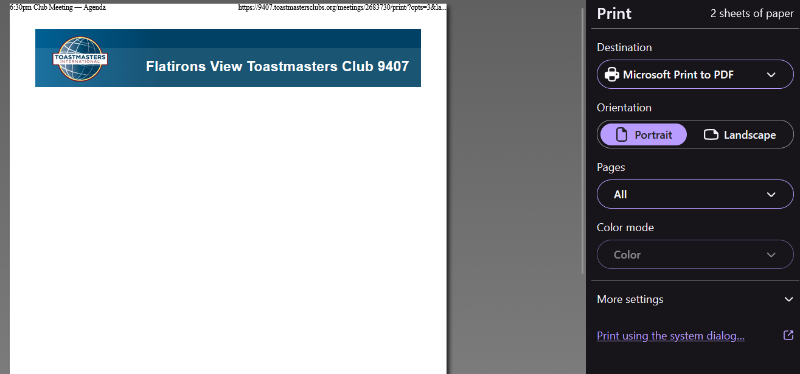
The header and footer are your browser print settings.
No you cannot do a custom agenda.
You want on 1 page reduce the print options selected or reduce the print percentage
No you cannot do a custom agenda.
You want on 1 page reduce the print options selected or reduce the print percentage
Thank you,
Brian McDonald DTM
Silver and Wiser Online Toastmasters Club #777940
Technical Support Consultant and Developer for FreeToastHost
Brian McDonald DTM
Silver and Wiser Online Toastmasters Club #777940
Technical Support Consultant and Developer for FreeToastHost
I was sure the issue was solved. I was able to go to the Hybrid Layout B&W (the bottom option in the left column), and then reduce the viewing option to 95%. It worked last week and earlier this week.
However, now when I request a print for the Hybrid Layout B&W, it presents a 3-page print, with the header on the first page, the agenda on the second page, and the Speaker Introductions on the third page. What made it change?
However, now when I request a print for the Hybrid Layout B&W, it presents a 3-page print, with the header on the first page, the agenda on the second page, and the Speaker Introductions on the third page. What made it change?
You must have turned on some of the print options like the meeting description.
Turn off some of the options until it almost fits on a page and then use the percentage to squeeze the last bit.
Turn off some of the options until it almost fits on a page and then use the percentage to squeeze the last bit.
Thank you,
Brian McDonald DTM
Silver and Wiser Online Toastmasters Club #777940
Technical Support Consultant and Developer for FreeToastHost
Brian McDonald DTM
Silver and Wiser Online Toastmasters Club #777940
Technical Support Consultant and Developer for FreeToastHost
Log in to reply.