For any agenda item (row) where the setting is "Members cannot sign up," and assigned to a Role via a drop-down a person's name doesn't appear anywhere on the agenda it just shows dashes instead. I would like to request that when a row/item is assigned to a role, their name should appear on the agenda as opposed to dashes just like any signed up agenda item.
Additionally, I'd like to request that the Role Name label be renamed to either Alternate Role Name or Role Description (depending upon the actual intent of the field). Placing Name on this field is being confused with a person's name. In a recent support request, I was told the intent is a description https://support.toastmastersclubs.org/kunena-2025-02-09/fth4-support/39789-agenda-roles-and-peoples-name#103438 however the documentation seems to indicate it's used when clubs have tweaked roles names.
We're club 2960.
Brendan
VPE
Add Names for roles which are marked as Members cannot sign up
5 replies · 189 views
Once you change the Role to allow a person in the role is will show in the agenda.
Role is the Role defined in the Agenda Templates Role Tab
Role Name is the name of the role in the Agenda
Role is the Role defined in the Agenda Templates Role Tab
Role Name is the name of the role in the Agenda
Thank you,
Brian McDonald DTM
Silver and Wiser Online Toastmasters Club #777940
Technical Support Consultant and Developer for FreeToastHost
Brian McDonald DTM
Silver and Wiser Online Toastmasters Club #777940
Technical Support Consultant and Developer for FreeToastHost
Brian,
Maybe I just don't understand. And, I do plan to attend the upcoming training- so hopefully this is going to be covered. If there is specific documentation or videos to reference in the meantime please refer to them too.
I do not see any box which says to allow a person in the role. I only see sign up. There is no reason for anyone to sign up as President.
Thanks
Brendan VPE 2960
Maybe I just don't understand. And, I do plan to attend the upcoming training- so hopefully this is going to be covered. If there is specific documentation or videos to reference in the meantime please refer to them too.
I do not see any box which says to allow a person in the role. I only see sign up. There is no reason for anyone to sign up as President.
Thanks
Brendan VPE 2960
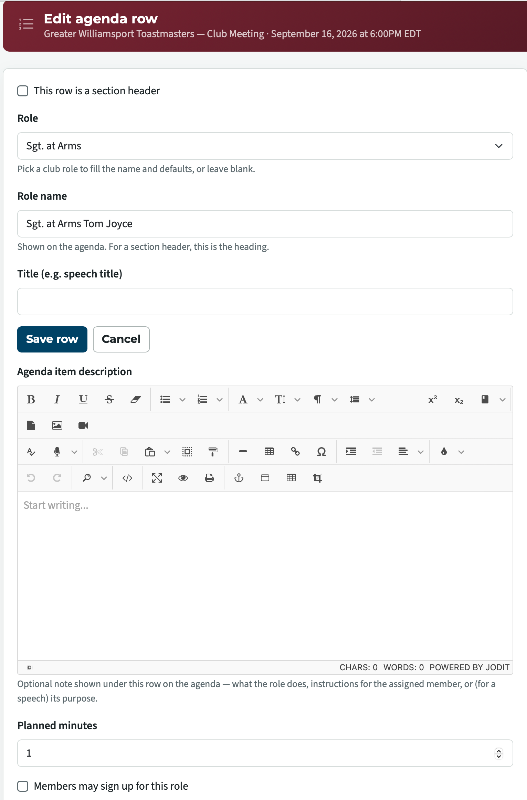
Last row in the image "Members may sign up for this role".
You have not done this correctly.
1) in your Agenda Template Tick "Members may sign up for this role".
2) in the "Assign Member Pull down" Select Thomas
3) save template
When you create the Agenda from the template Thomas will be in his SGT@ARMS role
If you want a person to show as in the role you have to tick "Members may sign up for this role"
If you don't want a member to actually sign up for the role fill the role and they can't.
You have not done this correctly.
1) in your Agenda Template Tick "Members may sign up for this role".
2) in the "Assign Member Pull down" Select Thomas
3) save template
When you create the Agenda from the template Thomas will be in his SGT@ARMS role
If you want a person to show as in the role you have to tick "Members may sign up for this role"
If you don't want a member to actually sign up for the role fill the role and they can't.
Thank you,
Brian McDonald DTM
Silver and Wiser Online Toastmasters Club #777940
Technical Support Consultant and Developer for FreeToastHost
Brian McDonald DTM
Silver and Wiser Online Toastmasters Club #777940
Technical Support Consultant and Developer for FreeToastHost
Okay. I will give it a try.
I did it on the SGT@ARMS for your next meeting
Thank you,
Brian McDonald DTM
Silver and Wiser Online Toastmasters Club #777940
Technical Support Consultant and Developer for FreeToastHost
Brian McDonald DTM
Silver and Wiser Online Toastmasters Club #777940
Technical Support Consultant and Developer for FreeToastHost
Log in to reply.