


- Details
- Category: FTH4
-
By Jane Atkinson
- Hits: 275
Agenda roles
It's worth spending some time defining global agenda roles. They make it easy to have different names for the same function; for example, "Contest Chair" carries out the same functions as a Toastmaster. They automatically allow multiple occurrences of the same role (e.g. Toastmaster) to count as one role for signup and report purposes.
Having pre-defined roles can also make building templates easier.
Go to the Roles tab and check what roles are already there. You may not need all of them in your club. If there are additional ones that your club uses, add them using the Add role button.
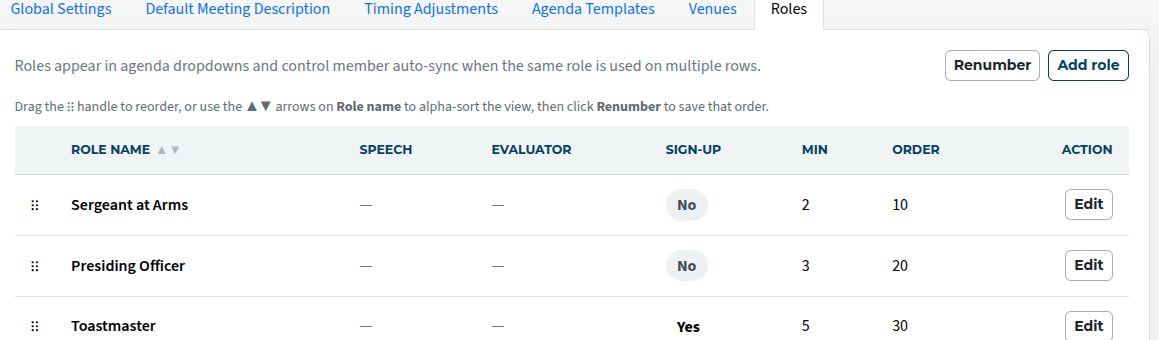
The order numbers control where a role occurs in the drop-down list. Lower numbers are nearer the top.
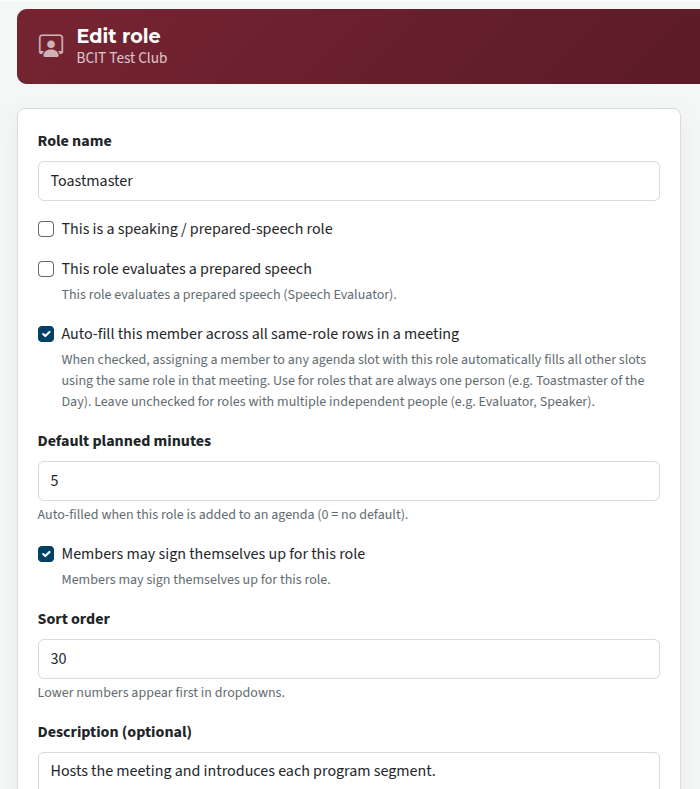
If there are roles that recur more than once in a meeting, and they are done by the same person (per meeting), check that they are set to automatically fill all other slots using the same role in that meeting. That means that these recurrences are linked together as parts of the same underlying role. If a member's name is then added to one of them, it will immediately show up in all the other instances.

Latest Forum Posts
-
- Level 4 - Create a Podcast sets incorrect timing o...
- In Public Forums / FTH4 Support
- 34 minutes ago
-
- Unable to Edit Main Heading
- In Public Forums / FTH4 Support
- 35 minutes ago
-
- "Order" column on Agenda Templates tab.
- In Public Forums / FTH4 Suggestions and Improvements
- 45 minutes ago
-
- GoAccess
- In Public Forums / FTH4 Support
- 49 minutes ago