


- Details
- Category: FTH4
-
By Jane Atkinson
- Hits: 224
Assigning members to agenda roles
You can assign members to agenda roles easily by using the drop-down list in each row.
If no one has already taken (or been assigned to) the role, the list will show "open".
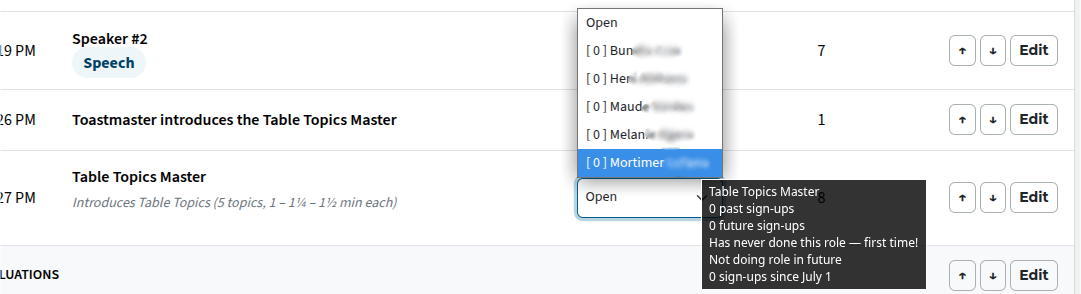
Click on the list, and choose the member from drop-down. The numbers alongside the names show how many times the person has already done this role. The tool-tip gives a useful summary of role history and future sign-ups.
The agenda is saved automatically.
To make changes to the assignments, you'll need to click on Edit (at the end of the row) and make the change in the edit window.

Latest Forum Posts
-
- Level 4 - Create a Podcast sets incorrect timing o...
- In Public Forums / FTH4 Support
- 32 minutes ago
-
- Unable to Edit Main Heading
- In Public Forums / FTH4 Support
- 34 minutes ago
-
- "Order" column on Agenda Templates tab.
- In Public Forums / FTH4 Suggestions and Improvements
- 43 minutes ago
-
- GoAccess
- In Public Forums / FTH4 Support
- 47 minutes ago