


- Details
- Category: FTH4
-
By Jane Atkinson
- Hits: 259
Assigning officers
To assign officer roles, go to Admin dashboard → Assign officers (at the bottom of the Officer-centric portion of the dashboard).
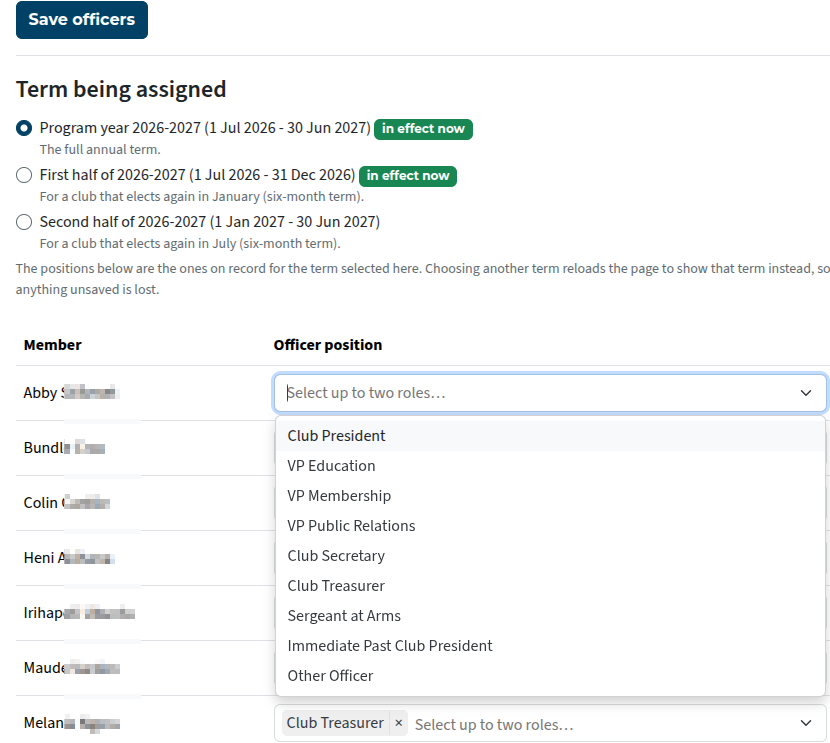
Check that the correct officer term is selected. In most cases, it will be the full annual term (first option).
Use the drop-down menu next to a member's name to select the role(s).
If you try to assign the same role to more than one member, you'll get an error message when you try to save.
Click on the "x" immediately after a role to remove it.
Save when finished.
A member may have a maximum of two officer roles.
The exception is Immediate Past President, who may hold two current roles (but not President) in addition to the IPP role.
"Other officer" is useful for incoming officers, assistants, and officers' mentors.

Latest Forum Posts
-
- Level 4 - Create a Podcast sets incorrect timing o...
- In Public Forums / FTH4 Support
- 33 minutes ago
-
- Unable to Edit Main Heading
- In Public Forums / FTH4 Support
- 35 minutes ago
-
- "Order" column on Agenda Templates tab.
- In Public Forums / FTH4 Suggestions and Improvements
- 44 minutes ago
-
- GoAccess
- In Public Forums / FTH4 Support
- 48 minutes ago