


- Details
- Category: FTH4
-
By Jane Atkinson
- Hits: 225
Email security and reducing spam
FreeToastHost already has spam protection built in. If you're happy with the way it's currently working, you don't need to do anything.
This tab allows you to fine-tune the settings in case the defaults aren't working for your club.
White list
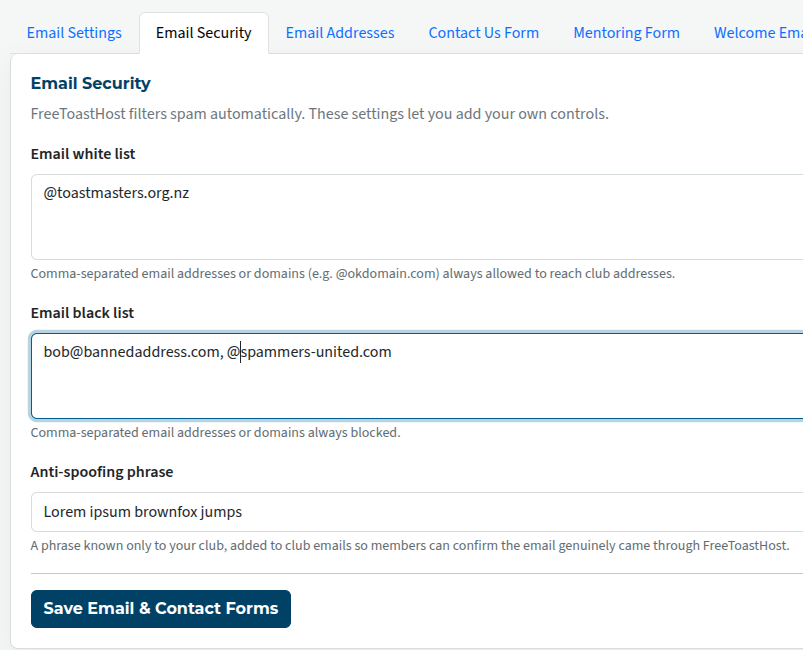
You can enter email addresses here that are allowed to send to groups that ordinary members can send to. You may want to add your club coach or club mentor to this list, for example.
Entries in the white list are processed before anything in the black list. Therefore, you can enter email addresses here that are "exceptions" to the Email Black List . For example, you may want to block "abc.com" because they host a lot of spammers, but you may want to let "jon_doe @ abc.com" to send to the mailing list.
Enter each name or domain, separated by commas, and save.
Black list
If you are getting unwanted emails from just a few places or people, you can put the names in this list.
They can be specific email addresses, or whole domains. Entering a whole domain in a blacklist will stop email from anyone whose email address ends with that domain. That is, unless there is an exception in the white list. Then the white-listed exception will get through, but everything else from that domain will be blocked.
But, because the white list is processed first, you can't allow an entire domain in the white list and then block one problem email address in the black list.
To add entries to either list, enter each name or domain, separated by commas, and save.
Anti-Spoofing phrase
This is a phrase that will be attached to emails that come through your FTH website. This will make it clear that a particular email did come via the club site, and not from some other source. Make sure that your members know what it is and why it's there, or it might even have the opposite effect to what's intended!
However, be aware that it doesn't guarantee that the content of the message is OK. If a member's email is hacked, for instance, it will still show the phrase.
The choice of the phrase is yours, up to 250 characters long.

Latest Forum Posts
-
- Old Website UI Issue with Merge to FTH. Cannot edi...
- In Public Forums / FTH4 Support
- 1 minute ago
-
- FTH4 Making your club standout
- In Public Forums / FTH4 Suggestions and Improvements
- 2 hours 1 minute ago
-
- VP Membership email alias not getting forwarded
- In Public Forums / FTH4 Support
- 5 hours 20 minutes ago
-
- update meeting info
- In Public Forums / FTH4 Support
- 6 hours 7 minutes ago
-
- Changing the photo on the FTH club website's homep...
- In Public Forums / FTH4 Support
- 8 hours 12 minutes ago