


- Details
- Category: FTH4
-
By Jane Atkinson
- Hits: 97
Exporting and importing agenda templates
It's possible to export and import agenda templates in FTH4. This can be used for backing up and restoring templates, or for giving them to another club.
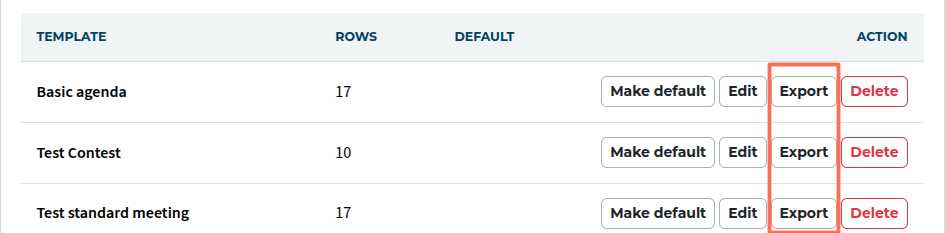
To export a template, click on the Export button (in red box). It is saved as a JSON file (a special kind of text file) on your computer.
DO NOT edit this file, or it can't be imported. You can either edit the template before exporting or after importing at the new location.
To import a template, click on import and choose an exported template file on your computer.

You'll be asked to give the new agenda template a name. You also need to enter your own venue and online meeting link information, as these details don't carry over from the original site.
From here on, the new template behaves exactly like any other template and can be edited as needed.

Latest Forum Posts
-
- Level 4 - Create a Podcast sets incorrect timing o...
- In Public Forums / FTH4 Support
- 34 minutes ago
-
- Unable to Edit Main Heading
- In Public Forums / FTH4 Support
- 35 minutes ago
-
- "Order" column on Agenda Templates tab.
- In Public Forums / FTH4 Suggestions and Improvements
- 45 minutes ago
-
- GoAccess
- In Public Forums / FTH4 Support
- 49 minutes ago