


- Details
- Category: FTH4
-
By Jane Atkinson
- Hits: 145
Moving members to other categories
When a person's membership status changes, move them to the appropriate sub-section.
e.g. guest to member, member to former member
Go the main membership list. It shows active members by default. If you want to work on another list, click on its button.
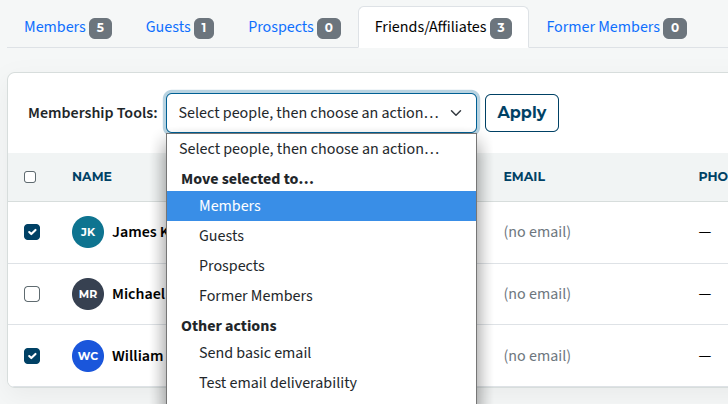
Check the name(s), then choose Move selected to the list you are wanting to move them to, and save.
You can move an individual member to another sub-section by opening their profile, selecting the list you want from the drop-down, and then saving.
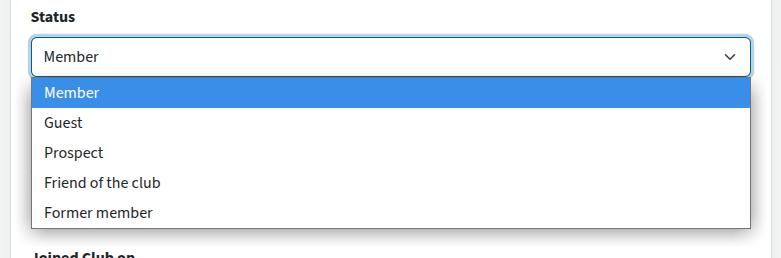
In general, it's better to move a person to Former member rather than delete them altogether. They can be restored to active member later if they re-join.

Latest Forum Posts
-
- Level 4 - Create a Podcast sets incorrect timing o...
- In Public Forums / FTH4 Support
- 35 minutes ago
-
- Unable to Edit Main Heading
- In Public Forums / FTH4 Support
- 37 minutes ago
-
- "Order" column on Agenda Templates tab.
- In Public Forums / FTH4 Suggestions and Improvements
- 46 minutes ago
-
- GoAccess
- In Public Forums / FTH4 Support
- 50 minutes ago