


- Details
- Category: FTH4
-
By Jane Atkinson
- Hits: 157
New member welcome email
When a new member opts in to the website, they will receive an email, shown on the Welcome Email tab.
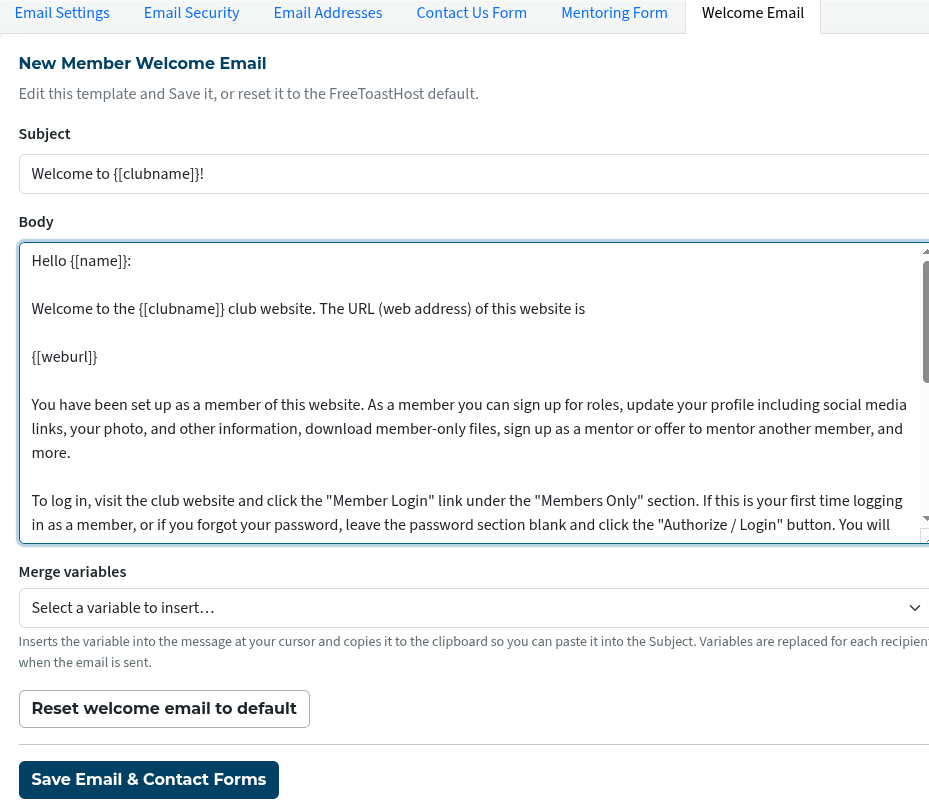
You can either leave it as is, or change it to suit your club.
The merge variables drop-down list shows a range of mail-merge-style variables that you can use if you wish.
The "reset welcome email to default" button deletes everything and sets the content to the default FTH4 member welcome message.
If your site has been upgraded from FTH3, your welcome message may contain information that is out of date. A suggestion is to:
- Copy the existing content and save it (e.g. in Notepad) so that you can refer back to it.
- Reset the welcome email to default, so that it contains current information on setting passwords etc.
- Then add any needed content from your earlier version.
Click on the "Save" button when you've finished.

Latest Forum Posts
-
- Level 4 - Create a Podcast sets incorrect timing o...
- In Public Forums / FTH4 Support
- 34 minutes ago
-
- Unable to Edit Main Heading
- In Public Forums / FTH4 Support
- 36 minutes ago
-
- "Order" column on Agenda Templates tab.
- In Public Forums / FTH4 Suggestions and Improvements
- 45 minutes ago
-
- GoAccess
- In Public Forums / FTH4 Support
- 49 minutes ago