


- Details
- Category: FTH4
-
By Jane Atkinson
- Hits: 164
Timing adjustments
Timing adjustments are a part of the Agenda Setting panel. They are a way of accommodating time needed between roles for participants to leave and/or arrive at the speaking position.
It is over to the club exec to decide whether or not they wish to use them. To use them, check the "Enable Timing Adjustments" box.
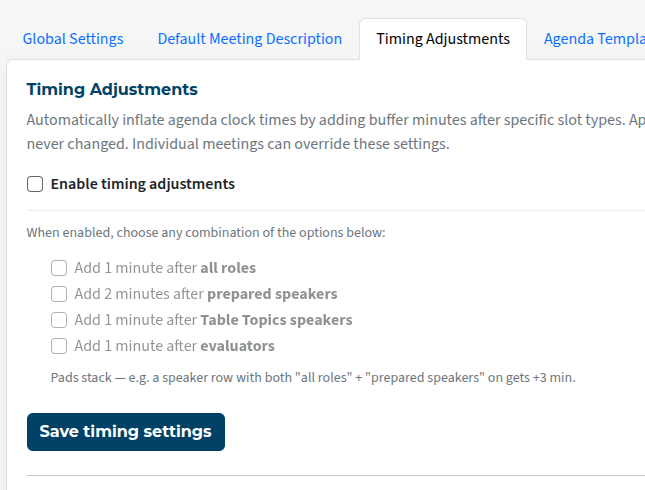
Check the box(es) to choose the adjustments you want. They will add together if relevant. E.g. one minute after all roles plus one minute after evaluators becomes two minutes after evaluators.
Note that the timing isn't added to the role description. If it says 7 mins for speaker, you will still see that printed on the agenda. The start time of the following role is advanced by the relevant amount.

Latest Forum Posts
-
- Level 4 - Create a Podcast sets incorrect timing o...
- In Public Forums / FTH4 Support
- 32 minutes ago
-
- Unable to Edit Main Heading
- In Public Forums / FTH4 Support
- 33 minutes ago
-
- "Order" column on Agenda Templates tab.
- In Public Forums / FTH4 Suggestions and Improvements
- 43 minutes ago
-
- GoAccess
- In Public Forums / FTH4 Support
- 47 minutes ago