


- Details
- Category: FTH4
-
By Jane Atkinson
- Hits: 270
Website email settings
Configuring site email settings
NOTE: Custom email groups are set up in the membership management area.
Recipient of replies
You can define who gets replies to certain types of emails.
These are member mailing list, group mailing list and officer mailing list.
Some clubs prefer replies to be sent to all members, or members of a group in the case of custom groups and officers.
Others decide that this makes for too much email and prefer fewer people to receive replies.
To set up the reply behaviour, click on the relevant field and make your choice from the pull-down menu.
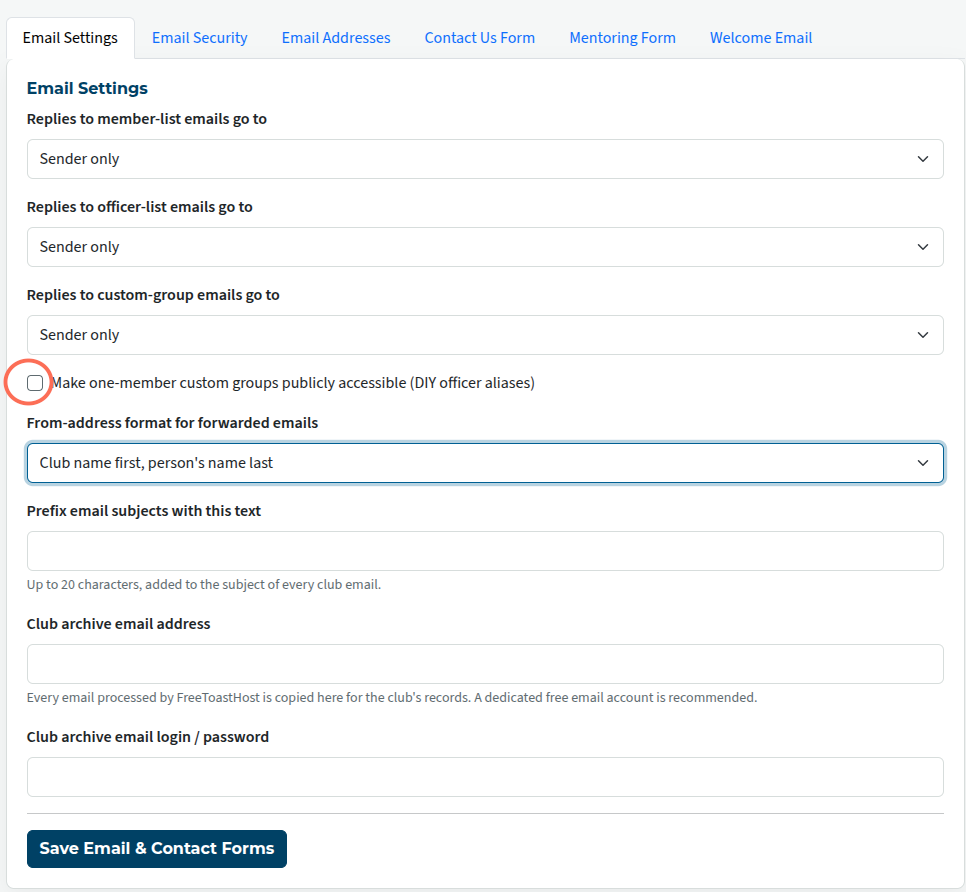
Publicly accessible custom email groups
These are custom email groups with only one person in them. Set them up in the same way as other custom email addresses, but add only a single member.
This gives you a way of adding an additional officer with a publicly-accessible email address. This could be someone responsible for organising Speechcraft programmes, for example.
To enable this feature, check the box (circled in the image above) and save.
"From address" format
You can choose between Club First, Name Last, e.g.
Toastmasters Club nnnn on behalf of Yu Li
or, Name First, Club Last, e.g.
Yu Li on behalf of Toastmasters Club nnnn
where nnnn is your club number.
The first one is the default. You may wish to change it if your club members have a definite preference for the second.
Make your choice from the pull-down menu and save.
Subject prefix
You can add a prefix so as to make emails from your club more distinctive. This can be especially useful if members belong to more than one club which uses FreeToastHost.
Enter the new prefix and save.
For example, entering ABC TM will cause every email subject line to start with [ABC TM]
Club archive email address + login info
FreeToastHost acts as an email forwarding service only. It does not store emails.
If you want archived copies of your emails, you can set up a club account with a free email service such as gmail.
Enter the club email address in the Email Archive Address field, and the password in the password field. Note that this is simply a convenient place to these details. The FTH system doesn't log into the other email account.
Club email addresses
No settings are made here. This tab gives you a convenient list of the email addresses and redirections that are in place.

Latest Forum Posts
-
- Old Website UI Issue with Merge to FTH. Cannot edi...
- In Public Forums / FTH4 Support
- 1 minute ago
-
- FTH4 Making your club standout
- In Public Forums / FTH4 Suggestions and Improvements
- 2 hours ago
-
- VP Membership email alias not getting forwarded
- In Public Forums / FTH4 Support
- 5 hours 19 minutes ago
-
- update meeting info
- In Public Forums / FTH4 Support
- 6 hours 7 minutes ago
-
- Changing the photo on the FTH club website's homep...
- In Public Forums / FTH4 Support
- 8 hours 11 minutes ago