


- Details
- Category: FTH4
-
By Jane Atkinson
- Hits: 294
Adding a map to Meeting Info-Directions page
Info / Directions page: adding a map
You can use a number of map providers, not just Google maps.
The map provider will allow you to choose a map area and place a marker. You can move the marker to the right place on the map.
Choose "HTML" for the type that you want to generate. This allows you to embed a direct link to the map website.
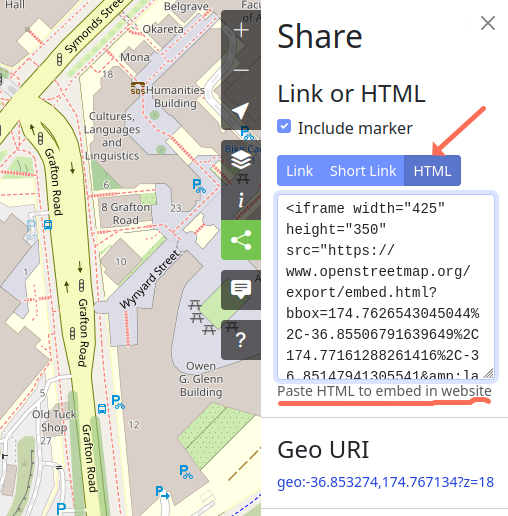
This image is from openstreetmap.org The resulting page will show an embedded map and, just below it, a link to the original map page.
Copy the entire code from the box and paste it into the map area (labelled Map Address / Iframe).
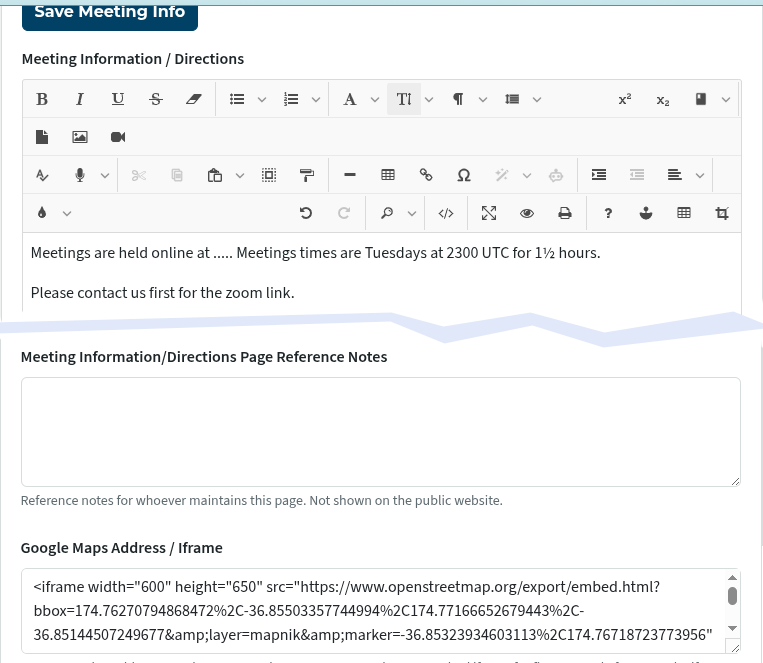
To add maps to other pages, paste the code into the main editing window where you want it to go. You may find it takes a bit of trial and error to get it to look right.

Latest Forum Posts
-
- Live timer sheet
- In Public Forums / FTH4 Support
- 12 minutes ago
-
- FTH Emails Not Going Through
- In Public Forums / FTH4 Support
- 15 minutes ago
-
- Not able to open club web site
- In Public Forums / FTH4 Support
- 22 minutes ago
-
- Members's input attending is not saved in Attendan...
- In Public Forums / FTH4 Support
- 25 minutes ago
-
- Could someone please reset our FTH web site?
- In Public Forums / FTH4 Support
- 1 hour 14 minutes ago