


- Details
- Category: FTH4
-
By Jane Atkinson
- Hits: 514
Site admin info
The site admin is the official point of contact for messages from FreeToastHost and other system notifications. Therefore it's important to keep it up to date, even if your club is sharing the login details among several users.
Administrator Info is accessed via "Edit Administrator Info" from the admin console
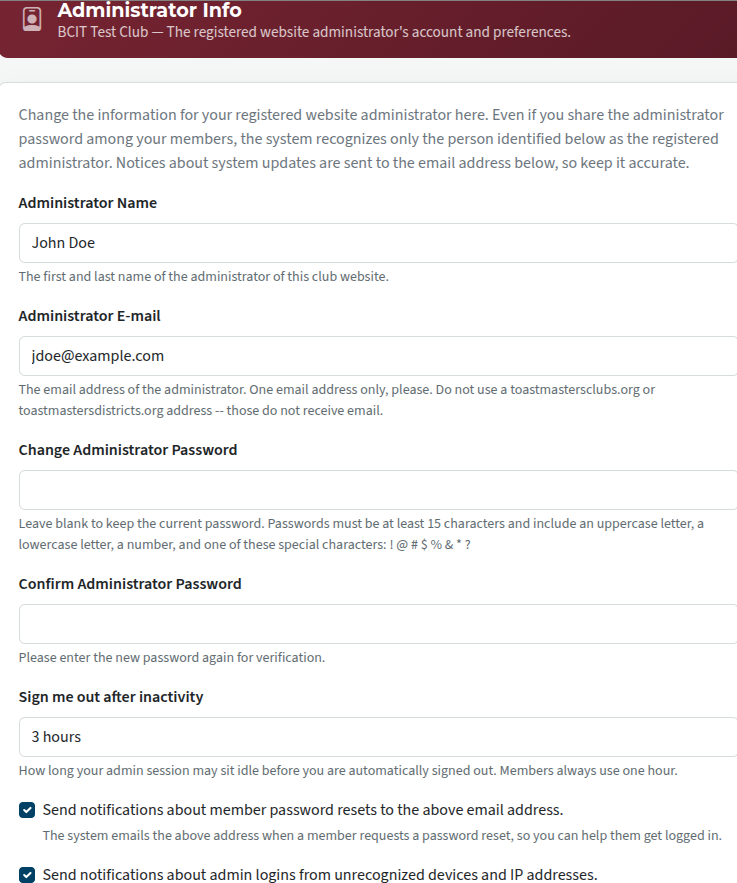
The administrator password can be changed here. Obviously, this will only work if you already have access to the site. Otherwise, use the "forgot password" link in the site login page.
For security reasons, the admin is automatically signed out when there has been no activity for a certain length of time. The minimum is 15 minutes, and there are increments of 15 minutes up to 3 hours. Click on the "Sign me out" field to make your choice.
The two checkboxes are optional. Receiving notification about password resets can be useful, especially if you see that someone is resetting their password frequently. Maybe they need help, and you can contact them.
If the second checkbox is enabled, you'll receive a notification every time a login occurs from an unknown (to the system) IP address or device. It can sometimes seem like a nuisance, but it does let you know if someone unwanted has logged in.
It's strongly recommended to change the admin details to your successor's when you leave the role. There are other ways of changing the administrator, but they are a lot less convenient.

Latest Forum Posts
-
- Live timer sheet
- In Public Forums / FTH4 Support
- 10 minutes ago
-
- FTH Emails Not Going Through
- In Public Forums / FTH4 Support
- 13 minutes ago
-
- Not able to open club web site
- In Public Forums / FTH4 Support
- 20 minutes ago
-
- Members's input attending is not saved in Attendan...
- In Public Forums / FTH4 Support
- 23 minutes ago
-
- Could someone please reset our FTH web site?
- In Public Forums / FTH4 Support
- 1 hour 12 minutes ago