


- Details
- Category: FTH4
-
By Jane Atkinson
- Hits: 379
Delegating website access
The club may choose to have all website functions remain with the admin, or it may choose to delegate some of them to members of the club exec.
Some functions can't be delegated and only the site admin can handle them. Some other functions are permanently delegated to certain club officers by default.
To delegate functions, click on Edit Access Settings in the admin console.
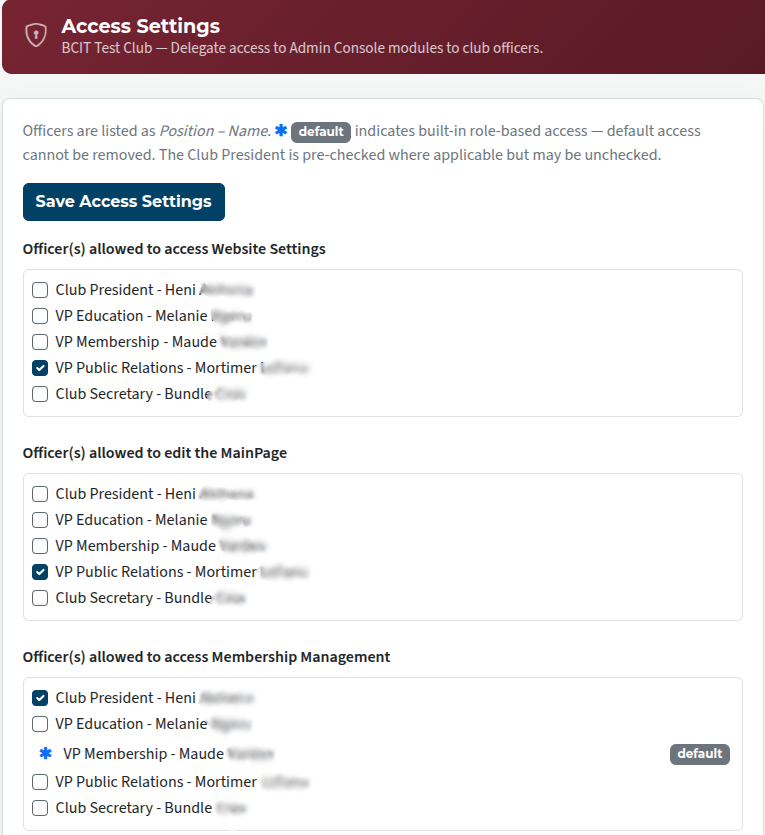
Check the boxes as necessary, and save.
The defaults are clearly marked and cannot be removed.

Latest Forum Posts
-
- Live timer sheet
- In Public Forums / FTH4 Support
- 11 minutes ago
-
- FTH Emails Not Going Through
- In Public Forums / FTH4 Support
- 14 minutes ago
-
- Not able to open club web site
- In Public Forums / FTH4 Support
- 21 minutes ago
-
- Members's input attending is not saved in Attendan...
- In Public Forums / FTH4 Support
- 24 minutes ago
-
- Could someone please reset our FTH web site?
- In Public Forums / FTH4 Support
- 1 hour 13 minutes ago