


- Details
- Category: FTH4
-
By Jane Atkinson
- Hits: 180
Pathways adjustments for admins
Important:
Any report or notification on the FTH site is for information and encouragement only. The true record is the one on the TI website. Please make sure it's updated after every speech.
Pathways report cards
The agendas build an excellent record of Pathways progress, as far as speeches are concerned. Manage Pathways report cards allows for inclusion of non-speaking-role requirements, such as meeting roles and between-meeting activities. Speeches and activities done at other clubs, or before this club joined FreeToastHost, can also be added here.
To alter a Pathways record, go to Manage Pathways Report Cards. A list of members' names will be shown.
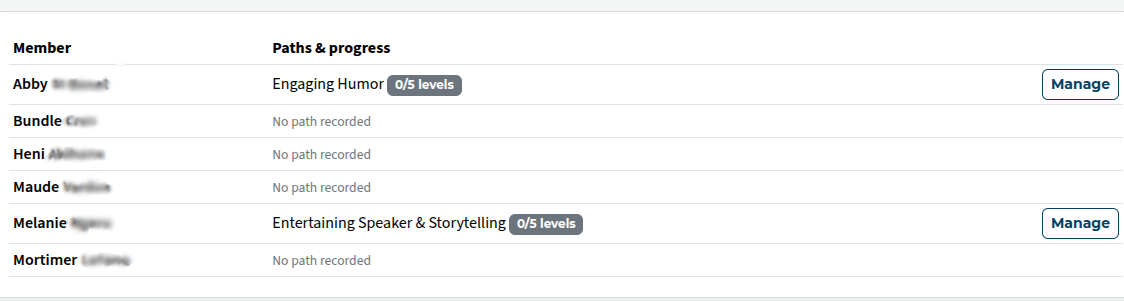
Click on Manage to view and amend a member's record.
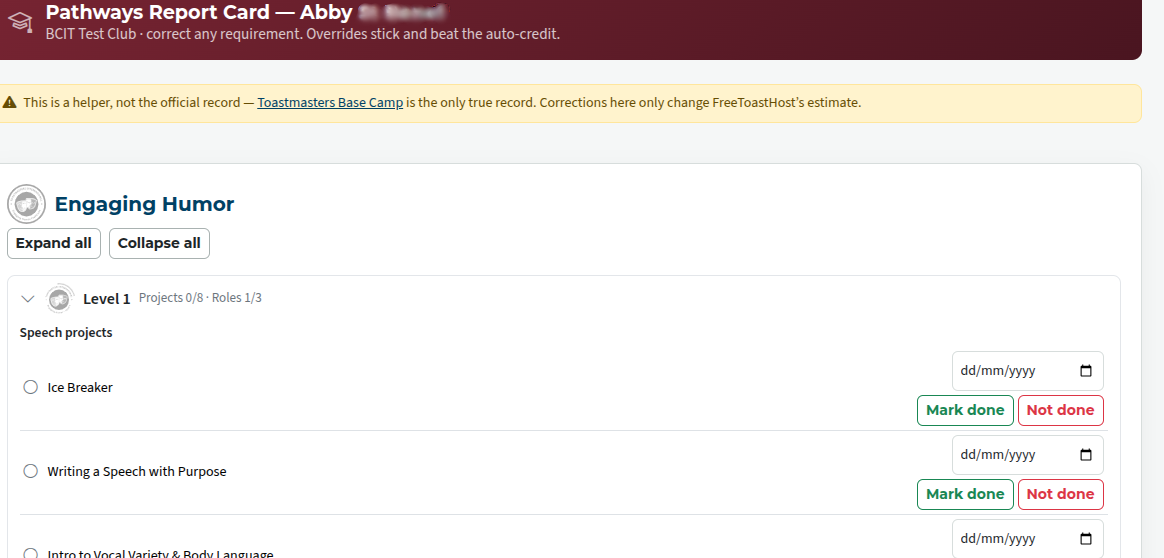
Anything that's included in this area overrides the automatic calculation of progress. Make sure, therefore, that it's done thoughtfully.
Records from Base Camp
Members who belong to more than one club, or who have history from a time before the club started using FTH, will have Pathways history that is not part of the site agendas. If they have done a large number of projects or levels, you will not be wanting to add the projects one by one.
In this case, members can submit copies of records from Base Camp, in the form of screenshots. All the screenshot needs to show is that a level or levels is/are completed. We are not concerned with the specifics of which activities needed to be done, just that TI considers it completed.
These records are added automatically to the member's report card. However, occasionally something may go wrong and you need to check what's happened.
- Go to Admin console → Manage report cards → See Base Camp checks
- Click on the member's submission.
- The screen shows the items credited, the screenshot(s) and an explanation of what's been recorded and why (or why not).
If you see anything on a member's report card that shouldn't be there, you can remove it manually.

Latest Forum Posts
-
- Head table and Assisting Head table
- In Public Forums / FTH4 Support
- 45 minutes ago
-
- header in an Agenda
- In Public Forums / FTH4 Support
- 1 hour 45 minutes ago
-
- FTH Emails Not Going Through to outlook
- In Public Forums / FTH4 Support
- 4 hours 18 minutes ago
-
- Update a member's email address
- In Public Forums / FTH4 Support
- 4 hours 22 minutes ago
-
- Agenda Printing - Website Link Split in two, Word ...
- In Public Forums / FTH4 Support
- 4 hours 28 minutes ago