


- Details
- Category: FTH4
-
By Jane Atkinson
- Hits: 338
Printing agendas
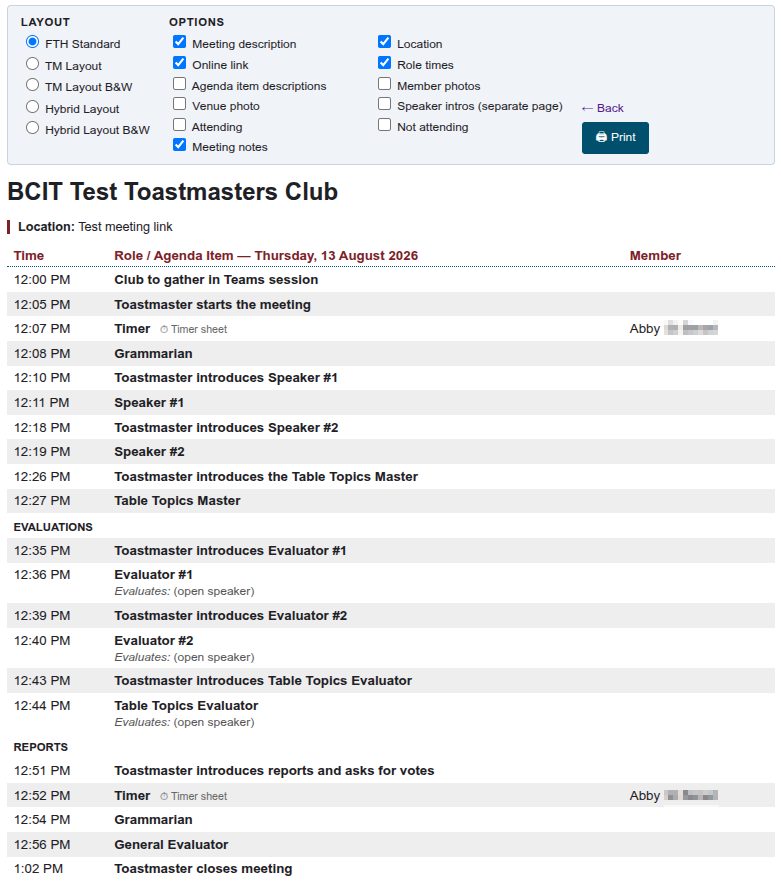
When you click on the Print button to print an agenda, the follow dialogue appears.
Choose the options you want. The appearance of the agenda will change as you make your selections, so you can see what you'll be printing.
You can have only one layout, but a number of options at the same time.
Speaker introductions print to a separate page.
Click on Print when you're ready.

Latest Forum Posts
-
- Live timer sheet
- In Public Forums / FTH4 Support
- 12 minutes ago
-
- FTH Emails Not Going Through
- In Public Forums / FTH4 Support
- 15 minutes ago
-
- Not able to open club web site
- In Public Forums / FTH4 Support
- 22 minutes ago
-
- Members's input attending is not saved in Attendan...
- In Public Forums / FTH4 Support
- 25 minutes ago
-
- Could someone please reset our FTH web site?
- In Public Forums / FTH4 Support
- 1 hour 14 minutes ago