


- Details
- Category: FTH4
-
By Jane Atkinson
- Hits: 799
Signing in to the club website
Go to the club site (you will have been given the URL or address). Click on the login button.
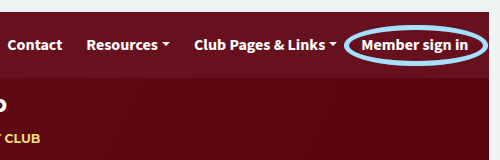
Initially, you won't have a password. You set this by following the process below.
There is a "forgot your password" link at the bottom of the login form (circled).
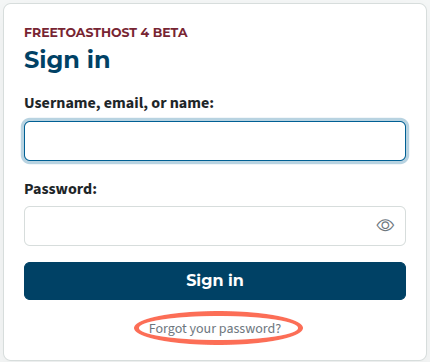
Clicking on that takes you to another form. Fill in your email address (that you used on the site) and click on the button.
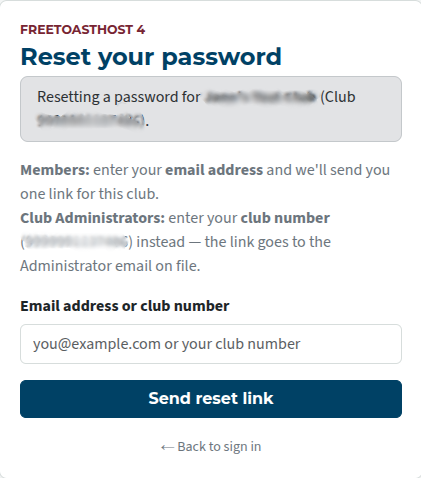
You will receive an email with a password reset link. Click on that (or paste it into your browser) and you'll be taken to the site, where you can set up a new password.
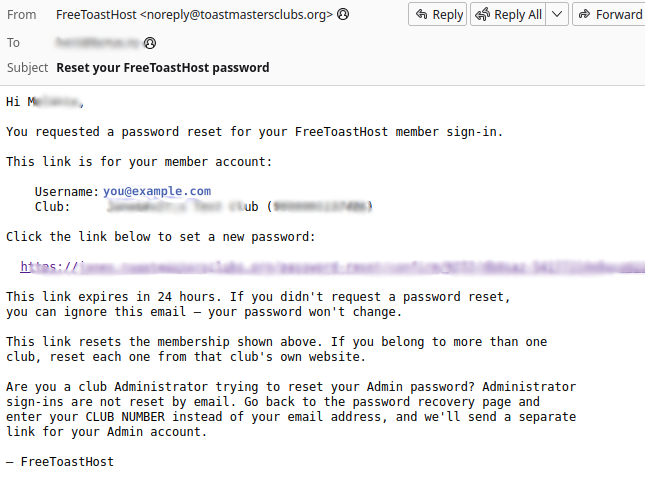
The email should arrive fairly promptly. If it doesn't, look in your spam folder. These emails sometimes end up there.
If it's not there, check that you are able to receive emails from FTH. Adding
From this point, members can sign in using either their username or email address. Club admins must use the sign in name of the club number preceded by "admin-". The club number should not include any leading zeros.
e.g. admin-99999955555 is valid; admin-099999955555 is not.

Latest Forum Posts
-
- Live timer sheet
- In Public Forums / FTH4 Support
- 12 minutes ago
-
- FTH Emails Not Going Through
- In Public Forums / FTH4 Support
- 15 minutes ago
-
- Not able to open club web site
- In Public Forums / FTH4 Support
- 22 minutes ago
-
- Members's input attending is not saved in Attendan...
- In Public Forums / FTH4 Support
- 25 minutes ago
-
- Could someone please reset our FTH web site?
- In Public Forums / FTH4 Support
- 1 hour 14 minutes ago