


- Details
- Category: FTH4
-
By Jane Atkinson
- Hits: 305
Social media accounts
Social media links are shown on the main page (coloured background area) as clickable icons.
To edit them, go to "Edit Social Links" in the admin console.
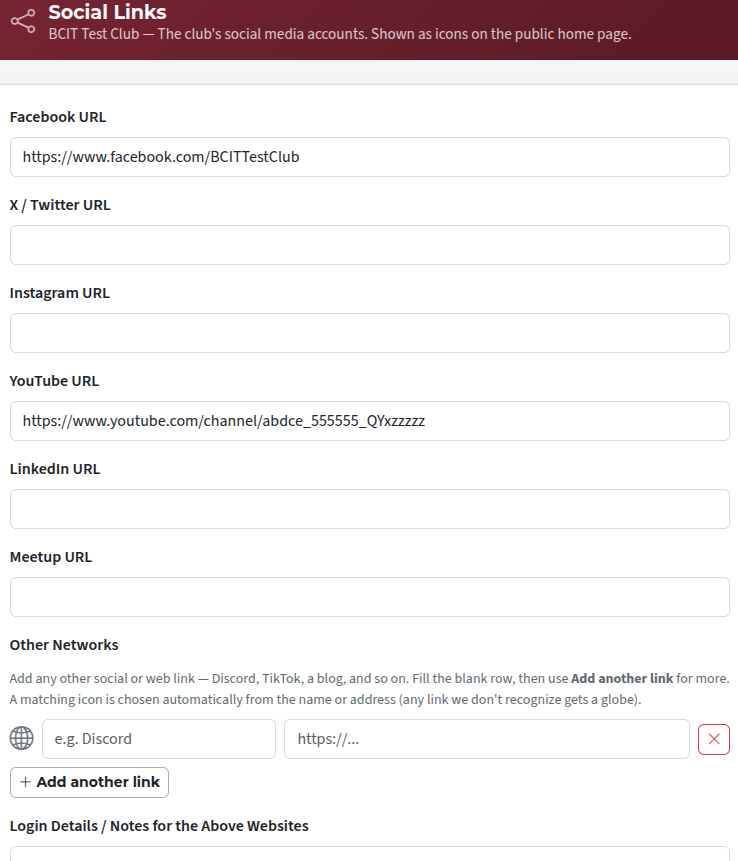
Enter the entire URL in the field, not just the final portion that's unique to your account.
You can add extra social media links, not on the list, by selecting "Add another link" and filling in the details there.
If the website can find the icon, it will be used. If not, the plain globe symbol is used.
You can record logins and passwords in the Login Details box, so that your successor knows how to access the social media sites.
If you don't want to leave passwords here in plain text (understandable these days), record where your successor can find them.

Latest Forum Posts
-
- agenda not matching order the signup / Attendance ...
- In Public Forums / FTH4 Support
- 50 minutes ago
-
- Head table and Assisting Head table
- In Public Forums / FTH4 Support
- 52 minutes ago
-
- Delete multiple agendas
- In Public Forums / FTH4 Support
- 2 hours 14 minutes ago
-
- Toastmaster of the day doesn't show on report card...
- In Public Forums / FTH4 Support
- 2 hours 36 minutes ago