


- Details
- Category: FTH4
-
By Jane Atkinson
- Hits: 255
Webpage tools
The webpage tools are part of the Edit web page or link screen (in the dotted-line box).
They are also available under Edit MainPage, Edit About Page and Edit Meeting Info.
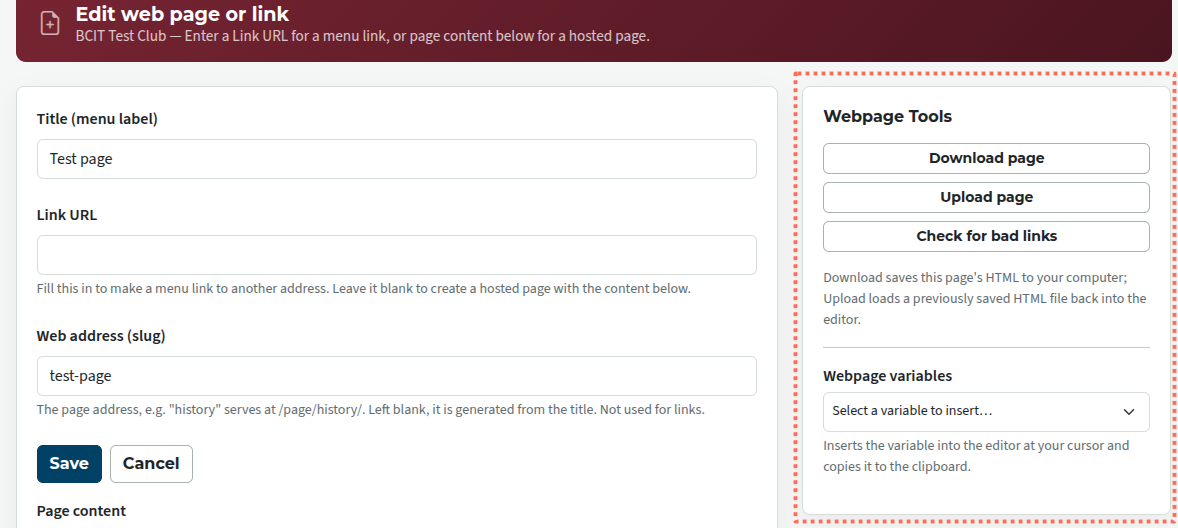
Download page — Saves the page contents to a HTML file on your computer. This is the all-important backup; make sure it is kept up to date.
Upload page — restores a previously backed-up file to the site, replacing whatever was there before (if anything).
Check for bad links — checks that all links in the page are working.
webpage variables
These allow you to include information likely to change often, from another part of the site. To use these, place the cursor where you want the variable to go, and select it from the list.
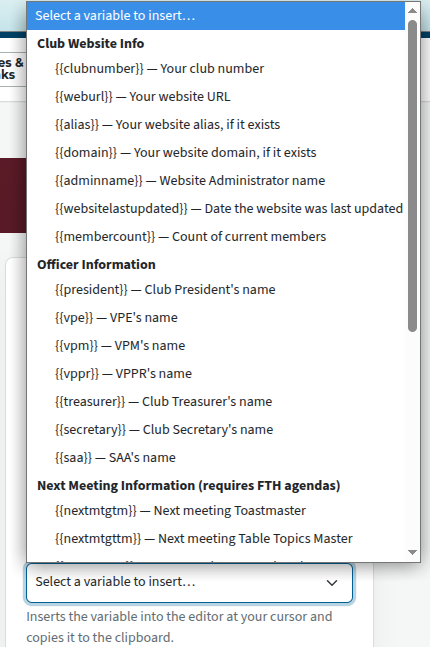
You will see only the variable in the edit window. To see the final result, save and view the completed page.

Latest Forum Posts
-
- Live timer sheet
- In Public Forums / FTH4 Support
- 11 minutes ago
-
- FTH Emails Not Going Through
- In Public Forums / FTH4 Support
- 14 minutes ago
-
- Not able to open club web site
- In Public Forums / FTH4 Support
- 21 minutes ago
-
- Members's input attending is not saved in Attendan...
- In Public Forums / FTH4 Support
- 24 minutes ago
-
- Could someone please reset our FTH web site?
- In Public Forums / FTH4 Support
- 1 hour 13 minutes ago