


- Details
- Category: Documentation
-
 By Jane Atkinson
 - Hits: 35520
Agenda default settings
Global Settings
These are for setting and configuring notifications.
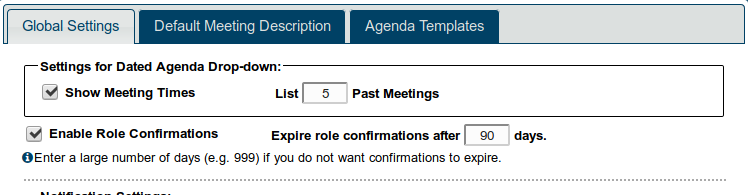
Settings for Dated Agenda Drop-down
You can choose to include the time as well as the date in the "View Another Agenda" drop-down. This could be useful for clubs with variable meeting times.
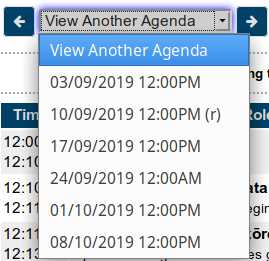
You can also select the number of past agendas that will show in this drop-down. Clubs meeting weekly may wish to display a larger number than those that meet less frequently.
Enable Role Confirmations
Checking this box allows Confirm links to be set up in the agenda.
Set the confirmation expiry time to something that makes sense for your club. Some like to have a role re-confirmed if it was originally confirmed a long time ahead of the meeting. If you don't want them to expire at all, set the number of days to something like 999.
Notification when a member takes, drops or confirms a role
If a member takes a role, confirms one or drops one, other members or officers can automatically be notified. This can help avoid problems caused by a member making changes of this kind without telling anyone.
You may choose one or more of
President
VP Ed
Club Secretary
Toastmaster of meeting
Table Topics masters
Member's mentor(s)
General evaluator
Click on the relevant box(es) in the multi-choice menu.
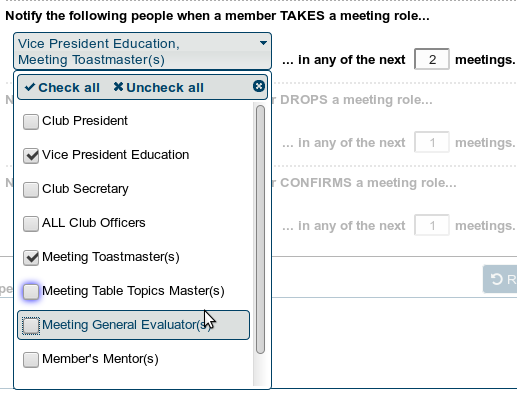
NB If a member signs up for a role more than 2 meetings in advance (using the above example), no notification messages will be sent. You can change the number in "next __ meetings" to suit your club. Any of the above settings can be changed at any time.
Introduction Template
You can enter some text here to act as a guide to members for creating a good introduction. It will be inserted into the Introduction box as a placeholder text. Members can then edit it as they wish.
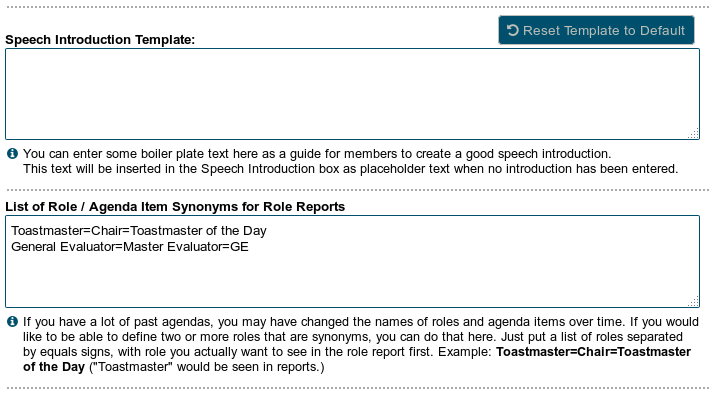
Role / Agenda item synonyms
If you have a lot of agendas going back a few years, the names of some of the roles may have changed over time. E.g. what was originally called "Toastmaster of the Day" may now just be called "Toastmaster". This will affect the accuracy of role reports.
In this box you can define the role names that should be considered to be equivalents. The first item in the list will be the one that appears in the role reports.
An example: Toastmaster=Toastmaster of the Day=Chair
All of those roles will be consolidated in the report, under the title of "Toastmaster"
Agenda Locked to Members
This is not strictly speaking something that an admin can set. It is activated automatically by the site a set time after the meeting. However, it's included here because sometimes there are problems with the agenda locking too soon.
If you are finding that the agenda is locked to members before the meeting, check the timezone setting on your site. It should be set to your local timezone. (See Basic Settings - Club Time zone
Default Meeting Description
The default meeting description (or agenda header) is automatically added to a new agenda every time one is created.
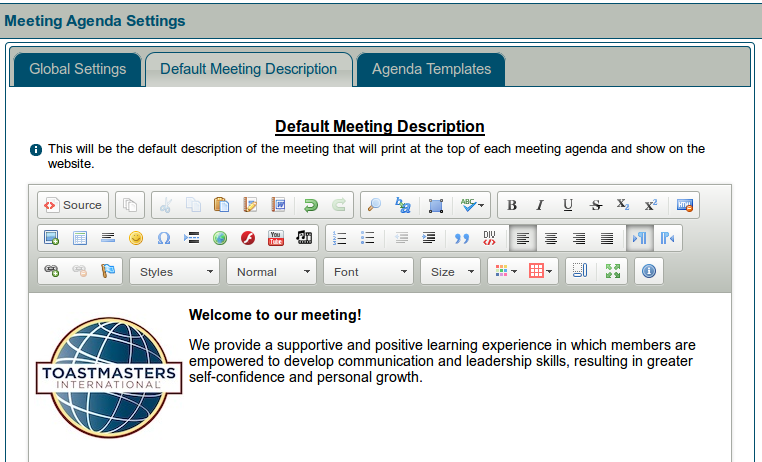
This is a word-processor-like window for editing content, as use, for example, when creating and editing custom pages. For further information, see Adding and editing content.

Latest Forum Posts
-
- Edit Club Officer List
- In Public Forums / FTH4 Support
- 2 hours 19 minutes ago
-
- Strategic Relationships Path Missing
- In Public Forums / FTH4 Support
- 3 hours 8 minutes ago
-
- Add Application and 1310 Leadership Manual to Gene...
- In Public Forums / FTH4 Suggestions and Improvements
- 6 hours 21 minutes ago
-
- Modify or hide small club name between "Banne...
- In Public Forums / FTH4 Suggestions and Improvements
- 6 hours 57 minutes ago
-
- Need SuperAdmin to change my purchase dates of pat...
- In Public Forums / FTH4 Support
- 17 hours 1 minute ago