Important: when posting, please provide your Club Number at a minimum, and as many details as possible.
For further info, please read This page before posting.

FTH4 DISTRICT BETA participation requests are now open

Remember club numbers are always required.

The 110 clubs who are part of FTH4 Beta testing, please post in the FTH4 Beta Support Forum only.

Create a Signature

  • MortgageGod
  • MortgageGod's Avatar Topic Author
  • New Member
  • New Member
  • Thanks: 0

Create a Signature

14 years 11 months ago
#648


An easy way not to get Brian's response:

Please, Include your TMC Website Address in every post.

http://[club number].toastmastersclubs.org

Is to create a signature, and place your club # in it. (Set it and forget it)

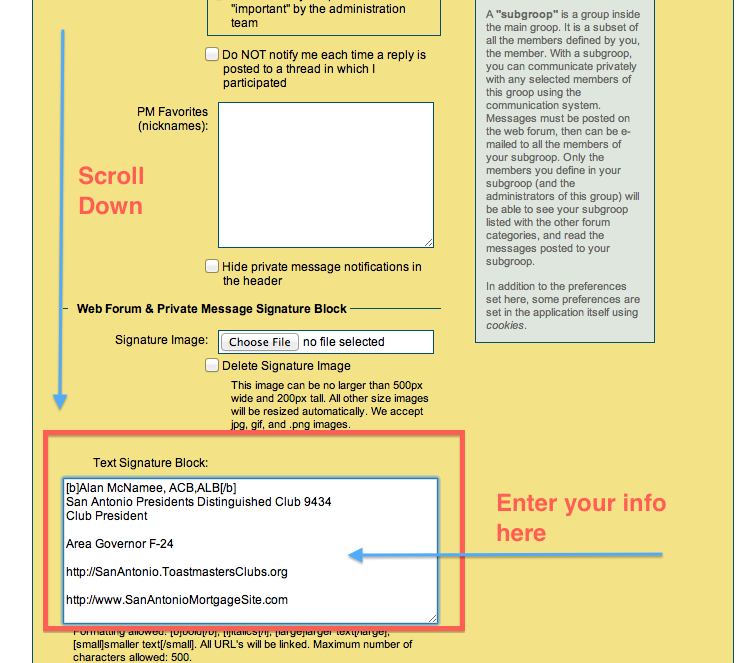
to create one: [*]Log in to FTH support. [*]On top of every forum, there are tabs. Select the User Prefs. [*]Scroll down to signature box, enter your info (including your club #). [*]Save [*]No more "send me your club #" responses!
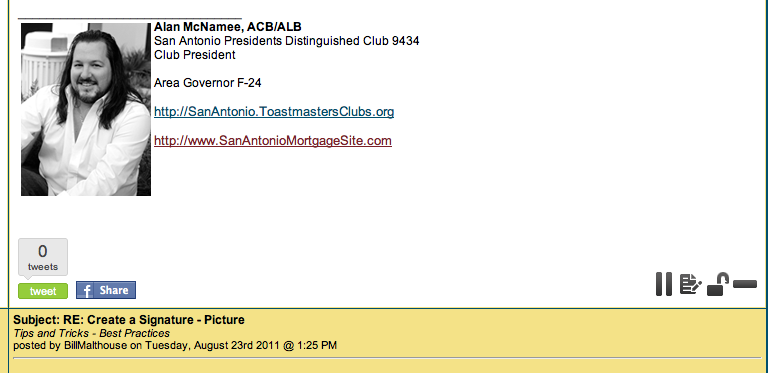
below are the screen shots

Where to go:


Where to place signature:


The topic has been locked.
  • BillMalthouse
  • BillMalthouse's Avatar
  • New Member
  • New Member
  • Thanks: 0

Re: RE: Create a Signature - Picture

14 years 11 months ago
#913
The topic has been locked.
  • BillMalthouse
  • BillMalthouse's Avatar
  • New Member
  • New Member
  • Thanks: 0

Re: RE: Create a Signature

14 years 11 months ago
#914


If you add a picture, use 500 x 200 aspect ratio of Bo's code will make you a fat head or pencil person
The topic has been locked.
  • MortgageGod
  • MortgageGod's Avatar Topic Author
  • New Member
  • New Member
  • Thanks: 0

Re: RE: Create a Signature

14 years 11 months ago
#917


LOL, mine worded fine it is 130 x 173, maybe you just had a photo size the freaked out the system.


The topic has been locked.
  • BillMalthouse
  • BillMalthouse's Avatar
  • New Member
  • New Member
  • Thanks: 0

Re: RE: Create a Signature

14 years 11 months ago
#921


For some reason I have to use the HTML editor of the WYSIWIG to get anything entered in THIS reply chain. I checked for white text on white etc. but even the text cursor does not show up here and this text is invisible itself. Hmmm until I log out and back in ... IE9 Cache? Anyway, the original picture was an 800 x 600 the first time I input it (look for the first post I put into the system to see Mr. fathead! I then switched to a special 500 x 200 I cut and pasted out of the original, and that is what is working here.
The topic has been locked.
  • Master8825
  • Master8825's Avatar
  • New Member
  • New Member
  • Thanks: 0

Re: RE: Create a Signature

14 years 11 months ago
#973


Thanks Alan,

Your instructions are clear and concise.
The topic has been locked.
Moderators: BrianPamrhtaylor3NotLiableNSBjgavinLcala305Henipeterb323DebbieT
Time to create page: 0.154 seconds