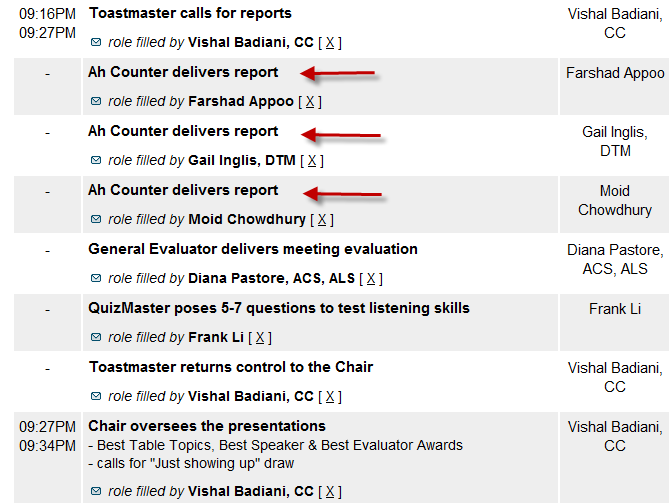
I found a problem if you have several agenda items that have the same time assigned (so FTH will not display every time on the agenda), and you want to rearrange certain types of items. The problem is that if you just rename the agenda items — all the titles change to the same item creating duplicates or triplicates, etc. See below. (In some cases, the names of the assinged person changes to the same name as well I have screen shots of both cases.)
In my case, I had Ah Counter, Grammarian then Timer plus the other three items, and I was requested to change the order to Grammarian, Timer, then Ah Counter, leaving the nother three items as they were. This was to affact future agendas only.)
The reason I tried to edit them rather than just delete and add the three items is that there is an internal time when each item is created, and this "time" is used to sort the agenda items when the start and end times are identical. If I removed the first three and added them back in, they would appear after the three I didn't delete.
To save time (or so I thought), I just went to the template and into each of those first three items and changed the names. All looked OK in the template. When I sasved the template, FTH changes the master agenda so all three items were the same, and it changes all the previous agendas I had previously created. When I tried to edit the role/activity names in the template, FTH just used a different role, but repeated it three times. And there is no way to edit the role/activity title in the Meeting Agenda editor.
The only way that I could fix this was to delete all six items and add them back in, but it is easy to do following these steps: [*]select the first existing item, and click Edit (click on the pencil) [*]highlight the contents of Role/Activity title, and press Ctrl+C (to copy the text of the title ) [*]click Save (there is no cancel option) [*]move the cursor in the empty title field at the top of the form and press Ctrl+V (to paste the text into the title field). If you have any changes to make, fix them here. Note that FTH uses the time from the last item that was edited, so you don't have to fix the times. [*]Click Save.
Repeat for the additional role/activity items with the same start and end times. Note you must add them back in the correct order.
When I did all of the items (6 in my case) the internal time when each item is created, and this "time" is used to sort the agenda items when the start and end times are identical.
Note that this does not fix any agendas already created that have the duplicate or triplicate roles, unlike the problem that was initially created because of the renaming. This fix will only affect new agendas when they are created.