


- Details
- Category: Documentation
-
 By Jane Atkinson
The agenda subsystem is designed to make it easier for members to include Pathways project details. While non-Pathways speeches can be accommodated, most speeches should be Pathways speeches.
Choosing the project
When a member signs up for a speech, they can choose the Path and project they are working on from a dropdown list. This fills in the correct timing in the agenda, and also shows buttons for downloading the project description and the evaluation form.

- The download links go to the FTH site and not the Toastmasters International site. We ensure that we keep our versions up to date.
Any club member can use these links, which means that an evaluator can obtain the form without having to ask the speaker for it.
Recording progress
There is no linkage between a FTH site and Base Camp in the TI site. Members will still need to fill in the necessary items in Base Camp and submit Level completion requests there.
Any club officer can approve a completion request. Unless your club is using the FTH officer email addresses in Club Central, any emails from TI to club officers will not go through the FTH system.
- Details
- Category: Documentation
-
By FreeToastHost
Introduction
GoAccess is a program that processes your site's logs so that you get a useful summary of what your site is doing. This can help you to determine how well your publicity is working, what time of day to do maintenance, and even what day you should have your new content ready in order to catch the peak traffic for the week.
Below is a brief summary of the different charts and lists. See the definitions at the end for some additional clarification.
Overall Website Activity
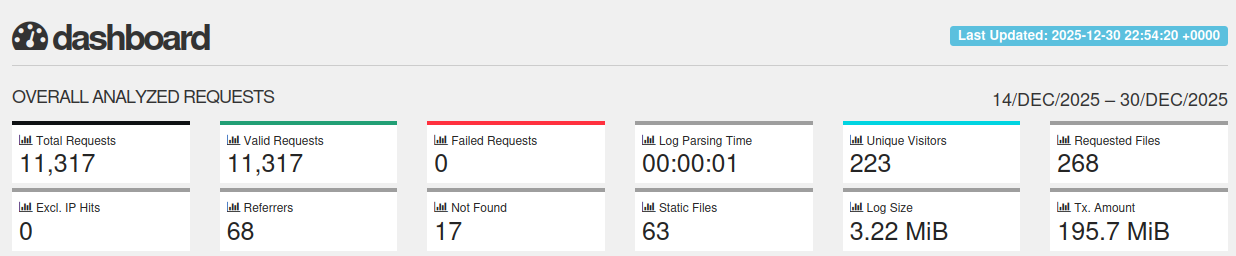
This section shows how many actions visitors made on your website while GoAccess was watching it. An action might be viewing a page, downloading a file, or opening an image. If the number suddenly becomes much larger or smaller, it may mean something has changed with your traffic or your website.
Daily Visitors (People and Search Engines)
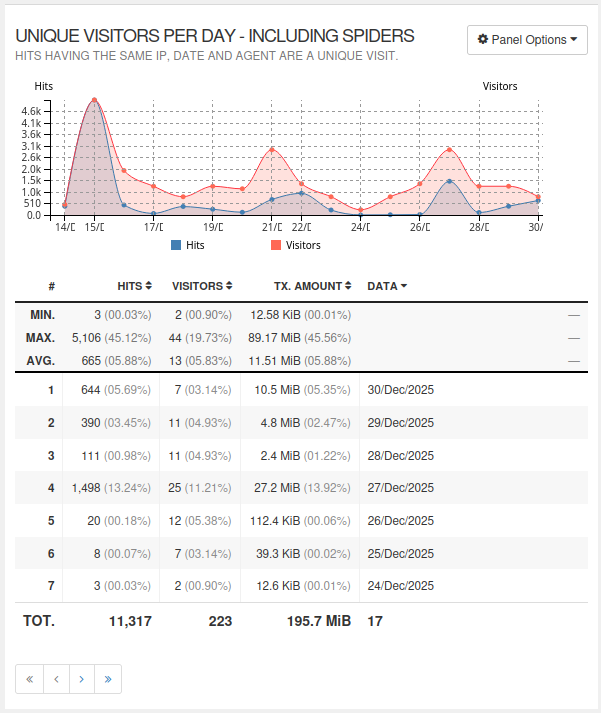
This helps you see how many different visitors came to your site each day. Visitors include real people and search engines like Google that scan your pages. If the number goes down a lot, your website may not be getting attention or may be harder to find.
Most Viewed Pages
This lists the pages that people visit the most. It helps you learn what information is popular. If something unexpected appears at the top, you may want to check why.

Images and Other Files
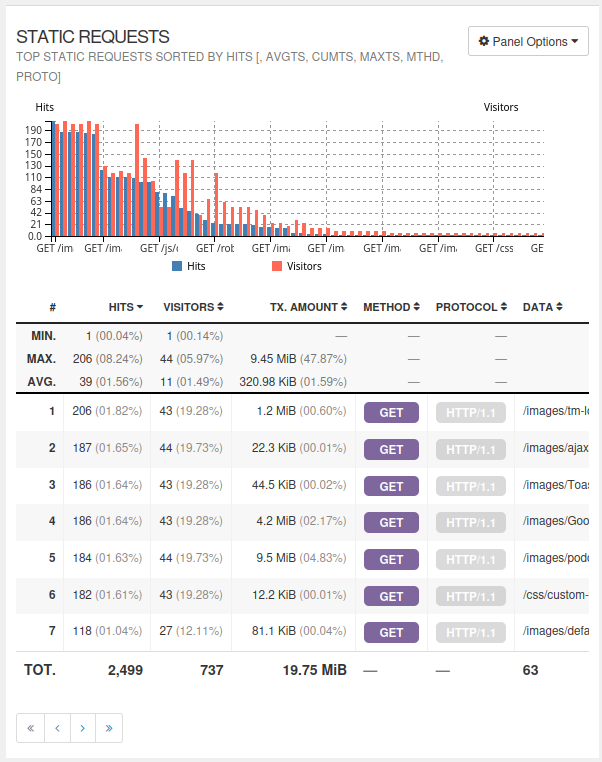
[missing]This shows how often pictures, documents, and design files are loaded. Lots of views here may mean many people are using those files, or a file might be too large and loading too slowly.
Page Not Found
(Error 404)
These are pages that visitors tried to reach but were not found. A missing page can mean an old link, typing error, or a page that was removed. If a page you expect to work shows up here, its link may need fixing.

Who Is Visiting
(by Internet Address)
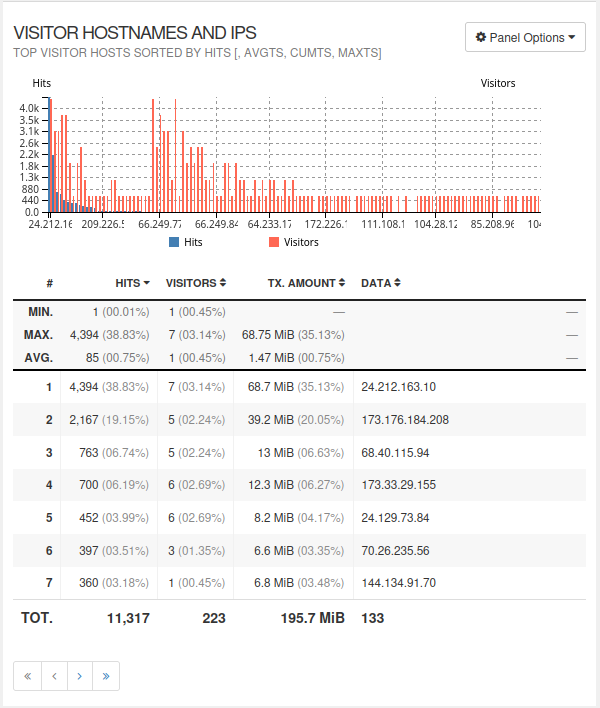
This helps you see where your visitors are coming from. Many repeat visits from the same address might mean regular users—or automated scanning tools.
When Visitors Come
This section shows when people are most likely to be on your website. It helps you choose the best time to do updates, so fewer visitors are affected.
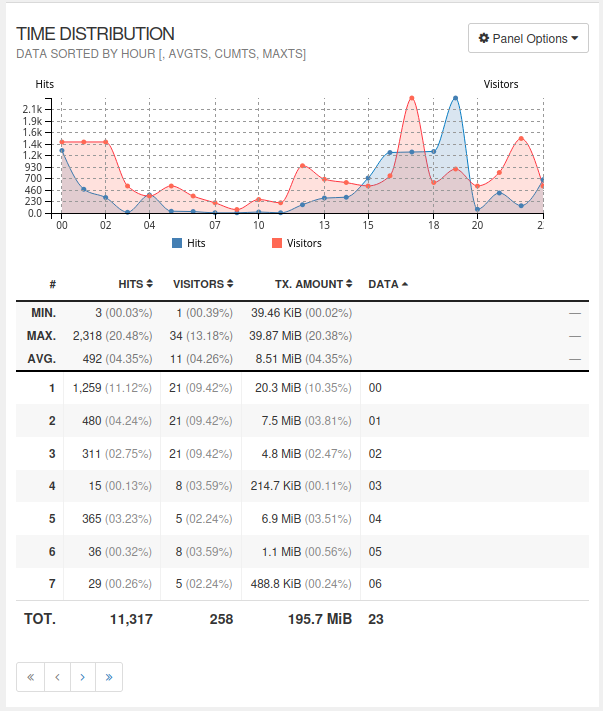
How Visitors Arrived
This tells you where visitors clicked from before they reached your site. It helps show which links or campaigns are working.
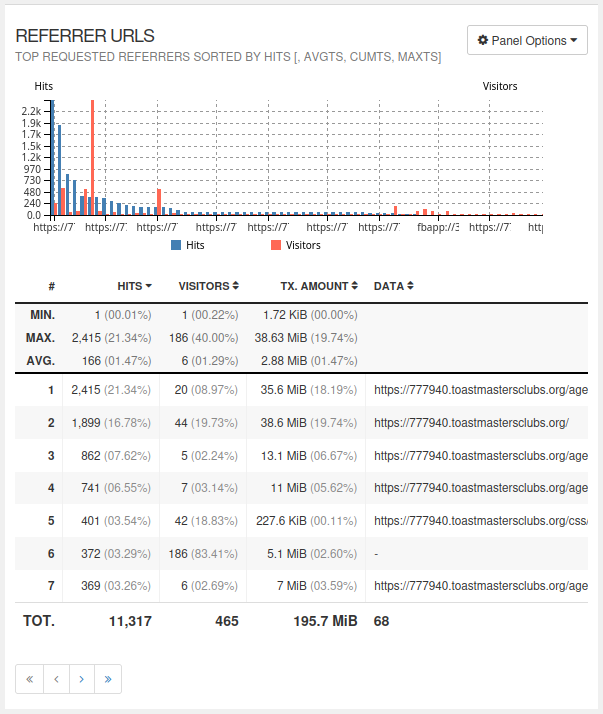
Websites Sending Visitors
This lists other websites that send people to yours. It shows which partners or links are helping people find you.

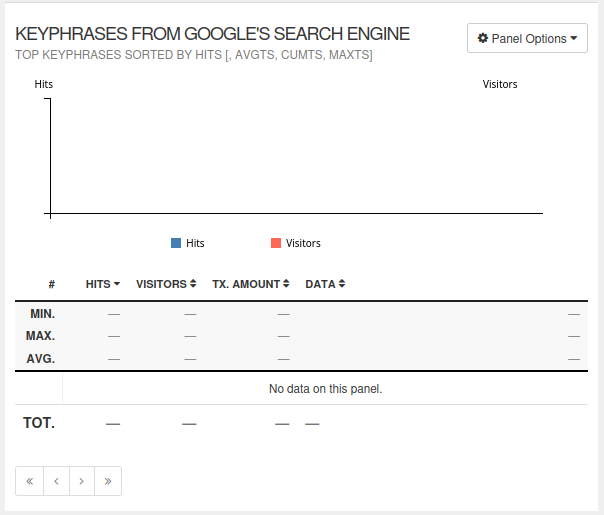
Search Phrases from Google
Sometimes this shows the words people typed into Google before coming to your website. Most searches are private today, so results may be limited.
Notes and definitions
Where a chart has two vertical scales (one at each end), they refer to different graphs. The fact that one is larger than the other at a particular point doesn't necessarily mean it's more important.
Hits vs visits: a hit is a request for a single file. A page is usually made up of several files, such as the actual text, the CSS (stylesheet) file and one or more images. A pageview, therefore, usually involves more than one hit. A visit is the time spent by a single viewer on one occasion, who may look at one or more pages. Visitors may return on more than one occasion.
Referring sites: this gives just the site name, and no further detail. Example: this might be your District website.
Referrer URLs: the exact address of the page or item where the request came from. Gives more info than just the site name. Example: this might be a "list of active clubs" page on your District website.
Static requests: are requests for a specific file, such as an image, or CSS (stylesheet) file. As a rule, these will get automatically requested whenever the page that they're on is requested.
Time of visits: these are UTC. You'll need to take the difference between your local time and UTC into account when working out the busiest/quietest times of day.
If you are curious and want in-depth info on how GoAccess works and what else it will do, try GoAccess - Manual Page. But be warned: it is rather geek-focused.

- Details
- Category: Documentation
-
By Brian
FreeToastHost, like any other topic, has its share of terms and acronyms which can be puzzling to new users. Some of them are set out below.
The list also includes some more general computer terms which come up regularly.
If you have other items that you think should be added to this list, please go to https://support.toastmastersclubs.org/forum/documentation-feedback/topic/create and post the details.
Agenda Templates
Agenda Templates are named agendas that are used as a common starting place for creating dated agendas. The dated agendas are really the "working agendas" actually used for specific meetings. The use of Agenda Templates allows you to save time by saving a copy of frequently used dated agendas as a named agenda. (You can also create named agendas from scratch.)
Authentication
Authentication refers the method by which software verifies your identity.
Browser Cache
Typically, much of the information displayed in a website is the same from one visit to another. Because of this, browsers try to save frequently used website content in the "browser cache" on your computer so it can be retrieved quickly and does not have to be retrieved from the server which takes longer. Thus, the browser cache is really just a local file storage area on your computer used to help speed up your browser.
Browser Cookie
A browser cookie is a small file placed on your computer by your browser to help it remember information for a website between visits to that website. One key aspect of cookies is that they can be cleared since they reside on the user's computer.
Custom Domain
In addition to a website alias, clubs (and districts) may optionally choose to choose to register a custom domain name for use for a given time frame. (it must be renewed for continued use.) This custom domain name is then used as the basis for their website address and email addresses instead of a club number or website alias.
DKIM (Domain Keys Identified Mail)
DKIM is an email security method used to verify that an email has not been altered since it was originally sent.
DNS (Domain Name Server)
The DNS is a mechanism by which people can enter meaningful text based domain names into browsers and the browser then queries one or more DNS servers to find the text based domain name and convert it to the numeric IP address that is actually used to locate a website or resource. The Internet actually runs on the numeric IP addresses, but by using DNS, meaningful text based domain names can be used as an alternative to the numeric IP addresses to access websites and resources.
Email Templates
Email Templates are emails that you have saved with a name to be reused later. The use of Email Templates allows you to save time by saving a copy of frequently used emails as a named template. These templates can also include variables to be filled-in when the email is actually sent.
HTML (HyperText Markup Language)
HTML is the main underlying coding scheme used for creating web pages for the Internet. HTML defines certain keywords and codes in angle brackets <> that are used to define the organization and content of web pages. Additionally, HTML allows for extensive formatting of content via references to external stylesheets (CSS), embedded style blocks, and inline styles. HTML is flexible enough to allow the incorporation of scripts, frames, hyperlinks, and media. The current version of HTML in use is HTML5, which incorporates features to allow for very dynamic, modern web sites. While HTML is very useful for producing rich web pages that can be viewed on the computer screen via a web browser, it typically offers only limited support for printed page layout.
HTTPS
HTTPS is a website access protocol that encrypts data transferred between your computer and a server as an enhanced security measure.
Iframe
An iframe is a type of HTML element (denoted by the <iframe> tag) that allows for content from one website or resource to be included into another website via a frame (like a window in a website to another website). FreeToastHost uses iframes to include Google Maps in your Meeting Information/Directions page, but you can also use them for other purposes, such as including YouTube videos or your club's DCB scoreboard into a custom page in your website.
Localization
Localization is an "umbrella term" that refers to the languages, standards, customs, and formats that are prevailing for different locations (locales) in the world. Thus, this would include what language, time zone, and formats used for dates, times, and currency are prevailing for a particular location. In some cases this can be inferred if your physical location (latitude and longitude) can be determined directly or via lookup from your IP address (geolocation). Otherwise, localization features may be implemented by allowing users to explicitly set their preferred language, time zone, and formats.
Meeting Venue
This is just another way to refer to the location where a meeting takes place.
Meta Tags
Meta tags are a type of HTML element that stores miscellaneous information about your website such as keywords, web page descriptions, and web page titles. Generally speaking, FreeToastHost handles most meta tags and you should not need to do anything with them. (The only exceptions are meta tags used for setting up Webmaster Tools.) Also, meta tags should not be inserted in content for FreeToastHost.
Publicly-available email addresses
These are email addresses that anyone can send an email to. They include the officer addresses, the admin address, and the contact address (if it is used).
Reconciling an Agenda
Reconciling the online agenda just means to update it after a meeting to reflect who actually performed the various meeting roles.
SPF (Sender Policy Framework)
SPF is an email security method used to verify that the sender of an email is valid and not fake.
SSL (Secure Socket Layer) / HTTPS Certificate
An SSL certificate is an encrypted file that is used to verify that a website being visited really belongs to whoever registered the certificate and has not been hacked.
Website Alias
A website alias is a short piece of easy to remember text used in place of the club number in a website address to simplify accessing the website without having to remember the club (or district) number.
More Articles …
Page 1 of 29
Latest Forum Posts
-
- Modify or hide small club name between "Banne...
- In Public Forums / FTH4 Support
- 37 minutes ago
-
- Club No. 1250 - Need to Edit our Club's Website
- In Public Forums / FTH4 Support
- 1 hour 10 minutes ago
-
- Club #6494 - Cedarbrae
- In Public Forums / FTH4 Support
- 1 hour 12 minutes ago
-
- The Admin-Entered Attendance (absent or excused) n...
- In Public Forums / FTH4 Support
- 3 hours 18 minutes ago
-
- How to become an FTH support volunteer?
- In Public Forums / FTH4 Suggestions and Improvements
- 3 hours 25 minutes ago